
The short answer
For prototypes and internal tools, the leading AI app builders are all strong: Replit for idea-to-URL, Lovable for polished output, Bolt for developer control, v0 for UI, and Cursor for professional coders. But for the system you run sales, finance and people on, choose a built, maintained platform rather than a generated codebase you must babysit.
Type a sentence, watch a working app appear. The current crop of AI app builders is genuinely impressive, and the honest news is that most of them are good at what they were built for. The unhelpful news is that "builds an app" and "runs your business" are two very different jobs.
This is a fair review of the leading tools — Replit, Lovable, Bolt, v0 and Cursor, with Base44, Softr and Bubble for contrast. We state each one's real strengths first, pricing as of mid-2026, and where it fits. Then we draw the one line that matters: prototype versus production.
What is an AI app builder, and what is it actually for?

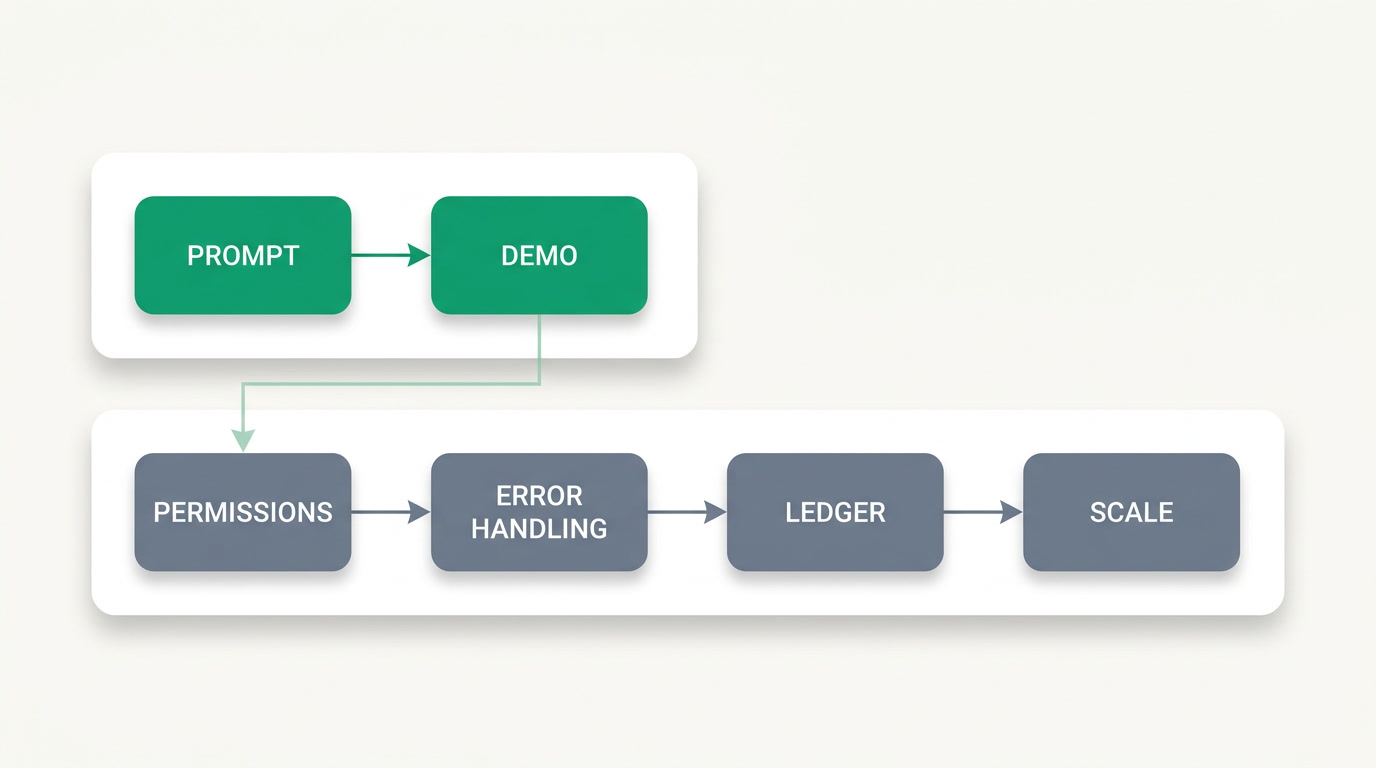
An AI app builder turns a plain-language prompt into working software — a front end, sometimes a database and hosting — in minutes instead of weeks. It is superb for prototypes, demos, landing pages and internal tools. Where it strains is the last, unglamorous 30% of any serious app: edge cases, permissions, error handling and long-term upkeep.
That last part is not a footnote. Industry research is blunt about it: security firm Veracode found that roughly 45% of AI-generated code introduces an OWASP Top-10 vulnerability, and Harness's 2025 delivery report noted teams now spend more time debugging and hardening AI code than they save writing it. The scaffold arrives fast; the trust takes work.
Which AI app builder is best at what?
There is no single winner — each tool has a clear sweet spot. Replit takes you from idea to a live URL in one place. Lovable produces the best-looking output for non-developers. Bolt gives developers file-level control. v0 generates the cleanest UI. Cursor accelerates professional engineers on real codebases. Pick by the job, not the hype.
Replit — idea to deployed URL, in one tab
Replit pairs a browser IDE with hosting and an Agent that builds and deploys full-stack apps from prompts with zero setup. Best for going from idea to a shareable, live URL without leaving the page. Free Starter is limited; Core runs about $25/mo and Pro $100/mo, with usage-based Agent credits — a real app can burn $30–50+ in credits, so budget for overages.
Lovable — the best-looking output for non-developers
Lovable is the most beginner-friendly of the group: prompt in, a polished React front end with a guided Supabase-style backend out. "Lovable Cloud" auto-provisions the backend so newcomers aren't wiring services by hand. Paid from about $25/mo on credits. The trade-off is that it is opinionated — deviate from its happy path and it gets less flexible.
Bolt — developer control at speed
Bolt (from StackBlitz) runs a full-stack IDE in the browser where you see and edit every file. It favours control and flexibility for people comfortable with code. Paid around $25/mo on tokens. Bolt versus Lovable isn't better-or-worse — Bolt is a developer tool, Lovable is a product for non-devs. Different users, different jobs.
v0 — the cleanest UI generation
v0 from Vercel generates the best React/Next.js and Tailwind components in the field — hand it a screenshot or a sentence and get clean, on-trend UI. Free tier around $5/mo; Plus roughly $20–30/mo on tokens. It is front-end-focused, so it's weaker on backend, auth and databases, and it leans toward the Vercel and Next.js stack.
Cursor — a professional's accelerator, not a no-code builder
Cursor is an AI-native code editor (a VS Code fork) for professional developers speeding up a real codebase. Its output is only as maintainable as the engineer driving it — which is the point. Pro is $20/mo with usage-based credits. If you already have engineers, it's a strong assistant; if you don't, it isn't the tool that will build your business system.
For contrast, three non-AI-first tools still matter: Base44 (Wix-acquired, around $16/mo) for quick apps, Softr (block-based portals over Airtable or Sheets, Pro from about $139/mo) for client portals, and Bubble (visual programming since 2012, $30–200+/mo) which builds real production apps at the cost of a learning curve and some lock-in.
| Tool | Best at | Pricing (mid-2026) | Best fit |
|---|---|---|---|
| Replit | Idea to deployed URL in one place | Free; Core ~$25; Pro $100/mo + Agent credits | Prototype, demo |
| Lovable | Polished output for non-developers | From ~$25/mo (credits) | Prototype, internal tool |
| Bolt | Developer control and speed | ~$25/mo (tokens) | Internal tool, MVP |
| v0 | UI / component generation | Free ~$5; Plus ~$20–30/mo | Front-end, design |
| Cursor | Accelerating pro developers | Pro $20/mo + usage credits | Real codebases, with engineers |
| ERPnBox | AI builds your workspace on a maintained platform | $15–$20/user/mo, all apps | The system you run the business on |
Prototype or production — how do you tell the difference?
A prototype has to look right and demo well. A production system has to be right when nobody is watching: correct permissions, clean error handling, a ledger that balances, data that stays separated between customers. That gap is the famous 70% problem — AI gets you 70% fast, and the last 30% is the hard, slow, expensive part.
Two habits of generated apps make this worse. They rarely ship tests, and they handle the genuinely hard question — "may this specific user touch this specific record?" — naively, if at all. Re-prompting to fix one screen can silently rewrite a working one (regeneration drift). None of this makes the tools bad. It makes them prototype tools, which is exactly what they are.
A new job title says it all
By late 2025 a role appeared that didn't exist before: the vibe-coding cleanup specialist — hired to harden and de-risk apps that were generated fast and then had to survive real users. If a market is paying people to clean up after a method, that tells you what the method is for.
So what should you run your business on?
Use the builders above to prototype fast — they're excellent at it. But for the system that holds your sales, your money and your people, run on a built, maintained platform rather than a generated codebase you have to babysit. You want AI's speed without owning its security, maintenance and scale problems.
That is the honest line ERPnBox walks. Its AI builds your workspace — modules, fields, workflows — in minutes, but on top of a hardened system that already ships real permissions, a genuine double-entry ledger, and strict separation between customers. You get the AI-built speed; we own the plumbing. One login, one per-seat price, CRM, HR and payroll and Finance in the same place, on web and native mobile, in any language.
To be fair to the field: if all you need is a throwaway internal tool or a quick portal, a builder is the right call — don't over-engineer. And ERPnBox is not a like-for-like replacement for heavy enterprise ERP like NetSuite; we don't cover full supply-chain, warehouse or procurement. We cover the business side — leads, quotes, invoicing, people and money — for teams that want to run, not rebuild.
See the AI build your workspace
Describe your business in plain language and watch a working CRM, Finance and HR take shape — on a platform that's already built to run, not babysit.
Build your workspaceWhat does this cost, honestly?
AI builders bill on usage credits or tokens, which is fine for a project and unpredictable for a running business — a busy app can burn $30–50+ a month in agent credits alone, plus hosting and your own time maintaining it. A run-the-business platform should be a flat, per-seat number you can plan around.
- Professional — $15/user/mo: all apps, 3,000 AI Credits.
- Growth — $20/user/mo (most popular): 6,000 AI Credits.
- Enterprise — custom: bring your own AI key, single sign-on.
A 30-day free trial needs no card, and paying yearly gives you two months free. See pricing for the full breakdown.
Frequently asked questions
Which AI app builder is the best overall?
There isn't one — it depends on the job. **Replit** wins for idea-to-live-URL, **Lovable** for the best-looking output without coding, **Bolt** for developer control, **v0** for UI, and **Cursor** for professional engineers on real code. Match the tool to the task rather than chasing a single champion.
Can I build my company's CRM or accounting with a vibe-coding tool?
You can build a working prototype quickly, yes. Running your real sales and finance on it is riskier: generated apps rarely ship tests, handle record-level permissions naively, and need ongoing hardening — the reason **vibe-coding cleanup specialists** now exist. For the system you actually run on, a built, maintained platform is the safer choice.
How is ERPnBox different from an AI app builder?
An app builder generates a codebase you then own and maintain. ERPnBox's AI builds your **workspace** — modules, fields and workflows — on top of a platform that already ships real permissions, a double-entry ledger and strict data separation. You get AI speed without inheriting the security, maintenance and scale problems of generated code.
What is the 70% problem?
It's shorthand for how AI code generation goes: the tool gets you about 70% of the way fast — the visible, demo-able part — while the last 30% is the hard, slow work of edge cases, error handling, security, performance and integration. That final stretch is where prototypes and production systems part ways.
Are AI-generated apps secure?
They can be, but not by default. Veracode's 2025 research found roughly 45% of AI-generated code introduces an OWASP Top-10 vulnerability, and AI-assisted teams ship faster while introducing security findings at a much higher rate. Generated code needs deliberate review and hardening before it carries real business data.
When should I just use a builder instead of ERPnBox?
When you need a throwaway internal tool, a quick client portal, a landing page or a prototype to test an idea — a builder is faster and you shouldn't over-engineer. Reach for a run-the-business platform when the thing has to hold real sales, money and people over time and be there tomorrow.