
The short answer
AI coders like Replit, Lovable and Bolt are excellent for prototypes and internal tools — prompt to app in minutes. But running a business needs auth, permissions, a real ledger and data isolation, which generated code rarely gets right. Prototype with AI coders; run on a maintained platform where that hard part is already engineered.
Type a sentence, get a working app. That is not a demo trick anymore — tools like Replit, Lovable and Bolt genuinely turn a prompt into a deployed URL while you finish your coffee. If you have felt the rush of watching software appear from a paragraph, you understand why this is one of the most exciting shifts in a decade.
So here is the honest question an operator should ask: is a generated app the thing you prototype with, or the thing you run the company on? Those are two different jobs. This piece is fair to the tools — they are very good — and firm about where the line sits.
What is vibe coding, and what is it genuinely good at?
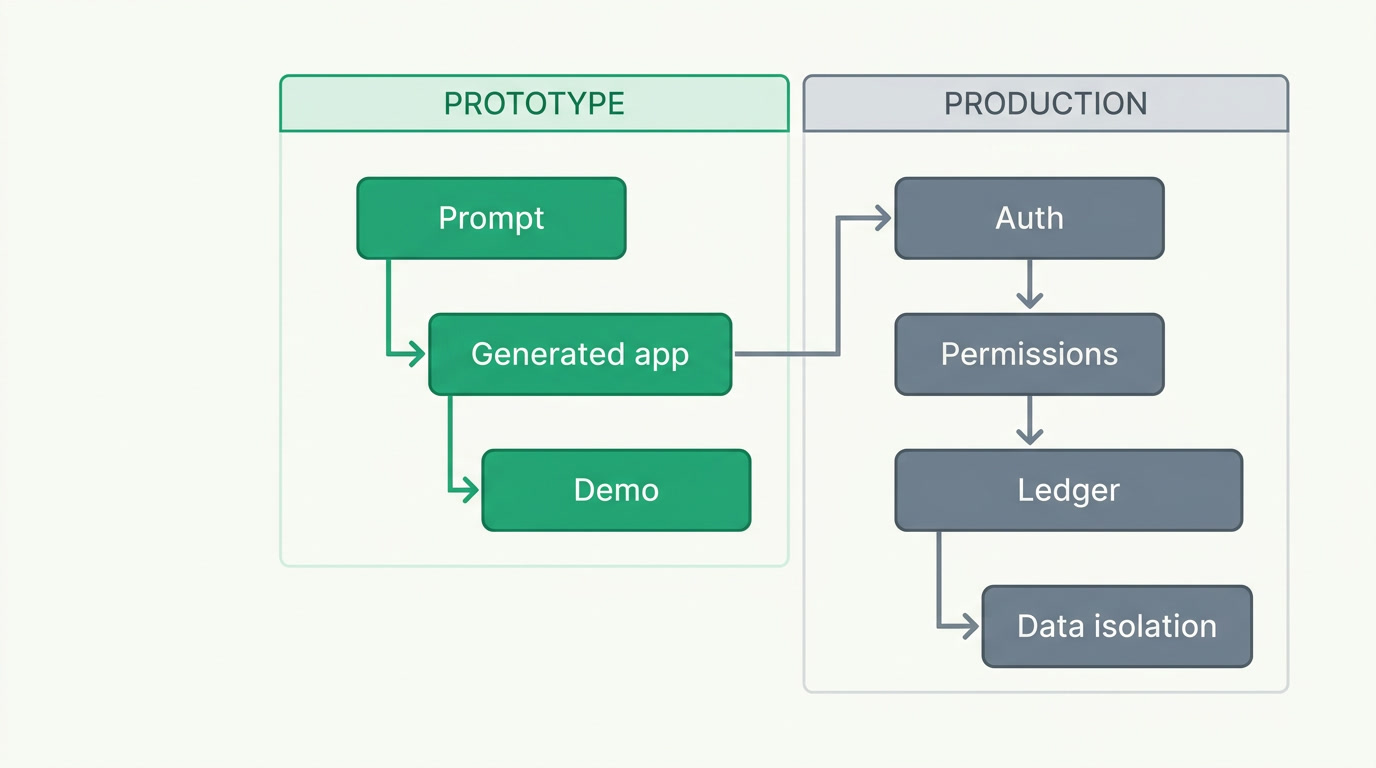
Vibe coding is describing software in plain language and letting an AI write and run the code. It is genuinely good at speed and at the blank page: Replit takes an idea to a deployed URL in one place, Lovable produces the best-looking first draft for non-developers, Bolt gives developers file-level control, and v0 generates clean interface components. For a landing page, a pitch demo, or an internal tool three people use, this is the fastest path there has ever been.
None of that is in dispute. A prototype exists to answer a question — will people want this? — as cheaply as possible. Generated code answers that question beautifully. The trouble starts when the prototype quietly gets promoted to production because it already "works."
Why does generated code struggle when a real business runs on it?

Because the demo is the easy 70%. Industry research calls it the 70% problem: AI gets you most of the way fast, then the last 30% — edge cases, error handling, security, performance, integrations — is the slow, expensive part it does not do well. That last stretch is precisely what separates a demo from a system a company depends on.
- Security you cannot see. Veracode's 2025 analysis found roughly 45% of AI-generated code introduces an OWASP Top-10 vulnerability. AI-assisted teams ship faster but log security findings at many times the normal rate — "security debt" you inherit silently.
- The hard permission question. "May this user touch THIS record?" — not the whole table, this one row — is the part generated scaffolds handle most naively. It is also the part that leaks other customers' data when it is wrong.
- Tests it never wrote. Generated apps rarely ship with a test suite, so nobody notices when re-prompting silently rewrites working code — teams call this regeneration drift.
- Maintenance you now own. Harness's 2025 delivery research reports developers spending more time debugging and hardening AI code than they saved writing it. A role that did not exist before — the "cleanup specialist" — appeared to fix exactly this.
The honest version
None of this makes the tools bad. It makes them prototype tools. "Works in the demo, breaks in prod" is not a bug in Replit or Lovable — it is the difference between answering a question and carrying a payroll run, a tax report, and a year of customer records.
Prototype needs vs production needs: what actually changes?
The two jobs optimise for opposite things. A prototype optimises for speed and disposability; you want to be wrong cheaply. A production system optimises for the boring guarantees a business is legally and financially on the hook for. Line them up and the gap is obvious.
| Requirement | Prototype (AI coder) | Production (business system) |
|---|---|---|
| Goal | Answer "will this work?" fast | Run daily operations for years |
| Auth & login | Good enough to click through | Hardened, tested, recoverable |
| Record-level permissions | Often naive or absent | "This user, this record" enforced |
| Accounting | A totals table | Real double-entry ledger |
| Data separation | Under-built | Isolation engineered in |
| Tests & upgrades | Rare; drift on re-prompt | Maintained by someone else |
| Who fixes it at 2am | You | The platform team |
Is there a way to keep the AI speed without owning the hard part?
Yes — move the AI up a layer. Instead of asking AI to generate a whole codebase you then have to secure and babysit, let it build your workspace on top of a system where the hard parts are already engineered. That is the difference between generating an app and configuring a platform.
That is how ERPnBox works. You describe your business in conversation and the AI assembles the modules, fields and workflows — in minutes — but it builds them on a platform that already carries real login, record-level permissions, a genuine double-entry ledger, and separation between one company's data and the next. You get the AI speed; we carry the maintenance, security and scale. It is, deliberately, the opposite of a vibe-coded app you would have to babysit — because the platform itself is built and maintained, not generated per customer.
Then it keeps running as one thing: CRM, HR and payroll, real Finance and a dozen more apps under one login and one per-seat price, with records staying connected across them. An invoice remembers its deal; a payment posts to the ledger. That is a system to operate a business on, not a prototype to demo one.
So which one should you actually use?
Use both, for what each is for. Reach for an AI coder when you are testing an idea, shipping a one-off landing page, or building an internal tool for a handful of people — that is where their speed is a gift. Reach for a built platform the moment real customers, real money, or teammates' logins depend on it staying correct at 2am.
A prototype is meant to be thrown away. A business system is meant to be trusted. The mistake is not using AI — it is running a company on the throwaway.
Describe your business. Watch it get built.
AI assembles your workspace in minutes — on a platform that already carries the auth, permissions and ledger. Free for 30 days, no card.
Build your workspaceFrequently asked questions
Are AI coding tools like Replit and Lovable bad?
Not at all — they are excellent at what they are built for. [Replit](https://replit.com) takes an idea to a live URL in one place, [Lovable](https://lovable.dev) gives non-developers the best-looking first draft, [Bolt](https://bolt.new) gives developers file-level control. For prototypes, demos and small internal tools they are the fastest option available. The argument here is narrow: don't run a whole company on a generated codebase you then have to secure and maintain yourself.
What exactly is 'the 70% problem'?
It's the industry shorthand for a consistent pattern: AI gets a project about **70% of the way there very fast**, then stalls on the last 30% — edge cases, error handling, security, performance and integrations. That last stretch is the slow, skilled, expensive work, and it is exactly the part a business depends on. A prototype can skip it; a production system cannot.
How is ERPnBox different from generating an app with an AI coder?
An AI coder generates a **codebase** you own, secure and maintain. ERPnBox's AI builds your **workspace** — modules, fields, workflows — on top of a platform we already built and maintain, with real login, record-level permissions, a [double-entry ledger](/finance) and data separation engineered in. Same conversational speed; none of the maintenance, security or scale burden lands on you. You configure a platform rather than inherit a generated app.
Is ERPnBox a replacement for enterprise ERP like SAP or NetSuite?
No, and we won't pretend otherwise. If you need full supply-chain, warehouse or procurement depth, a suite like [NetSuite](https://www.netsuite.com) is built for that. ERPnBox is the all-in-one system for a small business — CRM, HR and payroll, real Finance and a dozen apps at one per-seat price — without the six-figure, year-long implementation. It's a different category, deliberately.
When should I still choose a dedicated accounting tool instead?
If accounting is genuinely all you need, dedicated tools like [Zoho Books](https://www.zoho.com/books) and [QuickBooks Online](https://quickbooks.intuit.com) are excellent and today have broader automatic bank-feed coverage than we do. ERPnBox's Finance isn't trying to out-accountant them — its point is that the ledger lives **inside** the same platform as your CRM, HR and apps, so it isn't a separate tool you reconcile against your sales system. Need only books? Use the dedicated ones. Need one connected system? That's us.