The short answer
Small business accounting software records transactions in a double-entry ledger, then produces invoices, expense tracking, tax summaries, and financial reports that always balance. Choose based on ledger depth, reports, tax, and multi-currency. Switch from spreadsheets once you lose track of unpaid invoices, dread tax time, or need more than one person on the same live numbers.
Every small business hits the moment when the spreadsheet stops keeping up. Invoices live in one file, expenses in another, and at tax time you're stitching numbers together by hand, hoping nothing was double-counted. Small business accounting software exists to end that ritual — to give you a real ledger that always balances, reports you can trust, and invoices that go out in a click.
This guide keeps it plain: why double-entry beats a spreadsheet, the features that actually matter, how to compare your options, and how to tell when it's time to switch. And because your books don't live in isolation from your customers, we'll show where a finance tool that shares a login with your CRM changes the math.
What is small business accounting software?
Small business accounting software records every transaction in a double-entry ledger, then turns that data into invoices, expense tracking, tax summaries, and financial reports. Unlike a spreadsheet, it enforces that debits equal credits, so your books stay balanced and audit-ready without manual reconciliation of every formula.
The practical payoff: instead of one person guarding a fragile file, the whole team works from the same numbers. Invoices update receivables automatically, expenses land in the right account, and a profit-and-loss report is a click away rather than an afternoon of copy-paste.
Double-entry vs spreadsheets: what's the real difference?
A spreadsheet is a single list you maintain by hand — nothing stops a typo, a deleted row, or a number that goes into revenue but never leaves cash. Double-entry records every transaction twice, as a debit and a matching credit, so the books can only balance if the entry is complete. That built-in check is what makes reports trustworthy.
| Spreadsheet | Double-entry software | |
|---|---|---|
| Balance check | None — errors go unnoticed | Debits must equal credits |
| Reports | Built by hand each time | P&L, balance sheet, cash flow instantly |
| Audit trail | Overwrites lose history | Every change recorded |
| Multiple users | Version conflicts | Shared, always current |
| Tax time | Manual assembly | Tax summary report ready |
Which accounting features actually matter for a small business?
Six features carry the weight for most small businesses: invoicing and estimates, expense and bill tracking, financial reports, tax handling, multi-currency, and bank reconciliation. Everything else is nice to have. Buy for these first, and make sure each one is backed by a real ledger — not a cosmetic layer that looks like accounting but doesn't keep the books.
- Invoicing and estimates — send professional invoices, convert estimates, and watch receivables update on their own.
- Expenses and bills — capture what you spend and owe, sorted into the right accounts.
- Reports — profit and loss, balance sheet, trial balance, cash flow, and tax summaries on demand.
- Tax — VAT and withholding tax calculated as you invoice, ready for your filing.
- Multi-currency — bill and get paid in different currencies with exchange handled for you.
- Bank reconciliation — import statements and match them against your books.
How do I choose the right accounting software?
Match the tool to how your business actually runs. If accounting is all you need, a dedicated tool like QuickBooks or Xero is excellent. If your books are tied to sales — deals becoming invoices, customers carrying their history — a finance tool that shares a login with your CRM saves you the integration headache. Compare on ledger depth, reports, tax, and whether it connects to the rest of your work.
| Option | Best for | Trade-off |
|---|---|---|
| QuickBooks / Xero | Dedicated accounting, mature | Separate from your CRM |
| Zoho One | 40+ apps you wire together | ~$37/user; setup effort |
| Odoo | Modular, open-source control | Technical, often self-hosted |
| NetSuite / SAP | Deep enterprise ERP, supply chain | Six-figure, long rollout |
| ERPnBox Finance | Real double-entry inside your CRM login | No government e-invoicing portal |
Where does ERPnBox Finance fit?
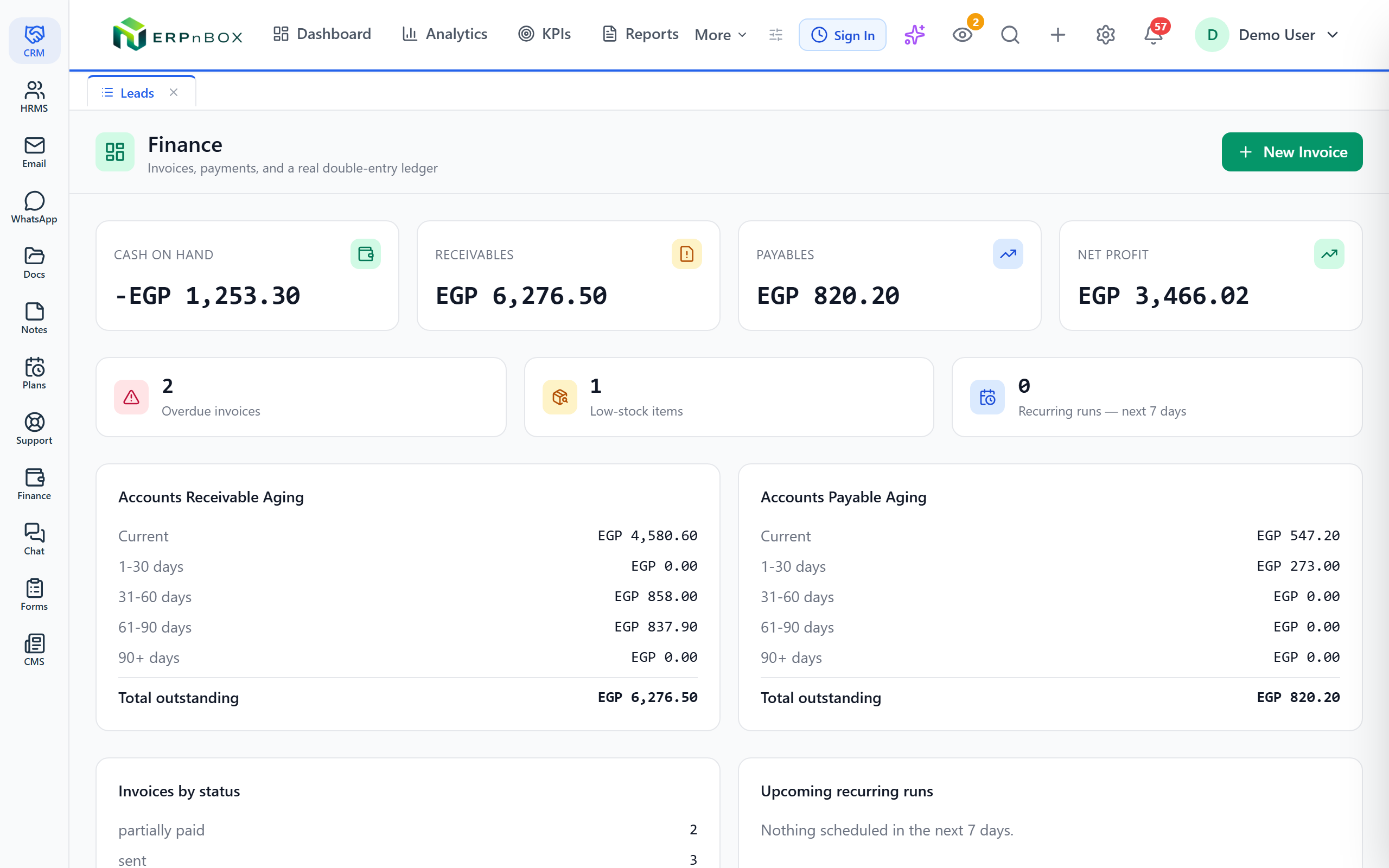
ERPnBox Finance is a real double-entry accounting system — chart of accounts with 26 subtypes, invoices, estimates, credit notes, payments, expenses, cost centers, and 14 reports including P&L, balance sheet, trial balance, cash flow, tax summary, and withholding tax. It handles multi-currency with FX, bank CSV import and reconciliation, VAT and withholding, basic inventory, and fixed-asset depreciation.
The difference is that it lives in the same login as your CRM, HR, and ten other apps. An invoice carries the deal it came from; a customer's payments sit next to their tickets and conversations. Describe your business in a sentence and, minutes later, it's a working system with a real ledger sitting under the invoice.
One honest note: ERPnBox does not file tax returns for you or connect to a government e-invoicing portal. It calculates VAT and withholding and produces the reports you file. If your country mandates e-invoicing to a state portal, pair it with your local compliance tool.
When should I switch from spreadsheets?
Switch when the spreadsheet starts costing you money or nerves: when you're chasing which invoices are unpaid, when tax season means days of assembly, when more than one person needs the numbers, or when you can't answer "did we make a profit last month?" in under a minute. Those are the signals that manual bookkeeping has outgrown itself.
- You lose track of unpaid invoices and cash owed to you.
- Tax time takes days of manual assembly.
- Two or more people need the same live numbers.
- You bill in more than one currency.
- Your sales and your books are drifting apart.
See real double-entry inside one login
Explore ERPnBox Finance — invoicing, 14 reports, tax, and multi-currency, sharing a login with your CRM and HR.
Explore FinanceThe bottom line
For accounting alone, a dedicated tool is a fine choice. But if your books are inseparable from your customers — invoices born from deals, payments tied to relationships — then keeping finance and CRM in one place isn't a convenience, it's the whole point. Start from what your business does, not from a feature list, and the right tool becomes obvious.
Frequently asked questions
Do I need double-entry accounting for a small business?
If you want reports you can trust and a clean handover to an accountant, yes. **Double-entry is what makes a balance sheet and cash flow statement possible**, and it catches errors a spreadsheet never would. Most small businesses outgrow single-line tracking within a year.
Does ERPnBox file my tax return?
No. ERPnBox calculates VAT and withholding tax as you invoice and produces the tax summary reports you need, but **it does not file returns with a tax authority** or connect to a government e-invoicing portal. You use its reports to file through your local process or accountant.
Can it handle multiple currencies?
Yes. [ERPnBox Finance](/finance) supports **multi-currency invoicing and payments** with exchange-rate handling, so you can bill an overseas client in their currency and still see everything consolidated in your base currency across the ledger and reports.
Is ERPnBox a replacement for SAP or NetSuite?
Not like-for-like. Those are deep enterprise ERPs with full supply chain, warehouse, and procurement. ERPnBox does not do full supply-chain management. What it offers instead is **the ERP without the six-figure implementation**: your whole business in one login, built from a conversation in minutes.
How much does small business accounting software cost?
It varies widely. Dedicated tools charge per company, all-in-one suites per user. ERPnBox is **$15/user on Professional and $20/user on Growth**, [one price covering Finance, CRM, HR and ten more apps](/pricing), with a 30-day free trial and no card required.