
The short answer
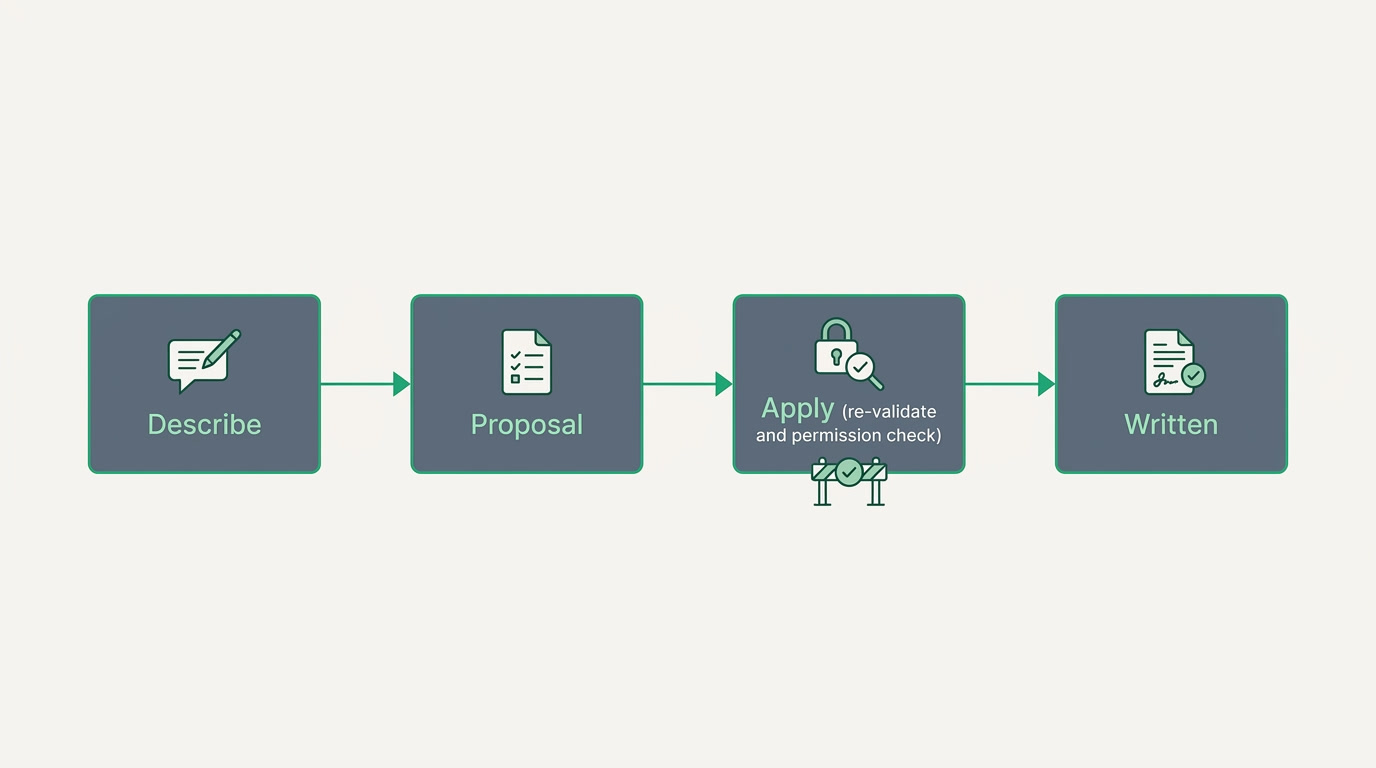
AI Builder lets an admin set up ERPnBox by describing it in plain language. You say what you need, and it proposes fields, layout rules, workflows, SLA rules, duplicate checks and dependent picklists. Nothing changes until you press Apply, which re-validates every proposal against the same rules as the normal screens.
There is a quiet tax on every piece of business software: the setup. Before a tool earns its keep, someone has to translate how the company actually works into the software's menus, fields and settings. That translation is where weeks disappear and where most implementations quietly go wrong. AI Builder removes the translator.
What is the AI Builder?

AI Builder is a way to configure ERPnBox by describing what you want in plain language instead of clicking through setup screens. You tell it how your business runs, and it proposes the pieces to match — custom fields, layout rules, workflow automations, SLA rules, duplicate checks and dependent picklists. It also sets up a brand-new workspace straight from that first conversation.
The important word is proposes. AI Builder never writes changes on its own. It hands back a plain-English draft of what it would do, and nothing touches your system until an admin reads it and presses Apply. Think of it as a very fast, very literal setup consultant who shows you the plan before doing the work — and only does the work you approve.
Why does describing beat configuring?
Configuration screens ask you to think like the software. You have to know which setting lives where, what a layout rule is called, how a duplicate check is expressed. AI Builder asks you to think like the owner of your business instead: say what should happen, in your own words. The pain it removes is the gap between knowing your process and knowing the product.
That gap is what turns a two-week rollout into a two-month project and a consultant's invoice. Traditional enterprise systems like SAP and NetSuite are honest about this: they assume you will hire someone to do the translation. ERPnBox takes the opposite bet — that the person who knows the process should be able to build the system, in an afternoon, in their own language.
How does it keep a wrong guess from breaking things?

Two guardrails. First, the AI only ever proposes; the change is written solely when an admin presses Apply. Second, at that moment the proposal is re-validated against the exact same rules as the manual setup screens, and re-checked against the admin's permissions. So an AI proposal can never do something you couldn't do yourself by hand — it just gets you there faster.
Because of that, AI Builder is opt-in and off by default, and only an admin can use it. It is a power tool for the person responsible for the system, not an open door for everyone. And it stays in its lane: it configures the structure and rules of your workspace, but it does not build dashboards — your ERPnBox AI Assistant handles those separately.
| You say | It proposes |
|---|---|
| "Track a budget on every deal." | A custom field on the right module |
| "Hide the discount box unless the stage is Negotiation." | A layout rule |
| "Email the owner when a lead goes cold." | A workflow automation |
| "Flag support tickets untouched for 24 hours." | An SLA rule |
| "Don't let two records share a phone number." | A duplicate check |
| "Show only the cities that belong to the chosen country." | A dependent picklist |
Who is it for, and which businesses does it help?
It is for the admin or operations lead in any business who knows exactly how the company works but would rather not spend a week inside configuration menus to prove it. Because ERPnBox is built for how you run a business rather than for one trade, the same describe-it-and-it-builds-it flow serves very different companies equally well.
- A property agency shaping a pipeline around units, viewings and reservations.
- A professional services firm tracking projects, retainers and approvals.
- A trading or distribution business tightening its quote-to-invoice flow.
- A clinic or agency wanting duplicate-free contacts and clean handovers.
The common thread is not the industry. It is a person who can describe their process in a sentence and wants the system to match — without a rollout, a specialist, or a stack of documentation.
How do you set it up?
Setup is short because setup is the point. An admin turns AI Builder on, opens the conversation, describes what the business needs, reviews the proposal it drafts, and presses Apply on the parts that look right. You can go one request at a time or hand it several at once; either way you stay the editor, not the typist.
- As an admin, switch on AI Builder in settings — it is off until you choose it.
- Describe what you want in plain language: the field, rule or automation, in your own words.
- Read the proposal it drafts, written back to you in plain English.
- Press Apply on what you approve; it re-validates and writes only then.
- Refine or add more — the same conversation keeps building your workspace.
Start a 30-day free trial, no card required, and describe your first workflow.
Start freeTraditional enterprise ERPs earned their reputation on depth, and they deserve it — for a company with a dedicated IT team and a year to spend, that depth pays off. ERPnBox is for the rest: the owners and ops leads who need the same discipline without the same implementation. AI Builder is how that promise becomes practical. You describe the business. It builds the system. You keep the final word. See how it compares to the old way.
Frequently asked questions
Does the AI change my system automatically?
No. AI Builder **only proposes a change** and shows it to you in plain language. Nothing is written until an admin presses Apply, and at that moment the proposal is re-validated against the same rules as the manual setup screens and re-checked against your permissions.
What exactly can it set up?
It proposes custom fields, layout rules, workflow automations, SLA rules, duplicate checks and dependent picklists. It can also **stand up a brand-new workspace from your first conversation**. It does not build dashboards — the ERPnBox AI Assistant handles those separately.
Who is allowed to use it?
**Only an admin.** AI Builder is opt-in and off by default; an admin turns it on for the workspace, and only admins can create proposals or apply them. That keeps configuration in the hands of the person responsible for the system.
Do I need any technical knowledge to use it?
No. The whole idea is that you **describe your process the way you would explain it to a colleague**, and AI Builder translates that into the right configuration for you to review and approve. You never have to learn where each setting lives.
What happens if it proposes something I don't want?
You simply don't press Apply. **A proposal has no effect on your system until you approve it**, and you can apply some parts while skipping others, or refine your description and ask again. You are always the editor of the final result.


