The short answer
Approval Processes in ERPnBox route a record through multi-stage chains before it counts as final. Each stage names its approvers, requires everyone or any one to agree, runs actions on approve or reject, and locks the fields that matter. Criteria decide which records need sign-off at all.
Somewhere in every growing business there is a discount that got approved by nobody, and a purchase order that sat in an inbox for a week. Approval Processes in ERPnBox close that gap. They take the informal favour-asking that surrounds any important decision and turn it into a rule the system enforces, quietly, every time.
What is an approval process in ERPnBox?
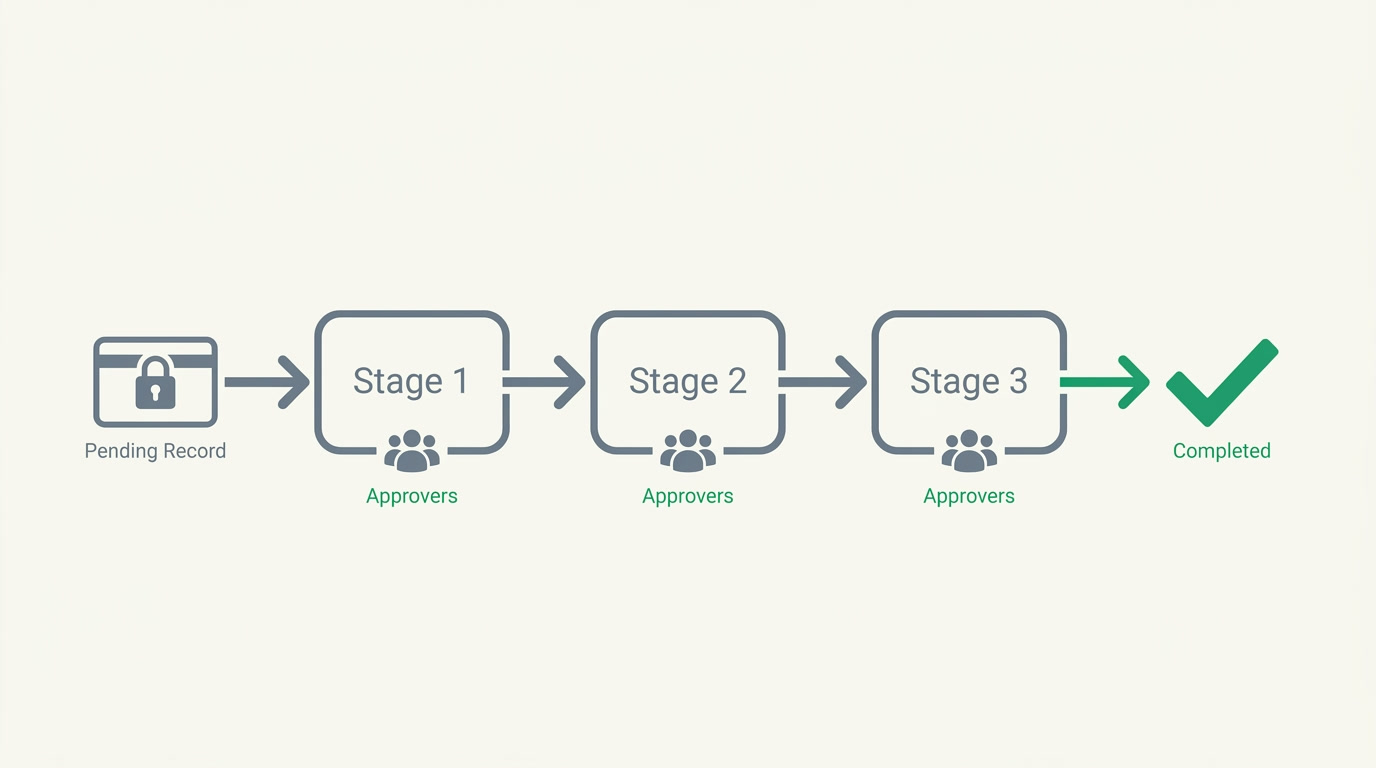
An approval process is a sequence of stages a record must clear before it is treated as final. Each stage names its approvers, decides whether everyone must agree or any one will do, and can run actions when a record is approved or rejected. You point it at a module and a layout, set the conditions that trigger it, and the record follows the chain on its own.
Because the stages are sequential, sign-off happens in the order your business actually works: a team lead first, then finance, then a director for the large ones. Nothing skips ahead. Nothing gets lost. And while a record waits, ERPnBox can lock the fields that matter so the numbers under review cannot quietly change beneath the reviewers.
Why do approval processes matter for a business?

They matter because unapproved decisions are expensive and untraceable. A rep grants a discount that erodes the margin. A manager books leave the roster cannot absorb. A contract goes out at the wrong price. Approval Processes remove the guesswork: the right person decides, at the right moment, and the decision is written down.
The quiet win is speed. A good approval flow is not more bureaucracy; it is less. People stop forwarding emails and asking "did you see my request?" The reviewer sees exactly what needs a decision, approves or rejects with a comment, and the record moves. What used to take a week of nudging takes an afternoon.
And every decision leaves a trail. Who approved, who rejected, when, and with what comment sits on the record. When a client, an auditor, or your own future self asks why a deal went out at that number, the answer is already there.
Which teams and industries use approval processes?

Any team where a decision needs a second set of eyes. Finance routes expenses, discounts, and purchase orders. HR sends leave requests and new hires up the line. Real estate holds contracts and price changes for sign-off. Procurement gates supplier orders above a threshold. The pattern is the same; only the record and the reviewers change.
| Team | What gets approved | Typical chain |
|---|---|---|
| Finance | Expenses, discounts, purchase orders | Manager, then finance, then director for large amounts |
| HR | Leave requests, new hires | Team lead, then HR sign-off |
| Real estate | Contracts, price changes | Sales manager, then owner |
| Procurement | Supplier orders over a limit | Requester, then budget holder |
None of this is hard-wired. ERPnBox is built around your own modules and fields, so an approval chain reads in your own language and works the way your business already talks about the decision.
See how approvals fit alongside your invoices, bills, and expenses in the finance module.
Explore FinanceHow do you set up an approval process?
You build it once, in plain steps, and it runs from then on. Choose the module and layout it watches, write the criteria that decide which records need sign-off, add your stages in order, and name the approvers on each. Set field locks, review fields, and a timeout, then switch it on. Most teams have a working flow in under ten minutes.
- Pick the module and layout the process applies to, and whether it triggers on create, edit, or both.
- Set criteria so only the right records enter the flow, combined with AND or OR (for example, discount over 10% OR amount over a set figure).
- Add stages in the order they should run, and name the approvers on each stage.
- For each stage, choose whether everyone must approve or any one is enough.
- Decide what happens on approve and on reject, and lock the fields that should not change while a record is pending or after it is rejected.
- Name your review fields, set a timeout, appoint process admins to step in, and switch the process on.
From there it looks after itself. When a record meets the criteria it enters the first stage, the approvers are notified, and it advances only as each stage clears. Review fields highlight what the reviewer should check first. Process admins can act when someone is away, and the timeout keeps a request from sitting silent forever.
Where do approvals sit in the wider system?
They sit on top of the records you already keep, not beside them. Because ERPnBox is one system for CRM, finance, and HR, an approval on a discount touches the same deal your sales team works, and an approval on an expense touches the same ledger your books run on. There is no export, no second tool, no reconciling two versions of the truth.
That is the whole idea behind ERPnBox: the ERP for small business, built for you and running without a six-month implementation. Approval Processes are one part of a system you can shape yourself and start using the same week.
Frequently asked questions
Can a stage need more than one approver?
Yes. A stage can list several approvers, and you choose the rule: **require everyone to agree** for a unanimous sign-off, or let any one of them approve so the record moves as soon as the first available person decides. Different stages in the same process can use different rules.
What happens to a record while it waits for approval?
You can **lock the fields that matter** so they cannot change while the record is pending, and separately lock fields once it is rejected. That keeps the numbers a reviewer is judging from shifting underneath them, and preserves the record as it stood when the decision was made.
How does the system know which records need approval?
You set **criteria on the process, combined with AND or OR logic**. Only records that match enter the flow; the rest save normally. So you can require sign-off on discounts over a threshold or high-value orders, while everyday records pass straight through untouched.
What if an approver is unavailable?
Each process can have **process admins who are able to step in**, and you can set an approval timeout so a request does not stall indefinitely. Between the two, a chain keeps moving even when someone is on leave or slow to respond.
Does something happen automatically when a record is approved?
Yes. Each stage can **run actions on approve and on reject**, so the outcome of a decision can flow on without anyone doing it by hand. A rejection can be handled differently from an approval, stage by stage.
Do I need a consultant to set this up?
No. You build an approval process yourself from the admin screen in a handful of steps, and most teams have a working flow the same day. ERPnBox comes with a **30-day free trial, no card required**, so you can try it on a real process first.