The short answer
Assignment Rules auto-route every lead, ticket, or record to the right person the instant it arrives. Choose from four fair modes, target users, roles, teams, or owner-relative pools, respect each person's schedule and timezone, queue off-hours work, and cap capacity — all set up in minutes without code.
A lead lands in your system at 9:04 on a Tuesday. Assignment Rules decide, in that same second, whose name goes on it — and that decision is the difference between a five-minute callback and a lead that quietly rots in an unowned queue.
What are Assignment Rules?
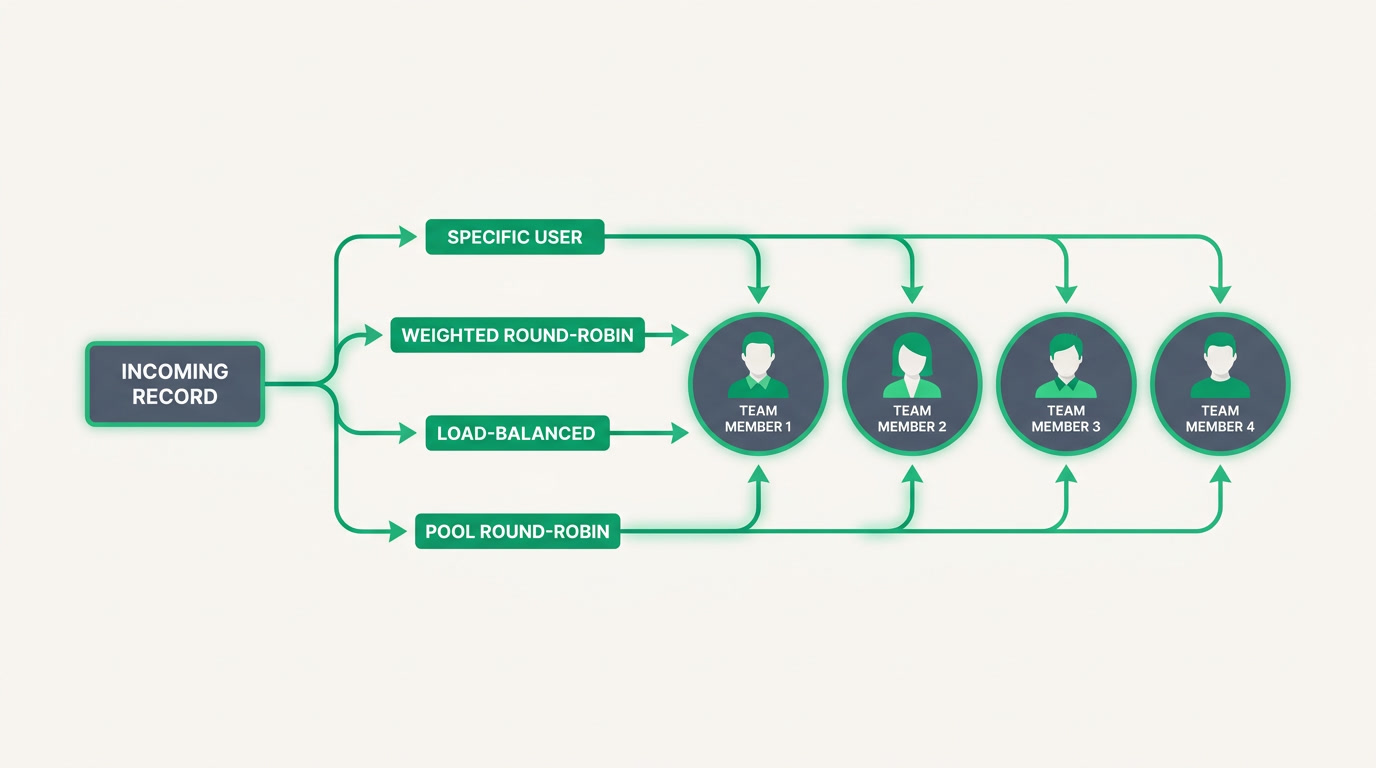
Assignment Rules are the traffic controller inside ERPnBox. Every time a lead, deal, ticket, or record arrives, the rule decides who owns it — instantly, by criteria you set. No manager standing at the whiteboard, no first-come free-for-all. The work routes itself to the right person the moment it exists.
You pick how the routing works. Assign to one specific person for named accounts. Or spread the work fairly with weighted round-robin, which tracks who is most owed and hands them the next one to close the gap. Or use load-balanced routing, which looks at who currently has the fewest open records in that module and gives it to them. Or run a simple pool round-robin, where everyone takes an equal turn.
Why do Assignment Rules matter to your business?

Because unrouted work is lost work. When a lead sits without an owner, nobody calls it, nobody is accountable for it, and it goes cold. Assignment Rules remove the gap between arrival and ownership entirely — every record has a name on it before anyone even opens the app, so response is fast and follow-up is somebody's job.
It also kills the two quiet office arguments: the star rep who somehow gets every good lead, and the newcomer buried while others idle. Fair modes distribute by what people are actually owed or actually holding, not by who shouts first. And because assignment respects each person's availability and weekly schedule — with the right timezone — nobody gets a 2 a.m. lead they can't act on.
Off-hours don't have to mean lost leads. Choose to QUEUE anything that arrives outside business hours — it parks safely and auto-assigns the moment hours reopen — or skip the wait and route it anyway. Either way, the decision is yours and it's made once, not re-argued every Monday.
| Mode | How it picks | Best for |
|---|---|---|
| Specific user | Always the same named person | Key accounts, house lists |
| Weighted round-robin | Whoever is most owed, to close the gap | Uneven quotas or seniority |
| Load-balanced | Fewest open records in the module | Support desks, service teams |
| Pool round-robin | Everyone takes an equal turn | Flat teams, simple fairness |
Who and which industries benefit most?

Any team where inbound work outnumbers the people handling it benefits. Sales teams routing leads before they cool. Support desks balancing tickets so no agent drowns. Real-estate agencies matching inquiries to available agents. Call centers and insurance brokerages spreading volume evenly across a floor. If work arrives faster than a human can triage it, this is for you.
Targets are flexible enough for how real teams are shaped. Route to a single user, to everyone in a role or designation, to a whole team, or to owner-relative pools — the owner's direct reports, the owner's team, or people outside the owner's team — always excluding the owner so a record never bounces back to the same desk. That last set is how managers reassign escalations without a spreadsheet.
See how routing works inside the CRM your team already lives in.
Explore the CRMHow do you set up an Assignment Rule?
Setup takes minutes and no code. Pick the module, choose the mode, name the target, and set the guardrails for availability and capacity. You can start with one plain rule and layer on schedules and caps as the team grows. Here is the practical path most teams follow on their first rule.
- Choose the module and mode — for example, route new leads by weighted round-robin.
- Set the target — a user, a role, a team, or an owner-relative pool.
- Set availability and weekly time-window schedules per member, with each person's timezone.
- Decide off-hours behavior — QUEUE and auto-assign when hours reopen, or skip.
- Add capacity thresholds — a per-module cap, an overflow default assignee, and exempt criteria.
- Pick a count-reset — daily, weekly, or monthly — so fairness starts fresh on your cycle.
Every assignment is recorded on the record itself, so you can always see who got what and why. A quick note on the guardrails, in plain terms: rule criteria combine with AND — every condition must be true, so there are no OR groups to juggle. And load-balanced routing counts open records within a single module, not across all of them. Set your caps and criteria with that in mind and the rest runs itself.
Frequently asked questions
What is the difference between weighted round-robin and load-balanced assignment?
**Weighted round-robin** tracks who is most owed over time and hands them the next record to close the gap, which suits uneven quotas or seniority. **Load-balanced** looks at who currently holds the fewest open records in that module and gives it to them, which suits keeping active workloads even.
What happens to leads that arrive outside business hours?
You choose. Set the rule to **QUEUE** off-hours arrivals — they park safely and auto-assign the moment business hours reopen — or set it to skip the wait and route them right away. Each member's weekly schedule and timezone govern what counts as off-hours for them.
Can I stop one person from being overloaded?
Yes. Set a **per-module capacity cap** so a person stops receiving new records once they hit it, name an overflow default assignee to catch the excess, and add exempt criteria for records that should bypass the cap. A count-reset by day, week, or month starts the tally fresh on your cycle.
Can I route work to a manager's team without it going back to the manager?
Yes. **Owner-relative pools** let you target the owner's direct reports, the owner's team, or people outside the owner's team — and every one of those pools **excludes the owner automatically**, so a record never bounces back to the same desk it came from.
Can I combine several conditions in one rule?
You can add multiple conditions, and they **combine with AND** — every condition must be true for the rule to apply. There are no OR groups, so if you need genuinely different paths, create separate rules rather than trying to branch inside one.