
The short answer
SLA & Escalation puts a timer on any record. When a field hits a value you care about, the clock starts. If nobody acts in time, ERPnBox runs the actions you chose — reassign, update, notify — and logs it. Timers respect your working hours, and a report shows exactly who let work go cold.
Every business runs on quiet promises. Reply to the new lead within the hour. Resolve the ticket by end of day. Call the customer back before they call you. The promises are easy to make and easy to forget — because the only thing tracking them is a person, and people get busy. SLA & Escalation gives each promise its own clock, and gives that clock the power to act.
What is SLA & Escalation, in plain terms?
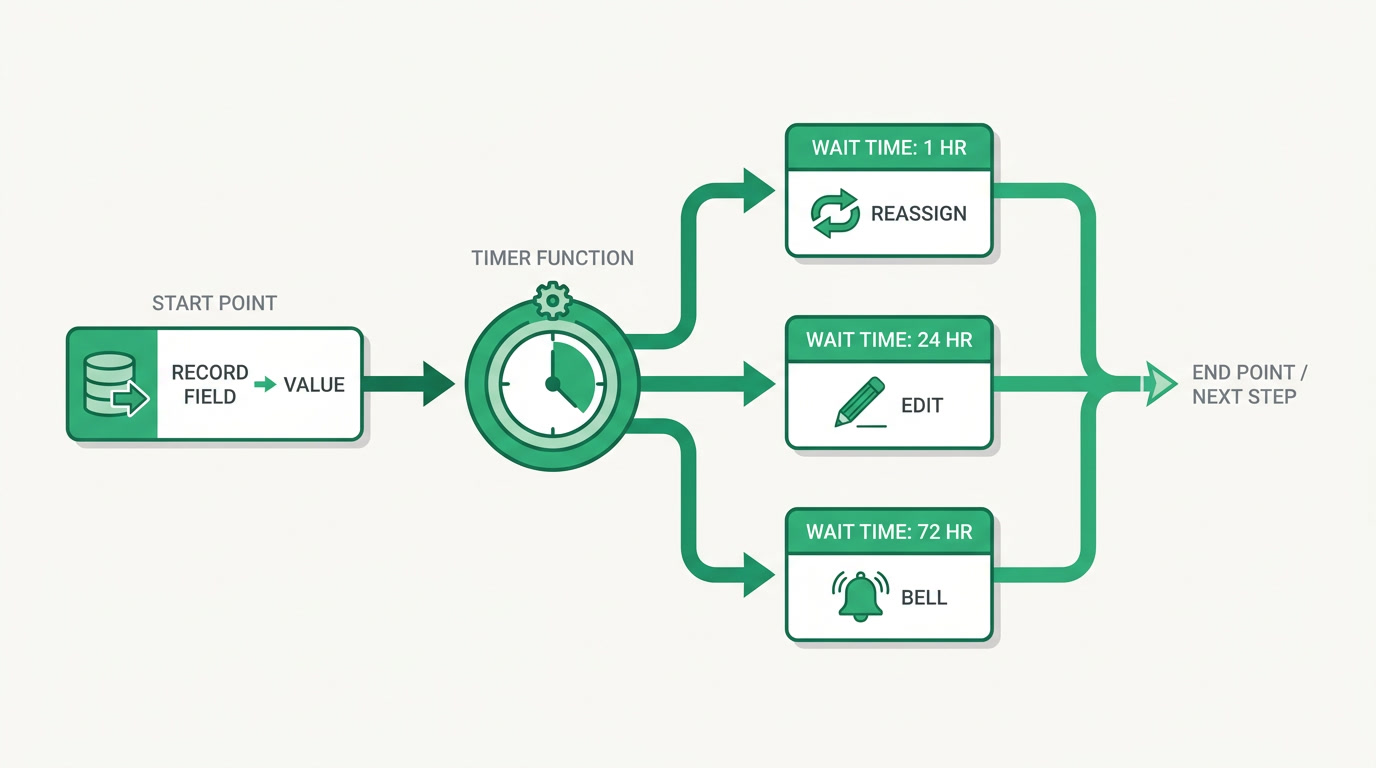
It is a timer you attach to your records. When a field reaches a value you care about — a lead marked New, a ticket set to Open — the clock starts. You define levels: wait this long, then do this; wait longer, then do that. If nobody acts before a level's time runs out, ERPnBox runs the actions itself and writes down what happened.
Each level can do real work, not just send a reminder. A level reuses the same action set as your automations — it can reassign the record to someone free, update a field, raise a priority, or send an email. You can also add extra conditions beyond the trigger, so a rule only arms for the records that truly qualify. The result is not an alert that hopes someone reads it. It is a deadline that does something when it is missed.
Why does a self-acting deadline matter?

Because the cost of a missed deadline is invisible until it compounds. A lead that waits three hours has usually already answered a competitor. A ticket that sits overnight becomes an angry email in the morning. Nobody meant to drop it; it simply fell between two busy people. A timer that acts on its own removes the single point of failure: human memory.
There is a second cost, quieter and more corrosive: nobody knows who let it slip. Without a record, a missed promise becomes a shrug in a meeting. SLA & Escalation keeps a permanent log of every deadline that fired and who owned the work when it did — so accountability is a fact, not an argument.
The clock only counts working time
A four-hour SLA set at 5pm shouldn't breach at 9pm while the office is dark. ERPnBox computes deadlines in business time — your timezone, your weekly hours, your holidays — so the clock pauses after hours and resumes when you open. A record's countdown even shows "Paused — resumes at…" so nobody is blamed for the night.
Who is it for, and where does it earn its keep?

Any team that makes time-bound promises. Support and service desks use it for first-response and resolution SLAs. Sales teams use it to guard lead-response time, so a fresh enquiry never cools on someone's desk. Real-estate agencies use it to reassign a listing when an agent goes quiet. The pattern is the same everywhere: a value, a deadline, and a consequence.
| Team | The promise | What the timer does when it's missed |
|---|---|---|
| Support desk | First reply within 1 hour | Raise priority, notify the team lead |
| Sales | Call a new lead within 30 minutes | Reassign to a free rep, log who stalled |
| Real estate | Work the enquiry the same day | Reassign the listing, notify the owner |
| Service delivery | Resolve the case before end of day | Escalate a level, email a manager |
How do you set an SLA up?
You build a rule in four short decisions: what to watch, how long to wait, what to do, and when your hours run. There is no scripting and nothing to install. Open the escalation rules for a module, pick the field and value that starts the clock, add your levels, and choose a business-hours calendar. The rule is live the moment you save it, and it scans existing records so nothing already waiting is left uncovered.
- Pick the trigger. Choose the field and the value that should start the clock — for example, status equals New. Add extra conditions if only some of those records should qualify.
- Set the levels. Give each level a wait in hours and minutes, then the actions it runs — reassign, update a field, send an email — and who gets notified.
- Choose your hours. Attach a business-hours calendar with your timezone, weekly windows, and holidays — or leave it round-the-clock for a 24/7 desk.
- Save and watch. The rule arms immediately, live countdowns appear on your records, and the performance report begins tracking compliance.
How do you know it's working?
Through the SLA performance report, which turns the quiet log into a plain scoreboard. It shows your compliance rate — the share of promises kept in time — alongside two views of accountability: which team members let work rotate away, and which rules breach most. It also lists the records that are stuck right now, so a problem gets a name before it becomes a pattern.
The report is careful about blame. It separates a genuine miss — an agent who simply didn't act in time — from a rotation the agent deliberately triggered, so honest disqualifications never drag someone's number down. Accountability, not a witch hunt.
Give every promise a clock that keeps it
SLA & Escalation ships inside the ERPnBox CRM, ready the day you sign in. Start free for 30 days — no card required.
Explore the CRMA deadline you have to remember is a deadline you will eventually miss. A deadline that reassigns the work, raises the priority, and names the moment it slipped is a promise your business actually keeps. That is the whole point: the discipline of an SLA, without a person standing over the clock.
Frequently asked questions
Does the SLA clock keep running after office hours?
Only if you want it to. Attach a business-hours calendar and **the clock counts working time only** — it pauses at night, on weekends, and on the holidays you list, then resumes when you open. A record's countdown even shows when it will resume. For a round-the-clock desk, leave the calendar off and the clock runs continuously.
What can happen when a deadline is missed?
Each escalation level runs the same actions your [automations](/crm) use. It can **reassign the record to a free team member**, update a field such as priority, send an email, or notify the owner and any people you choose. You can stack several actions on one level, and set several levels that fire at different times.
Can I have more than one escalation step?
Yes. A rule holds **multiple ordered levels**, each with its own wait in hours and minutes and its own actions. A common setup nudges at the first level, reassigns at the second, and alerts a manager at the third — so pressure builds the longer a record waits.
How do I see whether we're meeting our SLAs?
The SLA performance report shows your **compliance rate**, a per-employee view of who let work rotate away, a per-rule view of what breaches most, and a live list of records stuck right now. It also separates genuine misses from rotations an agent triggered on purpose, so the numbers stay fair.
Which apps and industries is this for?
It works on your [CRM](/crm) records, so any team with time-bound promises benefits: support desks on first-response and resolution SLAs, sales on lead-response time, and real-estate agencies reassigning quiet listings. The mechanism — **a value, a deadline, a consequence** — fits far more than these three.
Do I need to write code to set this up?
No. You build a rule by choosing a trigger field and value, adding levels with waits and actions, and picking a business-hours calendar. It goes live the moment you save, and scans existing records so nothing already waiting is left uncovered. **No scripting, nothing to install.**


