
The short answer
Custom modules let you build any business object — a Property, a Patient, a Course — with its own fields and views. ERPnBox gives you 23 field types, including formulas that compute live, sub-tables for line items, and aggregate and rollup fields that total child records automatically. No developer needed.
Every business has a shape that no template quite fits. A property agency tracks units, floors, and handover dates. A clinic tracks patients, visits, and prescriptions. A recruiter tracks candidates and stages. Off-the-shelf software makes you bend your business around its idea of a "contact" and a "deal." ERPnBox lets you build the thing you actually run — a custom module with exactly the fields your work needs, and 23 field types to describe them precisely.
What are custom modules and field types?
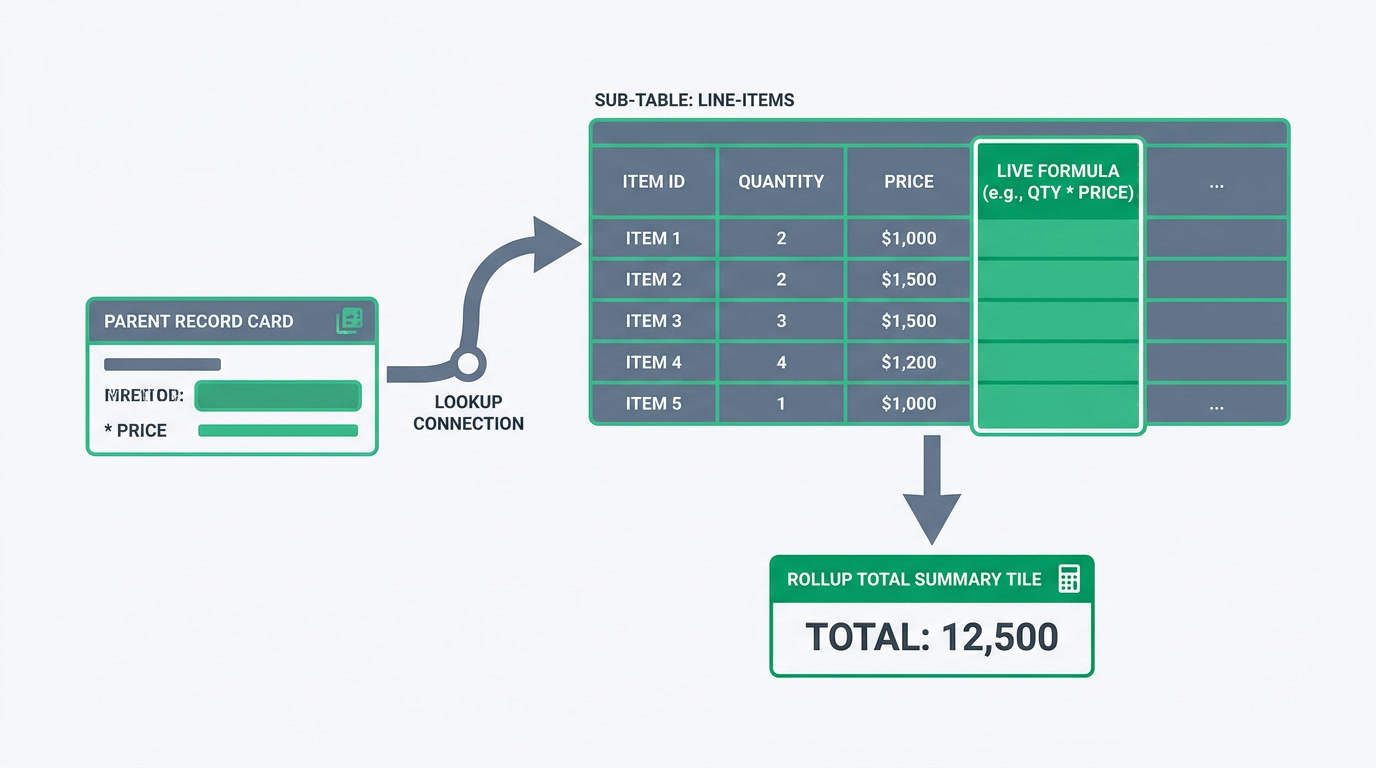
A custom module is any business object you define yourself — a Property, a Patient, a Course, an Asset — with its own records, its own fields, and its own list and detail views. Field types decide how each piece of information behaves. ERPnBox gives you 23 of them, from plain text to formulas that compute from other fields, so a record holds the right kind of value in the right kind of box.
The types cover the everyday and the specialized: text and textarea for names and notes; number, decimal, currency, and range for figures; date and datetime for scheduling; boolean, email, phone, and url for the obvious. Then come the ones that do real work — select and multiselect for choices, lookup to link one record to another, user to assign an owner, and file for documents. Global picklists let several modules share one option set, so "Status" means the same thing everywhere and you edit it once.
| Field type | What it does |
|---|---|
| Formula | Computes a value from other fields — and updates live inside line-item rows |
| Sub-table | A line-item table inside a record, like items on a quote |
| Aggregate / Rollup | Summarize child values — a total, a count, an average |
| Auto-number | Assigns a running sequence to each new record |
| Auto-rename | Builds a record's title automatically from its fields |
| Lookup | Links this record to a record in another module |
One honest note on formulas: this is an expression engine, not a spreadsheet. It calculates from your fields — a commission, a margin, a days-outstanding count — and it does that reliably, live, even inside sub-table rows. It is not a place to rebuild a workbook of interlinked tabs. For the arithmetic of a business record, it is exactly enough.
Why does building your own module matter?

Because the alternative is a spreadsheet that only one person understands, or a rigid product that forces you to store a handover date in a "Notes" field. Both cost you later — in errors, in lost history, in work that can't be reported on. When the software matches your business instead of the other way round, everyone enters data the same way and every record can be counted.
The field types are what turn a list into a system. A currency field can be totalled; a text field pretending to be money cannot. A lookup keeps a unit tied to its building, so opening the building shows every unit beneath it. A sub-table with a formula turns a quote into a document that adds itself up. Auto-number and auto-rename mean nobody invents their own naming convention on a Friday afternoon. Small choices, but they are the difference between data you trust and data you argue about.
The best systems don't ask you to think like the software. They learn to think like your business.
Who is it for, and which industries does it help?
It's for any business whose core work isn't a generic "deal" — and that's most of them. If you find yourself explaining your process with a whiteboard because no menu in your current tool has a word for it, custom modules are the answer. Any team modeling its own entities can build them without waiting on a developer.
- Real estate teams modeling Properties, Units, and handover milestones
- Clinics and practices tracking Patients, Visits, and treatment plans
- Recruiters and agencies moving Candidates through custom stages
- Training providers managing Courses, cohorts, and enrolments
- Operations teams keeping an Asset register with owners and service dates
Build your first module free
Start a 30-day trial — no card — and shape ERPnBox around the business you actually run.
Explore the CRMHow do you set up a custom module?
You don't need a project plan or an implementation partner. In practice it takes an afternoon: name the object, add the fields that describe it, choose sensible types, and link it to the modules it relates to. You can start small and grow the module as you learn what you actually track — nothing here is set in concrete.
- Name the module after the thing itself — Property, Patient, Course — not a generic label.
- Add fields and pick the type that fits: currency for money, date for milestones, select for fixed choices.
- Use lookup to connect it to related modules, so records open into each other.
- Add a sub-table for line items, then an aggregate or rollup to total them automatically.
- Turn on auto-number and auto-rename so every record is named and sequenced without human effort.
Reuse pays off as you go. A global picklist for "Status" or "Priority" can serve every module at once, so a change in one place changes everywhere. A formula written once keeps totals honest across thousands of records. The point of building your own object isn't novelty — it's that the software finally speaks your language, and everyone on the team speaks it back the same way. Pair it with workflow automation and the Finance ledger, and one clean data model powers your whole operation.
Frequently asked questions
How many field types does ERPnBox offer?
**Twenty-three**, covering everything from text, number, currency, and date to select, multiselect, lookup, and file. Beyond the basics you get formula fields that compute from other fields, sub-tables for line items, and aggregate and rollup fields that summarize child records. Auto-number and auto-rename handle sequencing and titling automatically.
Can formula fields do spreadsheet-style calculations?
They compute values from your other fields — a commission, a margin, a running total — reliably and live, even inside sub-table rows. **It's an expression engine, not a full spreadsheet**, so it's built for the arithmetic of a business record rather than a workbook of interlinked tabs. For the day-to-day math your records need, it's exactly enough.
Do I need a developer to build a module?
**No.** You name the object, add fields, choose their types, and link related modules yourself — usually in an afternoon. You can start small and grow the module as you learn what you actually track. There's no code, no implementation partner, and no waiting on an IT queue.
What's the difference between aggregate and rollup fields?
Both summarize child values so a parent record shows a total, count, or average without manual work — an invoice that adds up its line items, a building that counts its units. **Aggregate summarizes within a record's own sub-table, while rollup summarizes across linked child records.** Together they keep your headline numbers accurate automatically.
Can several modules share the same set of options?
Yes. **Global picklists** let you define an option set once — a "Status" or "Priority" list — and reuse it across every module that needs it. Change an option in one place and it updates everywhere, so the same word always means the same thing and you never maintain three copies of the same list.


