
The short answer
Dependent fields let a form reshape itself around the answers. A cascading picklist filters a child dropdown by its parent — pick a country, see only its cities. A layout rule shows, hides, or requires a field based on another answer. The result: shorter forms and cleaner, report-ready data.
A form that asks the same forty questions of every visitor is a form most people abandon. Dependent fields fix that: the form watches the answers and reshapes itself. Pick a country, and the city dropdown narrows to that country's cities. Choose "Company" over "Individual", and the tax-ID field appears. Fewer questions, cleaner data, and a record that makes sense the moment it's saved.
What are dependent fields and cascading dropdowns?
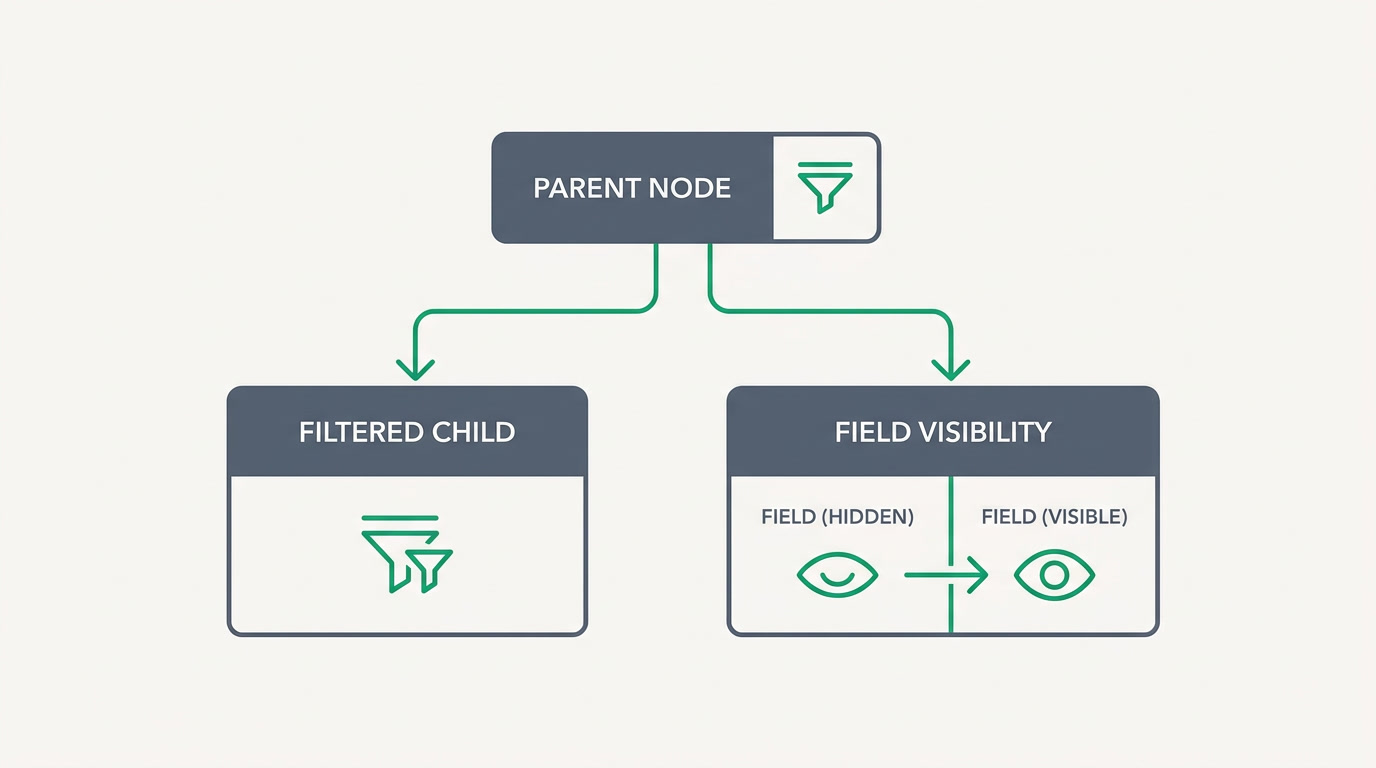
A dependent field is one whose behaviour is governed by another field's value. There are two flavours. A cascading (dependent) picklist filters a child dropdown by the parent's selection — choose a country and only its cities appear. A layout rule shows, hides, or requires a field based on another answer — mark a deal "Lost" and a "Reason" field becomes required. Both keep forms short and data honest.
The difference matters when you build. A cascading picklist is about the choices inside a single field. A layout rule is about whether a field appears at all. Most real forms use both together: the rule decides which sections show, the picklists decide what each dropdown offers.
Why do adaptive forms matter for your data?
Because every field you can hide is a field nobody can fill in wrong. A form that only asks what's relevant is shorter, faster to complete, and far less likely to be abandoned halfway. And a city dropdown that can only offer cities belonging to the chosen country closes the door on the mismatched entries that quietly poison reports for years.
There's a downstream benefit too. Clean, consistent picklist values are what analytics and automation rely on. Group your pipeline by city and it only works if "city" always holds a real city. Dependent fields aren't a cosmetic nicety — they're the quiet enforcement that keeps every chart, filter, and workflow rule downstream trustworthy.
| Pattern | Parent | Child behaviour |
|---|---|---|
| Cascading picklist | Country | City dropdown shows only that country's cities |
| Type to subtype | Ticket type | Subtype list filters to that type |
| Show / hide | Customer = Company | Tax-ID field appears |
| Conditional require | Deal stage = Lost | Reason field becomes mandatory |
Who needs dependent fields, and where?
Anyone whose records branch. A real-estate team scoping enquiries by country then city then neighbourhood. A support desk routing a ticket by type then subtype. An HR team where "Employment type" decides whether contract-end and probation fields even apply. Wherever one answer should govern the next, a flat form is quietly asking for bad data.
Because ERPnBox runs CRM, HR, Finance, Support and its public Forms on one system, a dependent picklist you build once behaves the same in the office, on the phone, and on a public form a stranger fills in. The country-to-city rule doesn't need rebuilding per app — it's a property of the field.
How do you set up dependent picklists in ERPnBox?
Start with two picklist fields — the parent and the child. In the dependent-picklist mapping you tell ERPnBox which child values are valid for each parent value: under "Germany" you list Berlin, Munich, Hamburg. Save it, and the child dropdown filters itself automatically wherever the field appears. For show, hide, and require, you add a layout rule: pick the trigger field and value, then the fields it governs.
One honest boundary worth knowing up front: ERPnBox layout rules cover show, hide, and require. They do not, at the rule layer, make a field conditionally read-only or auto-fill its value from another answer. If you need a computed value, that's a formula field's job, not a layout rule's — so plan the two together rather than expecting the rule to do both.
You don't have to build any of it by hand. Describe the form in plain words to the AI builder — "ask for country, then city within it, and require a tax ID only for companies" — and it proposes the fields, the mapping, and the rules for you to approve. Minutes, not a configuration afternoon.
See how CRM records adapt to every answer.
Explore the CRMDependent fields are the least glamorous feature that saves the most cleanup. They make the form shorter for the person filling it and the data cleaner for the person reading it — and in ERPnBox they carry across CRM, HR, Finance, Support and public forms without being rebuilt each time.
Frequently asked questions
What is the difference between a dependent picklist and a layout rule?
A dependent picklist filters the choices inside one dropdown based on a parent field — **pick a country, see only its cities**. A layout rule decides whether a field appears or is required based on another answer. Most forms use both: the rule controls which fields show, the picklist controls what each offers.
Can a layout rule make a field read-only or auto-fill its value?
No. ERPnBox layout rules cover **show, hide, and require only**. They don't make a field conditionally read-only or auto-populate its value at the rule layer. For a value computed from other fields, use a **formula field** instead, and plan the two together.
Do dependent fields work on public forms too?
Yes. Because dependency is a property of the field itself, a cascading picklist or show/hide rule behaves the same in the internal CRM view and on a public form built in the [Forms app](/apps/forms) that routes into a module. **You build it once and it applies everywhere the field appears**.
Can the AI builder create dependent picklists for me?
Yes. Describe the form in plain words — for example, ask for country then city within it, and require a tax ID only for companies — and the **AI builder** proposes the fields, the parent-to-child mapping, and the layout rules for you to review and apply.
Why do cascading dropdowns improve reporting?
Reports and automation depend on consistent values. A city dropdown that can only offer cities within the chosen country prevents mismatched entries, so grouping your pipeline by city or filtering by region stays accurate. **Clean picklist data is what keeps every chart, filter, and workflow rule downstream trustworthy**.


