
The short answer
Layout Rules are trigger-driven form logic in ERPnBox: when a field's value matches a condition, it shows, hides, or requires other fields, and dependent picklists filter a child dropdown by the parent. Forms adapt to each deal type, request, or role — keeping data clean at the point of entry.
A form should never ask a question that doesn't apply. Layout Rules make your forms pay attention: when someone picks a value in one field, other fields appear, vanish, or become required to match. The result is a form that feels custom-built for every situation, without a line of code.
What are Layout Rules?
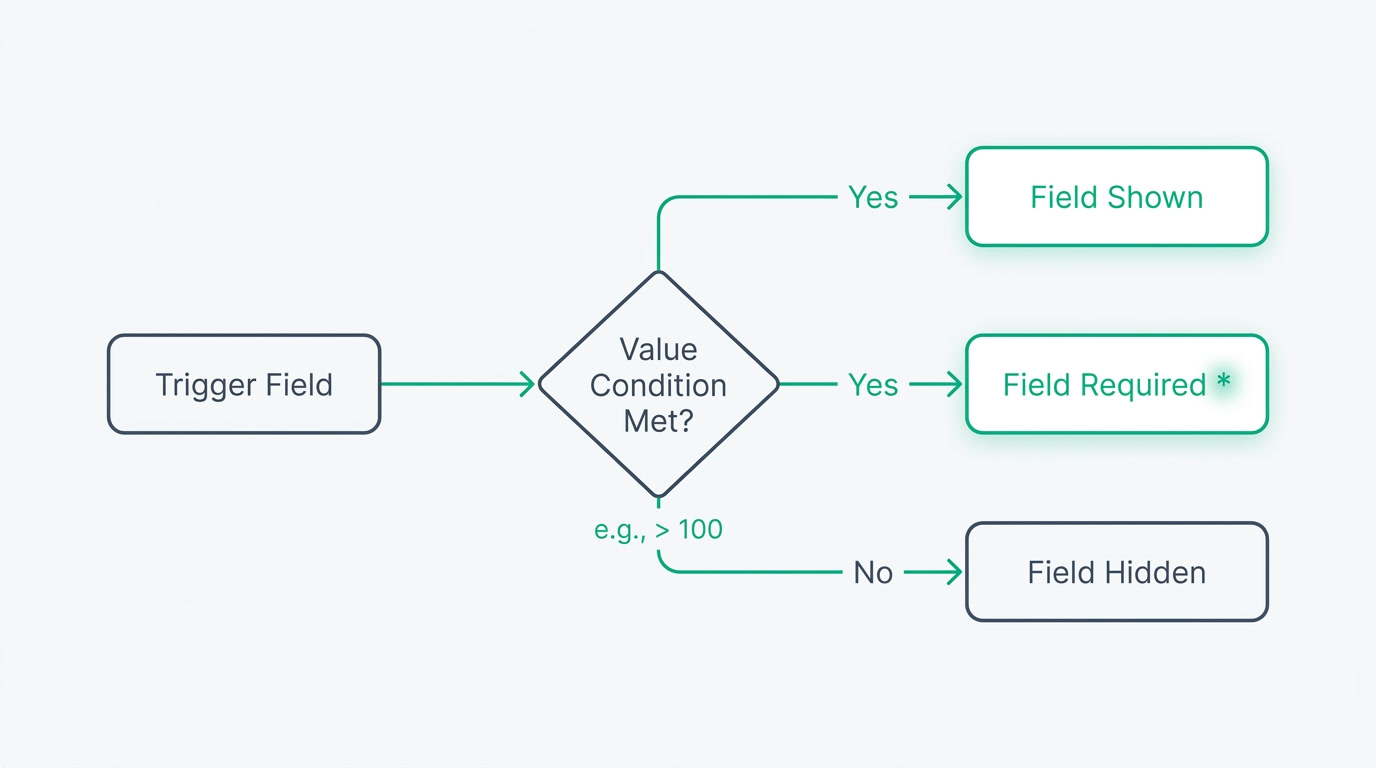
Layout Rules are trigger-driven form logic: when a chosen field value matches a condition, ERPnBox performs one of three actions on other fields — show them, hide them, or make them required. A dependent picklist can also filter a child dropdown by the parent's answer. The form reshapes itself as people fill it in, so only the relevant questions ever appear.
Because ERPnBox forms are described by your own configuration rather than fixed screens, a rule is just a condition and an action you set once. Pair rules with named page layouts — sections, columns, collapsible groups, quick-create fields, and a mobile layout you can assign per profile and per role — and add color to individual picklist options, and every form adapts to who's filling it and what they're recording.
Why do messy forms cost you more than you think?

A form built for every case at once punishes everyone. Reps scroll past fields that don't apply, skip the ones that do, and leave records half-empty. Then your reports lie, because the data underneath them is patchy. The cost isn't the form — it's the wrong deal marked won, the compliance field left blank, the follow-up nobody logged.
Layout Rules remove the noise. Hide what's irrelevant and the form gets shorter and faster. Require what matters at the moment it matters and the gaps close themselves — a rep can't advance a deal to a stage that demands a contract value without entering one. Clean input at the point of entry is the cheapest data quality you'll ever buy.
| Situation | The rule | What the person sees |
|---|---|---|
| Deal type = Renewal | Show "Current contract end date" | A field that only renewals need appears |
| Stage = Negotiation | Require "Contract value" | Can't move on until the number is in |
| Request type = Expense | Hide "Leave dates" | Irrelevant fields disappear |
| Country = selected | Dependent picklist filters "City" | Only that country's cities show |
Which teams and industries does this help?
Any team whose forms change by type, stage, or role. If a single record could mean two different things depending on one answer, Layout Rules earn their keep. That covers far more of your business than a CRM — it reaches wherever people record structured information across sales, service, and HR.
- Sales teams handling several deal types — new business, renewals, upsells — each needing its own fields.
- HR handling request types that share one form — leave, expenses, equipment — where each shows only its relevant fields.
- Service and support desks where the category picked decides which follow-up questions are required.
- Any operation where different roles need different views of the same record via per-role page layouts.
How do you set up a Layout Rule?
You build a rule the way you'd say it out loud: when this field is that value, do this to those fields. There's no scripting and nothing to deploy — you set the condition, pick the action, choose the target fields, and save. The form obeys the rule the next time someone opens it, on the web and on the phone.
- Open the module's settings and go to Layout Rules.
- Pick the trigger field and the value that should fire the rule — for example, Stage equals Negotiation.
- Choose the action: show, hide, or require — and select the fields it applies to.
- For linked lists, set a dependent picklist so the child options filter by the parent's value.
- Save. Then refine the page layout — sections, collapsible groups, quick-create fields, and option colors — and assign the layout per profile or role.
One honest note: Layout Rules show, hide, and require. They don't make a field read-only or auto-fill a value on their own — for those, ERPnBox uses validation and workflow automation, so the boundary between form logic and business logic stays clear.
See how adaptive forms keep your pipeline clean from the first click.
Explore the CRMForms are the front door to every record you keep. When they adapt to the moment — asking only what's relevant and insisting on what's essential — the data behind them is clean by default, and every report built on it tells the truth. That's the quiet payoff of Layout Rules: better decisions, because better data went in.
Frequently asked questions
What can a Layout Rule actually do?
A Layout Rule watches a **trigger field** and, when its value matches your condition, performs one of three actions on other fields: show them, hide them, or make them required. You can also set a **dependent picklist** that filters a child dropdown by the parent's selected value.
Can a Layout Rule make a field read-only or set its value automatically?
No. Layout Rules cover **show, hide, and require only**. To make a field read-only or fill it automatically, ERPnBox uses validation rules and workflow instead. This keeps form-shaping logic separate from business logic, so each stays simple to reason about and maintain.
Do I need a developer to set up Layout Rules?
No. You set a condition and an action from the module's settings — **no code and nothing to deploy**. Pick the trigger field and value, choose show, hide, or require, select the target fields, and save. The next person to open the form sees it behave.
Can different teams see different versions of the same form?
Yes. **Named page layouts** let you arrange sections, columns, collapsible groups, and quick-create fields, then assign a layout per profile and per role. There's also a mobile layout, so the phone experience is tailored too — the same record, shaped for whoever is looking at it.
Will Layout Rules work on the mobile app?
Yes. Rules apply wherever the form is used, and you can assign a **dedicated mobile layout** per profile and role so the phone form stays clean and relevant. The show, hide, and require behavior follows the record onto mobile without extra setup.


