The short answer
ERPnBox gives every module seven views of the same records: list, kanban, calendar, chart, SLA, hero, and cards. You set a default view per module and save named filter sets for yourself. On mobile, lists show as cards. It lets each team read its work its own way without exporting.
Every business keeps the same records, but no two people want to look at them the same way. Your sales lead wants a pipeline. Your dispatcher wants a calendar. Your support desk wants to see what's on fire right now. Record Views in ERPnBox give one shared set of records seven different faces — so each person reads their work the way it makes sense to them, without anyone exporting anything to a spreadsheet.
What are Record Views in ERPnBox?
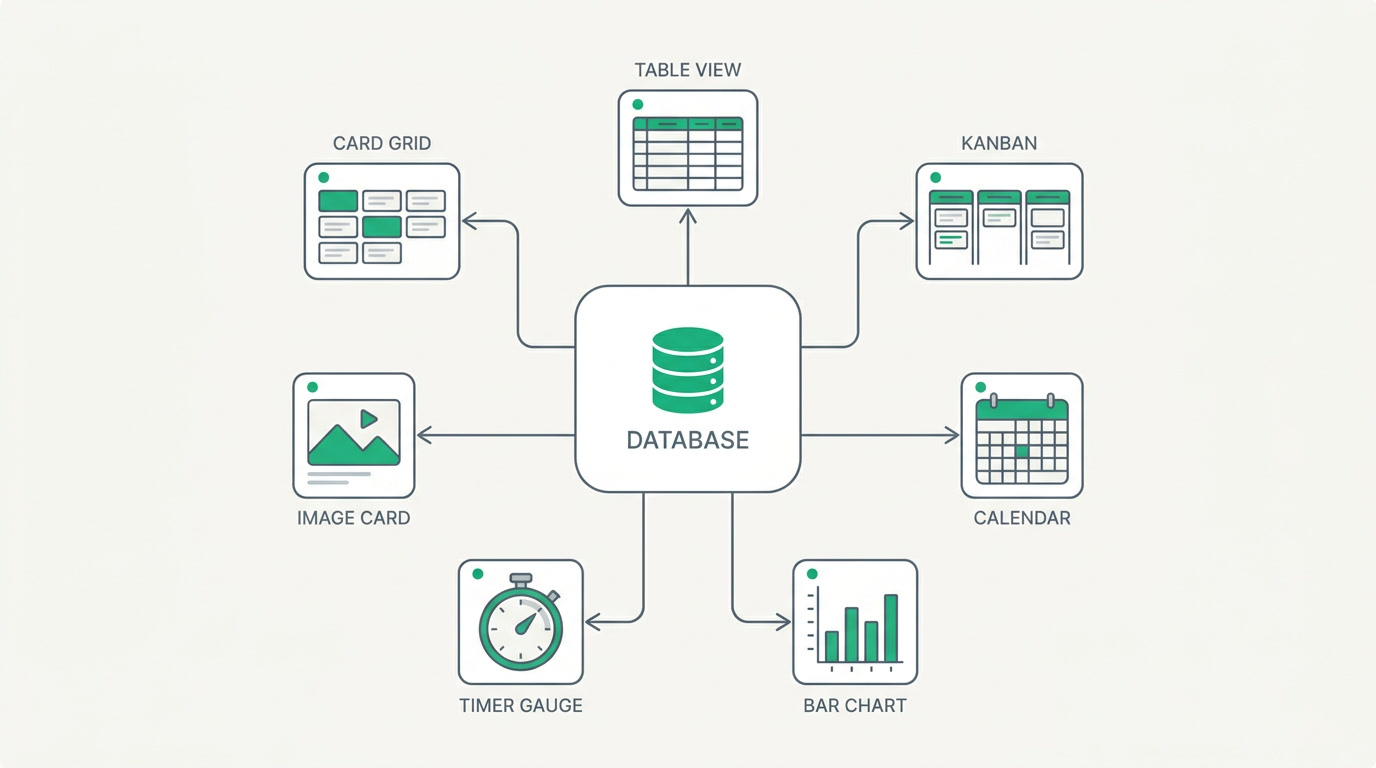
Record Views are seven ways to look at the same records inside any module: a list (a plain table), a kanban board you drag by status, a calendar that schedules records by a date field, an inline chart that aggregates whatever records you're viewing, an SLA board that shows records running against a live timer, hero cards for large visuals, and a compact cards grid. Same data, seven lenses — you pick the one that fits the job.
| View | Best for | What you see |
|---|---|---|
| List | Scanning and sorting many records | A sortable, filterable table |
| Kanban | Pipelines and stage-based work | Cards you drag between status columns |
| Calendar | Bookings and scheduled jobs | Records placed on dates |
| Chart | A quick read on the current set | An inline aggregation of those records |
| SLA | Support and time-bound cases | Records against a live escalation timer |
| Hero | Listings and visual catalogs | Large image-led cards |
| Cards | Compact visual browsing | A tidy grid using card layouts |
Why do different views matter for a small business?

Because the alternative is everyone bending one rigid table to fit work it was never shaped for — or worse, dumping records into a spreadsheet that goes stale the moment it's saved. When the pipeline lives on a board, no one asks which deals moved this week; they can see it. When bookings sit on a calendar, double-booking gets obvious. The record stays the single source of truth, and the view does the translating.
There's a quieter benefit too. You set a default view per module, so a person opening Leads lands on the board and a person opening Cases lands on the SLA timer — no hunting, no re-clicking every morning. The tool meets the work where it is instead of asking the work to bend.
Which teams and industries get the most from this?
Any team that manages records benefits, but a few pairings are natural. Sales and agile operations live on kanban, dragging work through stages. Field service and appointment-heavy businesses run on the calendar. Support desks watch the SLA board so nothing slips past its promised time. And anyone selling something visual — property listings, product catalogs, portfolios — reaches for hero and cards, where the image does the selling.
- Sales and agile ops — kanban to push deals and tasks through stages.
- Bookings and field service — calendar to schedule by date and spot clashes.
- Support — the SLA board to keep cases ahead of their timers.
- Real estate and visual catalogs — hero and cards where the picture leads.
See your records seven ways
Start a 30-day free trial — no card needed — and set up the views your team actually works in.
Explore the CRMHow do you set up and save your views?
Setup is a matter of choosing, not building. Open any module, switch to the view you want from the view switcher, and pick which fields drive it — the date for a calendar, the status column for kanban, the image for hero. Then set the module's default view so your team lands there. Filters you use often can be saved as named sets and reopened in a click.
- Open a module and use the view switcher to choose list, kanban, calendar, chart, SLA, hero, or cards.
- Point each view at the right field — a date for the calendar, a status for the board, an image for the cards.
- Set the module's default view so everyone opens where the work makes sense.
- Save your frequent filters as named sets to reopen them instantly.
Saved filters are personal — your named filter sets are yours, not shared across the team. If you want a view others can open, save it as a report, which can be shared. And on your phone, record lists show as clean cards rather than the full seven-view switcher — built for reading and updating on the move.
That's the whole idea: one set of records, and a face for every job. No exports, no parallel spreadsheets, no arguing about whose view is the real one. The record is the truth, and everyone gets to read it their way.
Frequently asked questions
How many record views does ERPnBox have?
**Seven: list, kanban, calendar, chart, SLA, hero, and cards.** Each shows the same records from a different angle, and you switch between them from the view switcher inside any module without moving or copying data.
Can I set a default view for a module?
Yes. The default view is **configurable per module**, so opening a module lands your team on whichever view fits it best — a kanban board for a pipeline, an SLA timer for a support queue — without anyone having to switch every time.
Are saved views shared with my whole team?
Saved filters are **per-user**, so your named filter sets stay personal to you. If you need a view others can open, save it as a report instead — reports can be shared across the team.
Do all seven views work on mobile?
On mobile, record lists are **card-based** rather than the full seven-view switcher. It's built for reading and updating records on the move, so you get a clean card layout instead of the desktop board, calendar, and chart controls.
What's the difference between the hero and cards views?
Both are visual, but **hero uses large image-led cards** for a showcase feel, while **cards is a compact grid** using your card layouts for denser browsing. Real-estate listings and catalogs often use hero to feature items and cards to scan many at once.


