
The short answer
An employee loan is money the employer advances, repaid by automatic deductions over agreed periods. Set the principal, installment, and start date once; the installment deducts at each pay run's approval — not during calculation — and lowers the remaining balance until it closes at zero. Show it as a named payslip line, cap it against net pay, and settle early to zero in one action.
An employee asks for help. Rent is due, or a car needs repair, and payday is three weeks away. You want to help — but a loan handled on a sticky note is a loan that gets forgotten, disputed, or repaid inconsistently. This guide shows how to run employee loans and salary advances the way good payroll does it: set up once, repaid automatically in installments, tracked to zero, and shown honestly on every payslip.
What is an employee loan repaid through payroll?
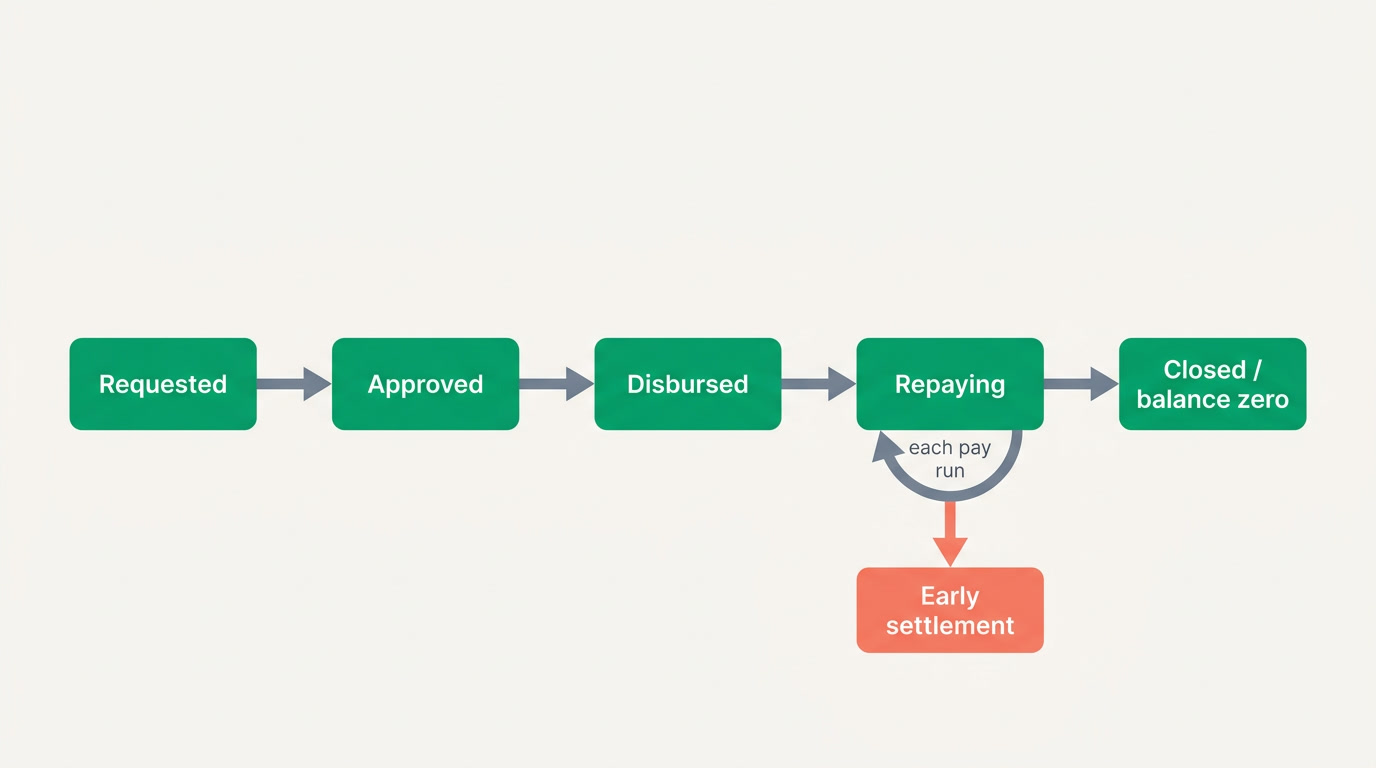
It is money the employer advances to an employee, repaid by automatic deductions from future paychecks over an agreed number of periods. The payroll system holds the loan's principal, the installment amount, the remaining balance, and the schedule — so each pay run deducts the right installment until the balance reaches zero, with no manual tracking.
Two flavors are common. A salary advance is small and short — usually a portion of the current month's pay handed over early and recovered in one or two installments. A loan is larger and spread over many periods. The mechanics are the same: a principal, an installment rule, and a deduction line that appears on the payslip. The difference is only scale and duration.
How do you set up a loan correctly?
Capture five things at setup: the principal (total amount), the installment (fixed amount or number of periods), the start period (when deductions begin), any interest or fee if your policy charges one, and a signed agreement. From those, the system derives the schedule and the remaining balance. Get these right once and the rest is automatic.
Decide the installment model up front. Fixed-amount installments (a set sum each period until paid) are the clearest for employees to understand. Fixed-term installments (principal divided by N periods) guarantee an end date. Many teams also set a rule that a single loan installment may never exceed a fraction of net pay, so a repayment never pushes take-home dangerously low. Whatever you choose, the employee should see the full schedule before signing, not discover it on the first payslip.
When does the installment actually deduct?
In a well-built payroll, the deduction lands at the approval step of the pay run — not during calculation. A good pay run has a lifecycle: draft, then calculation you can re-run freely with no side effects, then review, then approve. Approval is the commit: that is when the loan installment is deducted and the remaining balance drops. Everything before it can be re-run or cancelled safely.
This matters more than it sounds. If installments deducted every time you pressed "calculate," a payroll clerk previewing a run three times would deduct three installments and corrupt the balance. Tying the deduction to approval — the single, deliberate commit — is what keeps the remaining balance honest. It's the same reason good pay runs are reversible up to the point of disbursement.
How is the remaining balance tracked?
Each approved installment subtracts from the loan's remaining balance and appends a repayment record: which pay period, how much, balance before and after. The loan is effectively a small ledger of its own. When the balance hits zero, the loan closes automatically and stops appearing as a deduction — no risk of over-collecting a period too many.
The over-collection trap
The classic manual error is one installment too many — the loan was paid off last period, but the deduction wasn't removed from the spreadsheet in time. A system that closes the loan at zero and stops the deduction line automatically eliminates the most common and most damaging loan mistake: taking money you were no longer owed.
What does the loan lifecycle look like?
From request to closure, a loan moves through clear states. Each one is auditable, and the balance is unambiguous at every step. This table shows the journey and what should — and should not — happen at each stage.
| Stage | What happens | Effect on balance |
|---|---|---|
| Requested | Employee applies; amount and reason recorded | None yet |
| Approved (loan) | Manager signs off; schedule and installment set | Balance = full principal |
| Disbursed | Money paid to employee, off-cycle or with payroll | Unchanged |
| Repaying | Each pay run's approval deducts one installment | Drops by installment each period |
| Early settlement | Employee clears the rest in one payment or one deduction | Jumps to zero |
| Closed | Balance zero; deduction line stops appearing | Zero, permanently |
How do you handle early settlement?
Sometimes an employee wants to clear the loan ahead of schedule — a bonus arrived, or they're leaving the company. Early settlement means recovering the entire remaining balance at once, either as a lump payment back to the employer or as a single larger deduction on the next payslip. The system should let you settle to zero in one action and mark the loan closed, rather than forcing you to fake the last few installments.
The departure case deserves special care. When someone leaves with a loan still owing, the outstanding balance is usually settled from their final pay — but only up to what the law where you operate allows you to deduct from a final settlement. Know that limit before you rely on it. If the final pay doesn't cover the balance, the remainder becomes a debt to recover separately, and that should be a documented, signed arrangement — never an assumption.
A loan the employee can see counting down to zero is a loan nobody argues about. Transparency isn't a courtesy here — it's the whole control.
How do you keep it fair and transparent on the payslip?
Show the loan repayment as its own named deduction line — "Loan repayment," not folded into a vague "other deductions." Ideally the payslip also shows the installment number and the remaining balance, so the employee watches the debt shrink each month. That single design choice — visible, labelled, counting down — prevents almost every loan dispute before it starts.
- Name the line clearly — "Loan repayment" or "Salary advance recovery," never a generic bucket.
- Show installment progress — e.g. "installment 4 of 10" and the balance remaining.
- Never let a deduction push net pay below what the law allows — cap the installment.
- Keep the signed agreement on file — amount, schedule, and early-settlement terms.
- Give the employee self-service visibility — let them see the balance without asking HR.
Why does keeping HR, payroll, and finance connected matter?
A loan touches three systems at once. HR owns the employee and the agreement, payroll deducts the installment, and finance must reflect it in the ledger — the disbursement is an asset (money owed to the company), and each repayment reduces that asset. When these live in separate tools, the three numbers drift, and reconciling them at year-end is painful.
This is where an all-in-one platform earns its keep. On ERPnBox, payroll lives with HR, attendance, and leave in one app and connects to a real double-entry finance ledger — so the loan, the payroll deduction, and the accounting entry stay in sync by design instead of by spreadsheet. AI helps configure the setup from a chat, and it works in any language, web and mobile. Whether you choose ERPnBox or another tool, insist on that connection: a loan that isn't reflected in the ledger is a loan you'll lose track of.
Run loans and payroll on one connected system
Payroll, HR, attendance, and a real finance ledger together — so every loan, deduction, and entry stays in sync. 30-day free trial, from $15 per user.
See HR & payrollFrequently asked questions
What's the difference between a salary advance and a loan?
A **salary advance** is small and short — usually part of the current period's pay handed over early and recovered in one or two installments, often with no interest. A **loan** is a larger sum spread over many periods. Mechanically they're identical: a principal, an installment rule, and a named deduction line on the payslip. The only real differences are size and how long repayment takes.
When exactly is a loan installment deducted from payroll?
In a well-designed system, at the **approval** step of the pay run — not during calculation. You should be able to calculate and preview a run many times with no effect on the loan. Only approving the run — the deliberate commit before disbursement — deducts the installment and lowers the remaining balance. This prevents a preview from accidentally over-collecting.
How does early settlement work?
Early settlement recovers the **entire remaining balance** in one move — either a lump payment from the employee or a single larger deduction on the next payslip — and closes the loan. A good system lets you settle to zero in one action rather than faking the remaining installments. Keep the early-settlement terms in the original signed agreement so there are no surprises.
What happens to a loan when an employee leaves?
The outstanding balance is usually settled from the employee's **final pay** — but only up to the amount the law where you operate permits you to deduct from a final settlement. If the final pay doesn't cover the balance, the remainder becomes a separate debt to recover through a documented, signed arrangement. Never assume you can claw back more than the local rules allow.
How do I keep a loan fair to the employee?
Show it as its **own labelled deduction line** on every payslip, ideally with the installment number and remaining balance so the employee watches the debt shrink. Cap the installment so it never pushes net pay below what the law allows, give the employee self-service visibility of the balance, and keep the signed agreement on file. Transparency is the control that prevents disputes.
Does ERPnBox handle employee loans?
ERPnBox runs payroll inside its HR app alongside employee records, attendance, and leave, and connects to a real double-entry finance ledger — the foundation you need for loans, deductions, and their accounting entries to stay in sync. The advanced loan mechanics described here are what good payroll software should do; evaluate any tool, including ERPnBox, against your own requirements and the law where you operate.