The short answer
Payroll software is a system that calculates each person's pay, withholds taxes and statutory deductions, produces payslips, arranges payment, and posts the cost to your accounts. It replaces the fragile spreadsheet most teams start with. As headcount, variable pay, and compliance grow, the manual approach breaks and errors reach real people's paychecks.
Every business that pays people runs payroll, whether it knows the word or not. For the first few hires it hides inside a spreadsheet and a bank transfer on the last Thursday of the month. Then a commission structure appears, someone joins mid-month, a statutory deduction changes, and the spreadsheet starts to lie. Payroll software exists for that moment — and understanding what it actually does is the first step to knowing whether you need it yet.
What is payroll software, in one sentence?
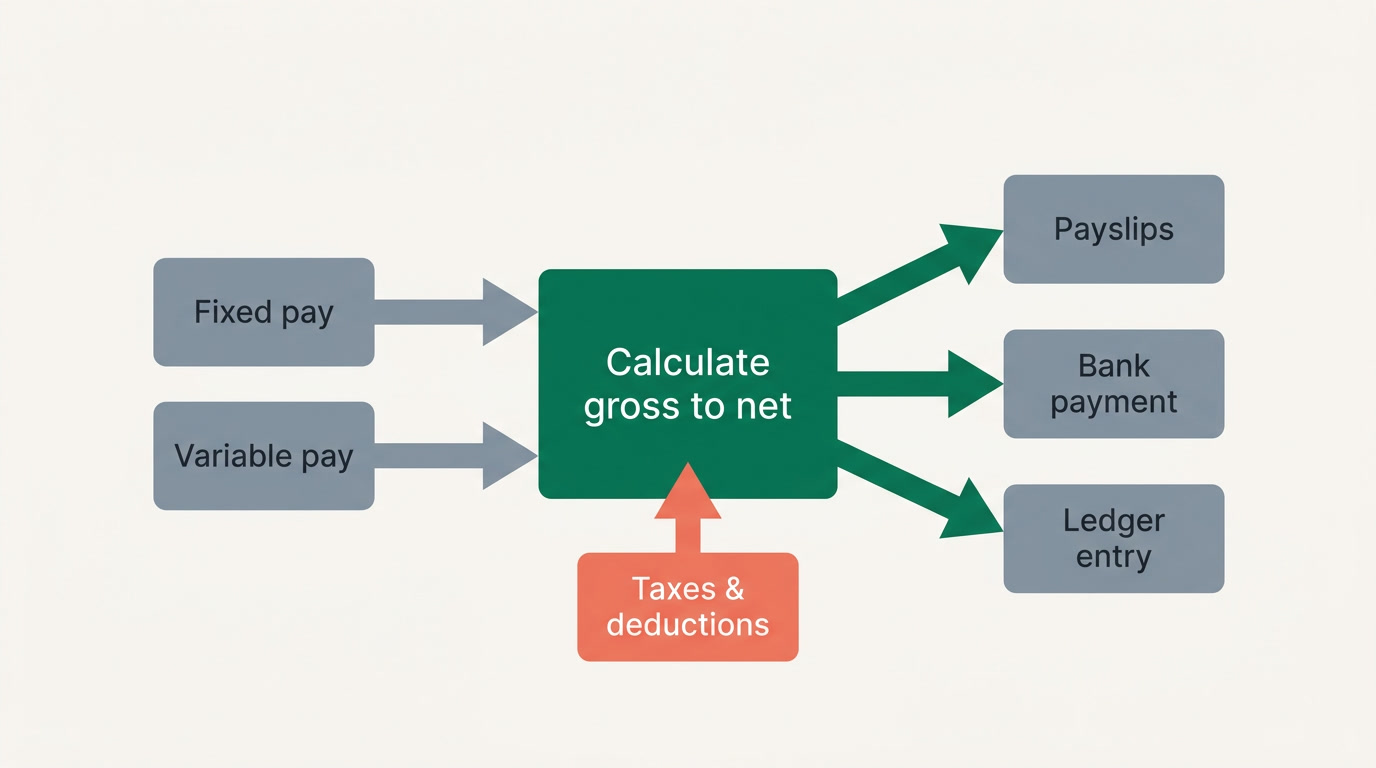
Payroll software is a system that takes each employee's salary rules and the facts of the pay period, then calculates net pay, withholds taxes and statutory deductions, produces payslips, arranges payment, and records the whole cost in your accounts. In short, it turns a promise to pay into a correct, documented, repeatable event — one you can defend to an employee or an auditor.
That last clause matters. A calculator gives you a number; payroll software gives you a number plus the evidence, the record, and the accounting entry behind it. That difference is why teams eventually stop reinventing formulas every month.
What does payroll software actually do each cycle?
In each pay period it does six jobs in sequence: gather the inputs, calculate gross-to-net for every person, apply taxes and statutory deductions, generate payslips, produce a payment file, and post the cost to the ledger. Good software does all six from one dataset, so the payslip, the bank file, and the accounting entry can never disagree.
| The payroll job | What the software does for you |
|---|---|
| Collect the inputs | Reads fixed pay (basic, allowances set once) and variable pay (overtime, commission, one-off bonuses uploaded each period) automatically. |
| Calculate pay | Applies each employee's salary structure and any formula paycodes — overtime = hourly rate × hours, and similar rules — to reach gross. |
| Handle taxes & statutory | Withholds income tax by your country's brackets and computes social-insurance shares. The employer collects and remits tax; it doesn't pay it for the employee. |
| Apply deductions | Adds attendance-based deductions, loan installments, and adjustments as clear separate lines — so the payslip shows the full salary and each cut. |
| Produce payslips | Generates a per-employee payslip and, ideally, lets each person view their own through employee self-service. |
| Pay & post to books | Creates a payment file for the bank and a journal entry so payroll cost lands in your general ledger, split by department or cost center. |
You can go far deeper on any one of these rows. Working backwards from a promised take-home figure is its own discipline — we cover it in net-to-gross payroll. Choosing a tool that fits your size and country is another — see how to choose payroll software.
Why do spreadsheets break as a team grows?
Spreadsheets break because they hold no memory and no rules. Every month someone re-copies formulas, re-types variable pay, and hopes no cell reference shifted. Below roughly ten people it usually holds; past that, the risk compounds with every new employee, allowance, and mid-month joiner — and the errors land in real paychecks.
- No audit trail. When a number is wrong, you can't see who changed what, or when.
- Formulas silently rot. A dragged cell, a hidden row, a rounding rule someone tweaked — all invisible until payday.
- Variable pay is re-keyed by hand. Commission and overtime come from another file, pasted in each month — the single biggest source of payroll mistakes.
- Compliance drifts. A change to statutory rates has to be found, understood, and manually applied everywhere it appears.
- No connection to the books. Someone re-enters the total into accounting, and now two systems can disagree.
A spreadsheet is a wonderful place to draft payroll and a dangerous place to run it. The moment a mistake reaches someone's bank account, it stops being a formatting problem.
How does payroll software connect to the rest of the business?
Payroll doesn't live alone. It reads from HR (who's employed, at what salary), from attendance and leave (who worked, who was absent), and it writes to Finance (what the pay run cost, split across departments). When those systems are separate, humans copy data between them — and each copy is a chance to be wrong.
This is where the design of your tools starts to matter. A dedicated payroll product does the payroll job beautifully but still needs to be wired to your HR and accounting systems. An all-in-one platform takes a different route: payroll sits with HR, attendance, leave, and a real finance ledger on one system, so the data flows without an export in the middle.
Where ERPnBox fits — honestly
ERPnBox is an all-in-one platform where payroll lives inside the HR app, connected to attendance, leave, and the finance ledger on one login. That connection is the point: hours worked and leave taken feed the pay run, and the pay run's cost posts to the books without re-keying. The deeper techniques in this cluster — grossing-up, four-dimension cost allocation, reversible pay-run lifecycles — are ideas we're teaching you to look for in any payroll tool, not a checklist we claim to have fully solved. Setup is AI-assisted and it works in any language.
Do you need dedicated payroll software or a broader platform?
It depends on where your complexity lives. If payroll is your hardest problem — many jurisdictions, contractors across borders, intricate benefits — a dedicated tool earns its place. If your challenge is running a whole growing business on too many disconnected apps, a platform that includes payroll usually wins on fewer moving parts.
Be fair to the specialists. Tools like Gusto and Deel are genuinely excellent — Gusto for smooth small-business payroll in its markets, Deel for hiring and paying people across countries — while ADP carries deep enterprise and compliance muscle. If one of those matches your exact problem, use it with a clear conscience. Our own bias is toward businesses that want CRM, HR, payroll, and Finance under one roof; we explain the tradeoff in how to choose payroll software.
See payroll, HR, and Finance on one login
Explore the [HR & payroll](/hrms) app where employee records, attendance, leave, and the pay run share one system — and one price from $15 per user, with a 30-day free trial.
Explore HR & payrollWhat should you look for once you're ready to switch?
Look for software that handles both fixed and variable pay without manual re-keying, computes taxes and statutory deductions by your country's rules, keeps a clear audit trail, and posts cleanly to your accounts. The best systems also make a pay run reversible — you can recalculate safely and only commit when everyone has reviewed it.
- Reads variable pay automatically — commission and overtime from a Finance upload, not typed by hand.
- Separates deductions into clear lines so the payslip always shows the full contractual salary and each cut.
- Splits cost across dimensions — department, cost center, product line — for accurate journal entries.
- Handles loans and installments — automatic repayment deducted at approval, with a running balance.
- Gives employees self-service so payslips arrive without an email thread every month.
None of this has to arrive at once. Many teams move off the spreadsheet the month a mistake finally costs them trust, then adopt the deeper features as they grow. Start with what good payroll should do, read net-to-gross payroll if you promise take-home figures, and let the payslip become something you never have to explain twice.
Frequently asked questions
What is the difference between payroll software and an accounting system?
Payroll software specializes in **calculating what each person is paid** — gross-to-net, taxes, statutory deductions, payslips, and the payment file. Accounting records the financial consequences of everything the business does, including that payroll cost. The two connect: payroll produces a **journal entry** the accounting system posts. Some platforms include both so no one re-keys the total between them.
At what team size should I stop using a spreadsheet for payroll?
There's no universal number, but the pressure usually appears somewhere around ten employees — or sooner if you have **variable pay, mid-month joiners, or statutory deductions that change**. The real trigger isn't headcount; it's the first mistake that reaches someone's bank account. If you're re-typing commission every month or can't explain last cycle's numbers, you're already past the point.
Does payroll software file my taxes with the government?
Be careful with this claim. Payroll software **calculates and withholds** income tax and statutory contributions, and produces the figures you or your accountant need to remit. Whether a specific product also **files returns to a government portal** depends entirely on the product and the country — many don't, and you shouldn't assume it. Confirm exactly what a tool submits, to whom, and where, before you rely on it.
What is the difference between fixed and variable pay?
**Fixed pay** is set once and repeats — basic salary and standing allowances that don't change month to month. **Variable pay** is entered each period — commission, overtime, one-off bonuses, occasional allowances — often uploaded from a Finance spreadsheet. Good payroll software reads both at run time from one dataset, so nobody re-types the variable part and risks a costly slip.
Can payroll software connect to my HR and attendance data?
It should. Attendance and leave decide who worked and who was absent, which directly affects pay and any attendance-based deductions. If payroll is separate from HR, someone bridges that data by hand. On an **all-in-one platform, payroll sits with HR, attendance, and leave**, so hours worked and leave taken feed the pay run automatically — one of the strongest arguments for keeping these apps together.
What does it mean for a pay run to be reversible?
A well-designed pay run moves through stages — draft, validated, processing, review, approved, disbursed — and the calculation stage is **safe to re-run with no side effects**. Only when you approve does it commit real changes like loan installments and leave-balance updates. Any state before disbursement can be cancelled. This means you can recalculate confidently until the numbers are right, then commit once.