
The short answer
Choose payroll software by your pay model, not headcount. Confirm it handles gross-first and net-to-gross, reads fixed and variable pay, deducts attendance issues as separate lines, posts cost to your ledger, and gives you a reversible run with an audit trail. Buy a specialist if payroll stands alone; go all-in-one when it must connect to HR and accounting.
Choosing payroll software is really a question about your pay model, not your headcount. A ten-person shop with commissions, overtime, and a promised take-home number can be harder to pay correctly than a hundred salaried people. This guide gives you the criteria that separate software that pays people accurately from software that just prints payslips.
What should payroll software actually do before you buy?

Good payroll software must calculate gross pay both ways (gross-first and net-to-gross), read fixed and variable pay each period, apply attendance-linked deductions, withhold statutory amounts correctly, route each run through an approval with an audit trail, and post the cost to your ledger. If it does the first three but skips the last, it is a silo.
Most buyers over-index on the login screen and the payslip PDF — the easy 20%. The hard 80% is the calculation engine underneath: does it handle a grossed-up net salary? Does overtime compute from a formula you can edit? Does an absent day dock the right amount without hiding the full contractual salary? Ask vendors to run *your* messiest month, not their clean demo.
Does it handle both gross-first and net-to-gross pay?
Most software assumes you set a gross salary and subtract tax and contributions to reach net. But many employers promise a fixed take-home number and must work backwards to the gross that yields it after deductions. Because tax depends on gross, this is an iterative calculation. If your offers quote net, this is non-negotiable.
Ask the vendor directly: *"Can you gross up a net salary automatically?"* Many can't, and the workaround is a manual spreadsheet that breaks the moment tax brackets or contribution rates change. Read our deeper explainer on net-to-gross payroll before you sit through a demo — it will tell you exactly what to watch the salesperson click.
Can it read variable pay and attendance every period?
Fixed pay — basic and standing allowances — is set once. Variable pay changes every cycle: commission, bonuses, overtime, one-off allowances, often arriving as a spreadsheet from Finance. Strong payroll software imports both at run time and computes formula-based items (overtime = rate × hours, mileage = km × rate) from rules you can edit yourself.
Attendance is the other half. A conduct policy turns absence, lateness, and short-hours into separate deduction lines — so basic and gross always show the full contractual salary while the docking is transparent. The best systems offer optional leave-first absorption: an absent day pulls from the leave balance before it touches pay. This only works cleanly when payroll and attendance live on one system, not two synced apps.
Does payroll connect to your ledger, or stop at the payslip?
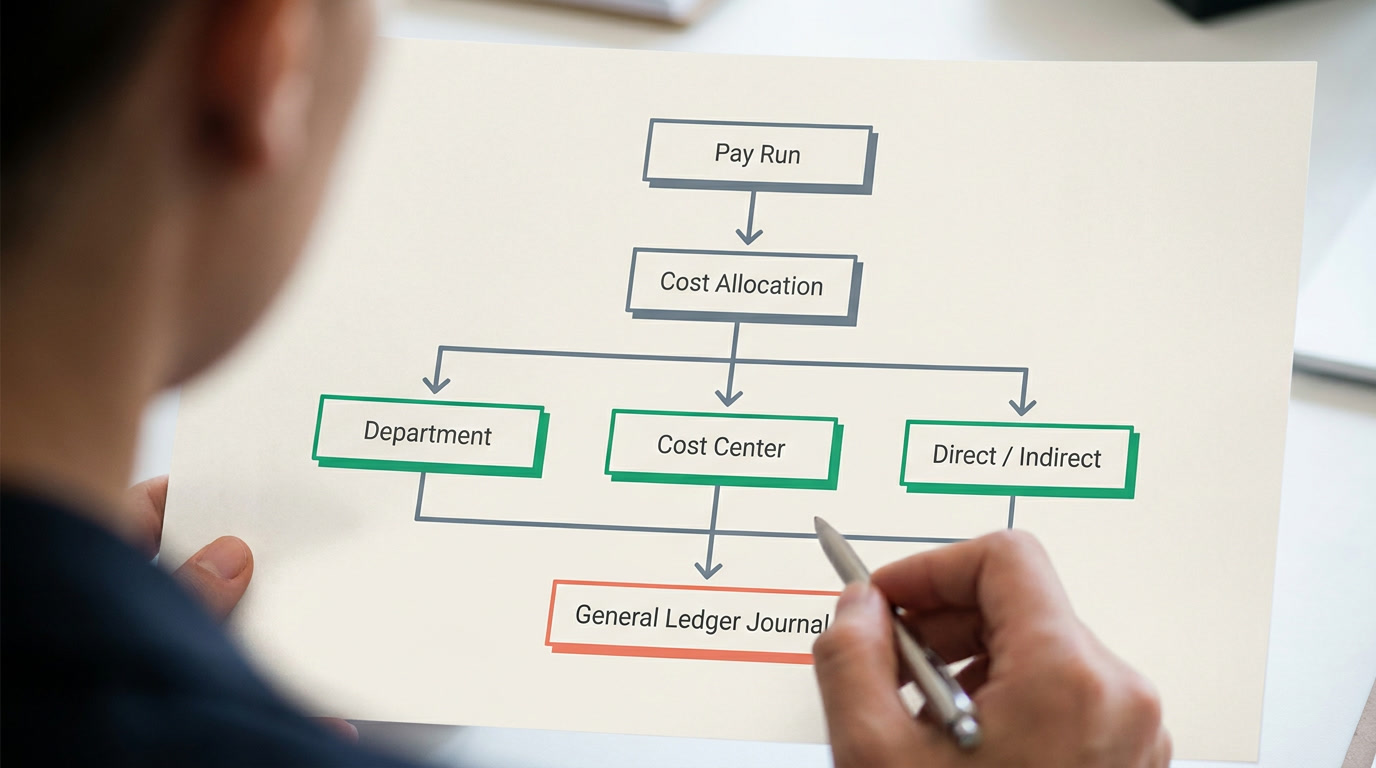
Payroll is one of the largest costs a business posts. Mature software allocates each cost across dimensions — legal entity, department, direct or indirect, and cost center or product line — and produces a journal voucher the accounting side can post directly. Without this, someone re-keys payroll totals into the ledger by hand every month, and that is where errors and audit gaps are born.
This is the honest fork in the road. A dedicated payroll tool exports a file; an all-in-one platform posts straight into the same double-entry ledger that already holds your invoices and expenses. Neither is wrong — but you should decide *before* you buy which side of the fork your business is on. When cost-per-department or cost-per-product reporting matters, the connected model saves real hours.
What about approvals, audit trail, and statutory correctness?
A pay run should have a reversible lifecycle: draft, calculate, review, approve, disburse. Calculation must be safe to re-run with no side effects; approval is the commit that fires loan installments and leave-balance changes. Any state before disbursement can be cancelled. If a vendor's run is a single irreversible button, keep looking.
On statutory matters, be precise about what software can and cannot do. It should withhold income tax against your country's brackets and calculate employee and employer shares of social insurance — the employer collects and remits, it does not *pay* the employee's tax. But most software does not file returns to a government portal for you; that stays with your accountant or a local agent. Any vendor claiming to "file everything automatically" everywhere deserves a hard follow-up question.
Dedicated payroll tool or all-in-one platform?
Be fair to the specialists. Dedicated payroll tools are genuinely excellent at what they do — and for many businesses they are the right answer. The honest test is whether payroll is your *only* connected problem, or one of several. Use this table as your shortlist scorer.
| Criterion | Ask the vendor | Why it matters |
|---|---|---|
| Pay model | Gross-first AND net-to-gross gross-up? | Net offers break gross-only tools |
| Variable pay | Import a spreadsheet of commission/OT each cycle? | Fixed-only tools force manual math |
| Attendance link | Deduct absence/lateness as separate lines? | Keeps contractual salary visible |
| Ledger posting | Cost split by department/cost center to a journal? | Kills monthly manual re-keying |
| Approvals & audit | Reversible run with an audit trail? | Protects you when a run is wrong |
| Self-service | Employees see payslips and balances themselves? | Cuts the HR inbox in half |
| Connectedness | One login with HR + accounting, or a silo? | Decides specialist vs all-in-one |
A fair word on the specialists
Tools like Gusto, Deel, ADP, QuickBooks Payroll, and Zoho Payroll are strong, mature products. Deel shines at paying contractors across borders; ADP has deep enterprise and compliance depth; QuickBooks Payroll sits naturally beside its own books; Zoho Payroll is tidy and affordable in the markets it supports. If payroll is your only connected problem, buy a specialist. The all-in-one case is different: it wins when payroll is one of several things — CRM, HR, invoicing, ledger — that you'd rather not stitch together yourself.
Where does ERPnBox fit in this decision?
ERPnBox is an all-in-one platform where payroll lives inside the HR app — connected to attendance, leave, and a real double-entry finance ledger — on one login and one per-seat price. It handles the connected baseline honestly: employee records, attendance and leave, basic payroll and payslips, with AI-assisted setup and support for any language, web and mobile. It's the right shortlist entry when *connectedness* is your reason for buying.
Be clear-eyed about the advanced concepts in this guide — grossing-up, formula paycodes, four-dimension cost allocation, a fully reversible run — those describe what great payroll software should do, and they are the questions to put to every vendor, us included. Read what is payroll software and HR & payroll to see the baseline, then judge us against the same table you use on everyone else.
Buy the software that pays your hardest employee correctly. The easy ones take care of themselves.
See payroll where it belongs — next to HR and your ledger
One login, one per-seat price, from $15/user with a 30-day free trial. Payroll, attendance, leave, and a real finance ledger on one platform.
Explore HR & payrollFrequently asked questions
Should I choose a dedicated payroll tool or an all-in-one platform?
If payroll is your **only** connected problem, a specialist like Gusto, ADP, or Zoho Payroll is often the cleanest answer. If payroll is one of several things — CRM, HR, invoicing, and a ledger — that you'd rather not stitch together, an [all-in-one platform](/hrms) wins because the data already lives together and posts straight to accounting.
Why does net-to-gross support matter when choosing?
If you promise employees a **fixed take-home amount**, the software must work backwards to the gross that yields it after tax and contributions — an iterative calculation because tax depends on gross. Many tools only go gross-first, forcing a fragile manual spreadsheet. See our [net-to-gross explainer](/guides/net-to-gross-payroll-explained) for what to test.
Can payroll software file my taxes with the government?
Usually not directly. Good software **withholds** income tax against your country's brackets and calculates social-insurance shares, but filing returns to a government portal typically stays with your accountant or a local agent. Statutory filing rules differ by country, so treat any "files everything automatically" claim with caution and confirm exactly what's included where you operate.
How do I test attendance-linked deductions in a demo?
Ask the vendor to process one employee with an **absent day, a late arrival, and short hours**. Confirm each appears as a separate deduction line while basic and gross still show the full contractual salary. Then ask whether an absence can pull from the leave balance first. If they can't show it live, assume it isn't there.
What makes a pay run safe to correct?
A **reversible lifecycle**: calculation you can re-run with no side effects, then a separate approval that commits things like loan installments and leave changes, and the ability to cancel any state before disbursement. This protects you when a variable-pay upload was wrong. A single irreversible "process" button is a real risk with monthly money.
Does ERPnBox do everything in this guide?
Honestly, no — and no single tool should claim it does everywhere. ERPnBox covers the **connected baseline**: employee records, attendance and leave, basic payroll and payslips, on one platform with the [finance ledger](/finance) and AI-assisted setup, in any language. The advanced concepts here — grossing-up, formula paycodes, four-dimension allocation — are the questions to put to *every* vendor, us included.