The HR system your team runs on, set up by AI
Attendance, leave, shifts, and payroll in one Arabic-first system. Describe your team and AI builds it, then it runs on the same login as your CRM, so people and pipeline share one workspace.
- Describe your team. AI sets up your HR system.
- Attendance, leave, shifts, and payroll in one place.
- Arabic and English, right-to-left native.
- One login with your CRM, not a separate tool.
One suite, seven modules
Each module is a full page. Start anywhere, and it all runs on one login with your CRM.
Payroll
Monthly pay runs in EGP with configurable tax brackets, social insurance, loans, and attendance-driven deductions.
ExploreAttendance & time
Location-stamped, geofenced check-in with an automatic late, absence, and overtime engine that feeds payroll.
ExploreLeave management
Accrual, proration, carry-forward, encashment, and sandwich rules, with holiday calendars per location.
ExploreShifts & scheduling
Weekly and rotating shift patterns with paid-hour margins, core hours, and statutory-weekend tracking.
ExploreEmployee records
Profiles, documents, hierarchical departments, multi-location structures, and a live org chart.
ExploreSelf-service & mobile
Employees check in from their phone, view their own payslips and attendance, and request leave.
ExploreLearning (LMS)
Courses, quizzes, certificates, SCORM, live training sessions, and compliance tracking — a full LMS inside your HR suite.
Explore4 modules
Attendance, leave, shifts, payroll, on one record model
EGP-ready
Payroll defaults tuned for Egypt
AR + EN
Full right-to-left Arabic interface
Web + mobile
Location-stamped check-in on iOS and Android
Not another HR tool to wire up
Most teams buy an HR app, then spend weeks connecting it to the rest of their operation. ERPnBox HR shares one login, one permission model, and one set of records with your CRM. The salesperson closing a deal and the employee getting paid are the same person, in the same system.
Describe it, and it is built
Tell the AI what your team looks like, which shifts they work, and how you pay them. It sets up departments, attendance policies, leave rules, and salary structures for you, then you adjust anything in plain language. No consultants, no long configuration project.
01
Attendance that feeds payroll on its own
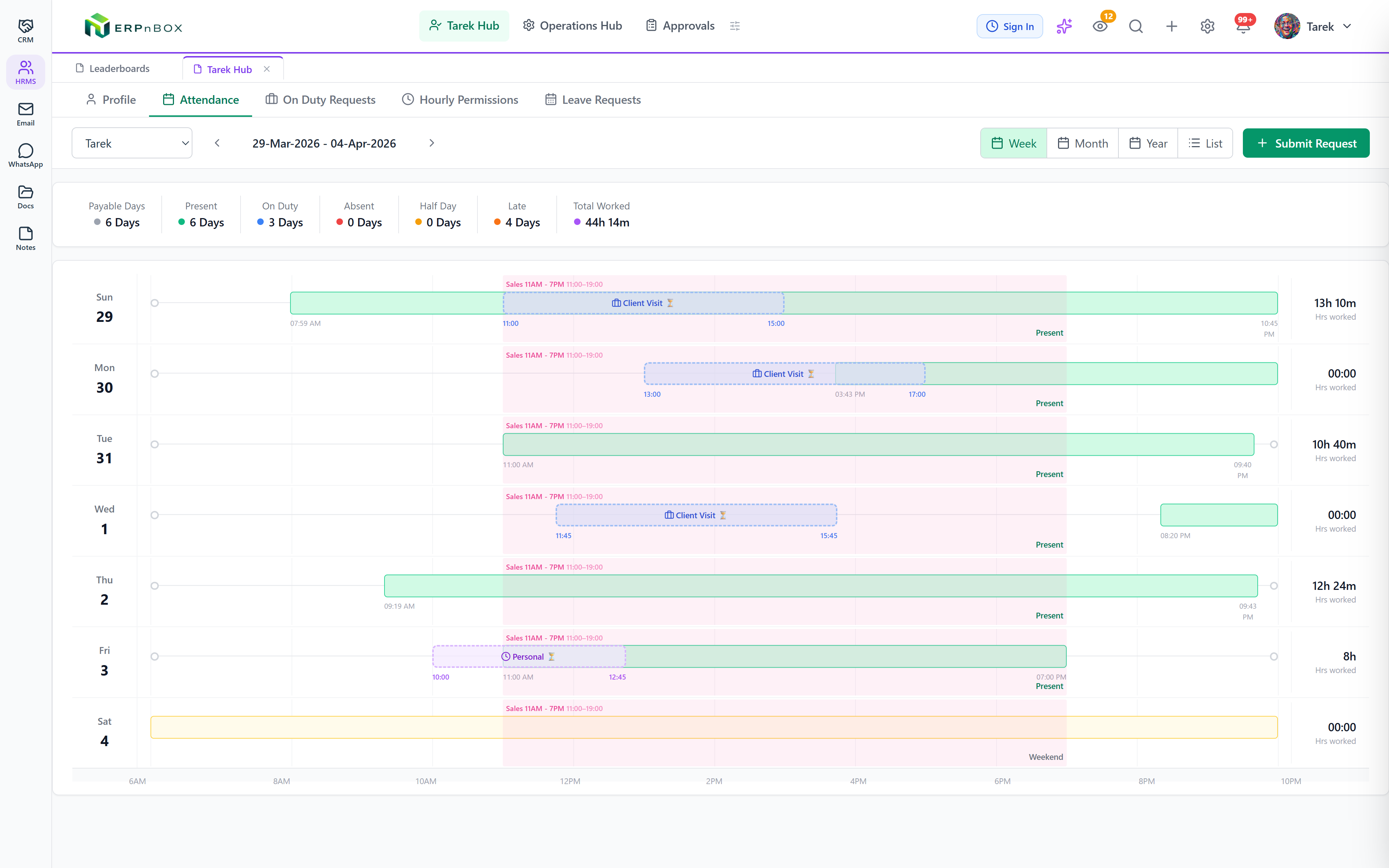
Every check-in, break, and permission is plotted against the assigned shift, with payable days, late days, and total hours totaled automatically. Those numbers flow straight into payroll, so a two-hour errand is never a month-end dispute.
02
Payroll that reconciles itself
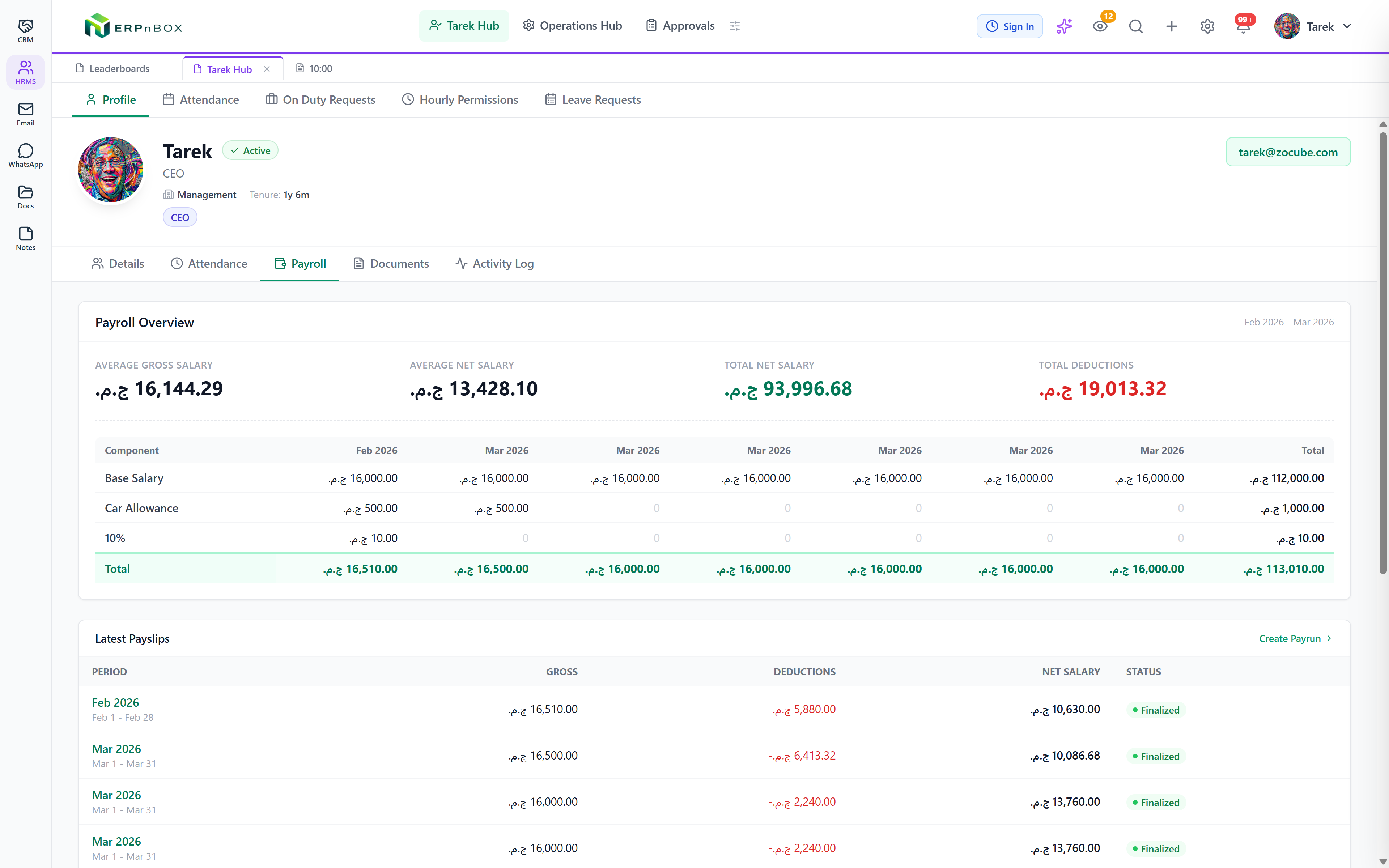
Salary components, tax brackets, social-insurance rates, loans, and attendance penalties roll into a monthly pay run per employee, with gross, net, and total deductions computed for the whole team. Defaults come tuned for Egypt in EGP.
03
Shift schedules per person
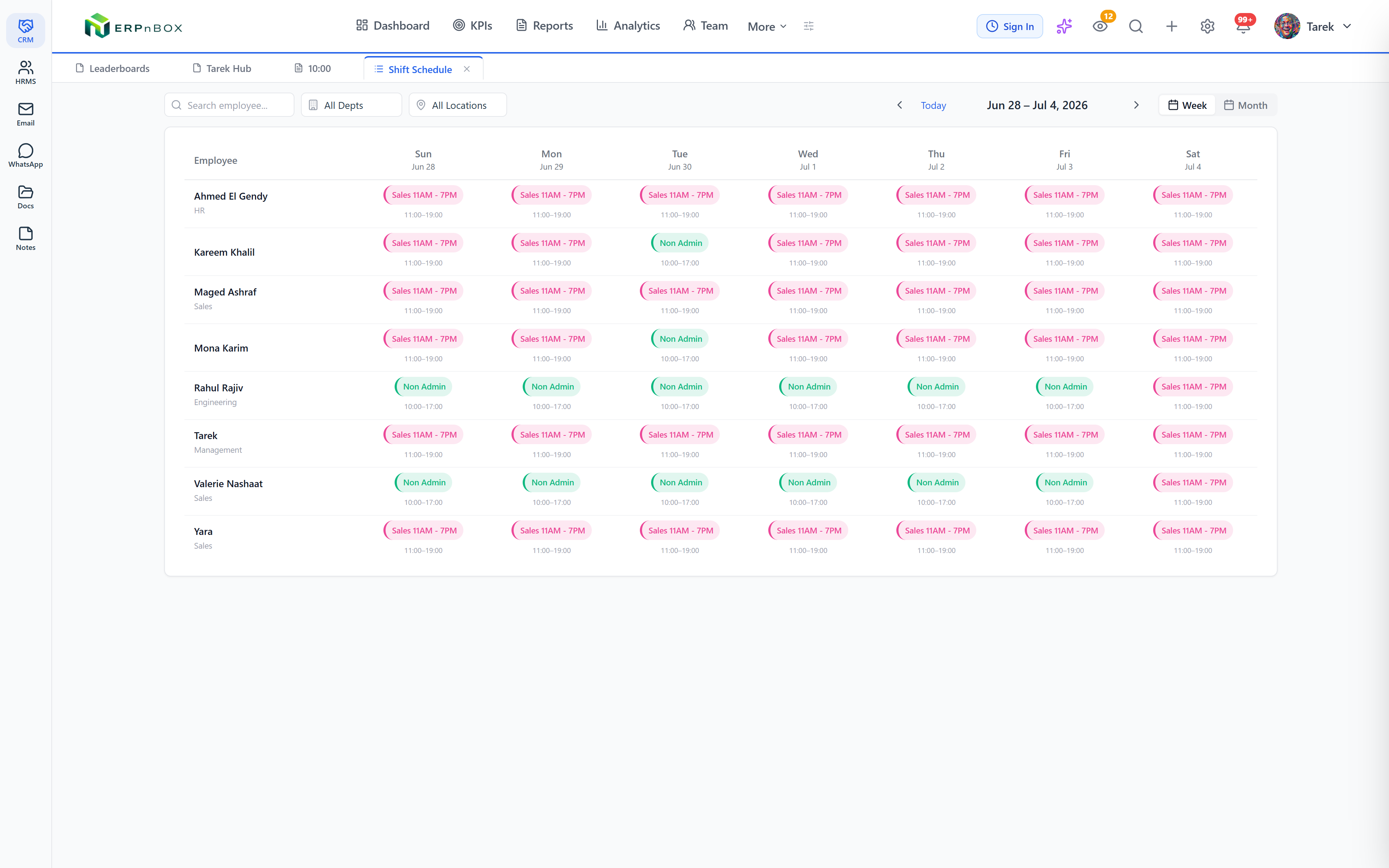
Build weekly and rotating shift patterns with paid-hour margins and core hours, then assign them to people. Attendance, overtime, and business-hours automation all measure against the right schedule, including statutory weekends.
04
Approvals in one inbox
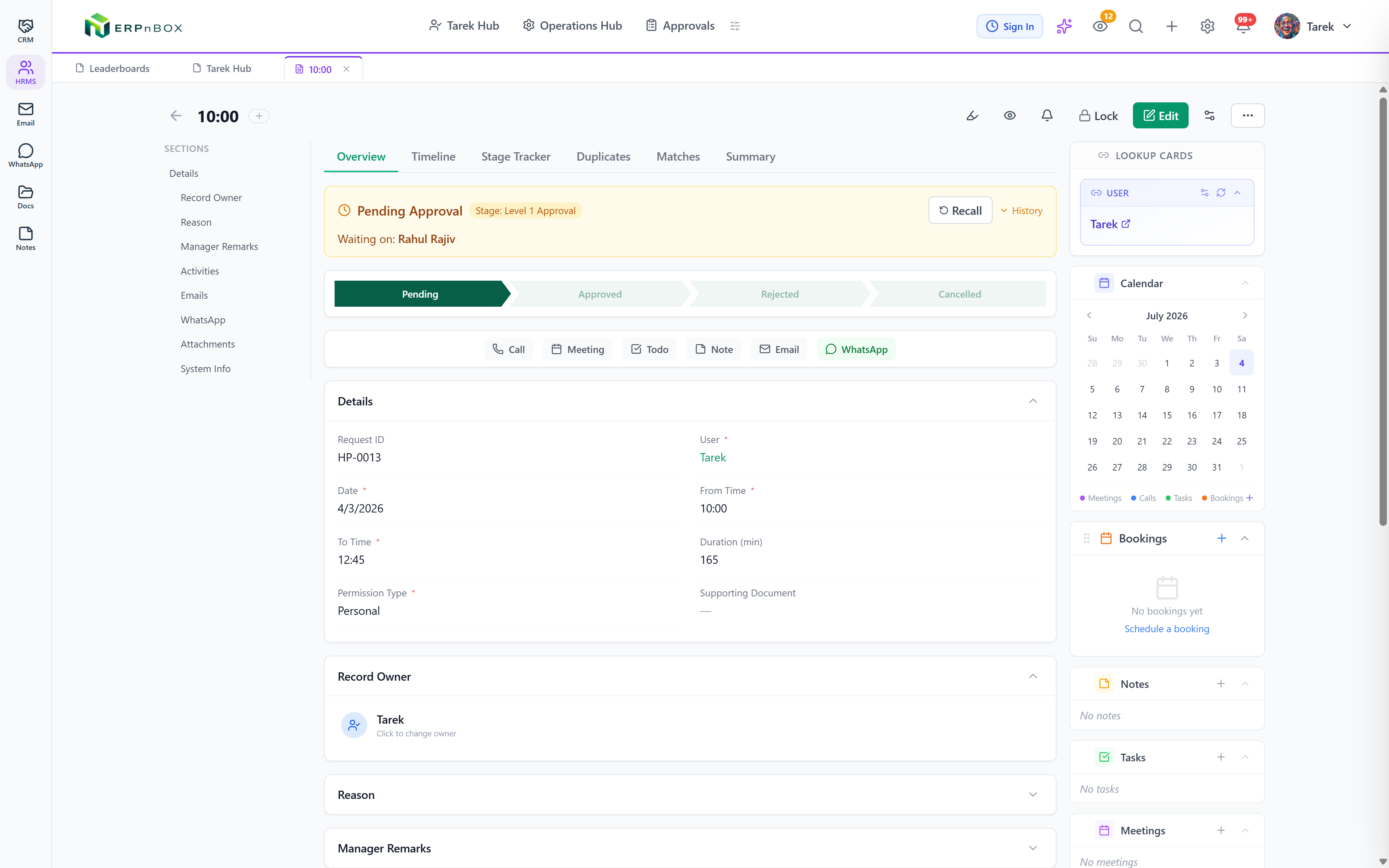
Leave requests, salary revisions, and attendance corrections route through hierarchy-based approvers with a full audit trail. Approvers act from one inbox, not a chain of emails and screenshots.
Full feature list
Everything that's inside
Employees & organization
Employee records & documents | Profiles with department, designation, reporting manager, and joining date, plus admin-defined document types uploaded per employee. |
Departments & locations | Hierarchical departments with heads, and multi-location structures with geofencing for mobile check-in. |
Live org chart | An interactive chart of the reporting hierarchy that drives data visibility, with department views and PNG export. |
Manpower planning | Plan hires by title, department, and reporting line with quotas, and link a plan to the person hired. |
Attendance
Check-in & breaks | Check in and out from web or mobile with paid and unpaid break types, auto-checkout, and location-stamped entries. |
Attendance policies | Working hours, overtime rules, check-in methods, penalties, breaks, and permissions, assigned per user, department, or location. |
On-duty & hourly permissions | Client visits and work-from-home requests with approval, plus short in-shift permission windows netted out of worked hours. |
Regularization | Employees request corrections for wrong or missing check-ins, routed through approval. |
Penalty engine | Progressive absence penalties, late-minute tiers, missing-punch handling, and overtime pay by day type, computed into daily logs automatically. |
Week, month, year & list views | Timeline views against the assigned shift with payable days, present days, late days, and total hours totaled automatically. |
Shifts & schedules
Shift definitions | From and to times, margins, core hours, weekend basis, and allowances, with per-day weekend, half-day, and statutory configuration. |
Rotating patterns | Build rotating shift cycles and assign them to employees with effective dates, shown on a visual schedule calendar. |
Leave management
Leave policy engine | Entitlement, accrual frequency, proration, carry-forward, encashment, sandwich-leave handling, advance-notice restrictions, and experience-based slabs, assigned by user, department, location, designation, or gender. |
Requests & balances | Apply, approve, reject, and cancel with a day-by-day breakdown flagging holidays and weekends, validated against live per-year balances. |
Compensatory off | Earn comp-off for working holidays or weekends, then approve, avail, or let it expire. |
Work calendar & Bradford score | A yearly holiday calendar per location, a team leave calendar, and Bradford-factor absence-pattern scoring. |
Payroll
Salary components & templates | Earnings and deductions as flat amounts or percentages of base or gross, bundled into reusable compensation templates. |
Tax & insurance | Progressive tax brackets by net, gross, or taxable income, plus configurable social-insurance rates. |
Loans, bonuses & misconduct | Loan installment schedules, plus configurable bonus and misconduct categories that flow into the pay run. |
Salary revisions | A full change history of salary revisions, routed through the approval engine. |
Pay runs | Monthly batch runs through draft, process, review, approve, and complete, orchestrating the payroll engine per employee. |
Payslips with full breakdown | A payslip per employee with earnings, deductions, attendance penalties, overtime, loans, and bonuses, viewable in an employee self-service My Payslips page. |
Self-service & approvals
Employee, team & operations views | Dashboards for the employee, the manager, and operations, with attendance, leave, payslips, and approvals each in one place. |
Approvals inbox | Leave, on-duty, regularization, and salary revisions all route through the same multi-stage approval engine into one inbox. |
Business-hours sets | Named business-hours sets with timezones, working windows, and holidays, shared by SLA timers and assignment queues platform-wide. |
Frequently asked questions
Is ERPnBox HR built for Egypt?
Yes. Payroll defaults to the Egyptian pound (EGP) and a 30-day month, with configurable income-tax brackets and social-insurance rates you set to match your obligations. The whole interface works in Arabic with full right-to-left layout.
Does it handle Arabic?
Arabic is native, not translated after the fact. The interface, reports, and right-to-left layout are first-class, and the AI can translate custom labels you add into any language.
How is this different from a standalone HR app?
ERPnBox HR is part of one platform that also runs your CRM, so HR and sales share the same login, permissions, and records. You are not paying for and integrating two separate systems.
Can AI really set up the HR system?
You describe your team, shifts, and pay structure in a conversation, and the AI creates departments, attendance policies, leave rules, and salary components. You then refine anything in plain language, without a configuration project.
Run your team on ERPnBox
Describe your team and AI sets up your HR system. Start free, no credit card.