Every employee, department, and document in one place
Employee profiles carry department, designation, reporting manager, and joining date, with documents stored per person. Hierarchical departments and a live org chart drive who can see what, with no separate access system to maintain.
- Profiles with department, designation, and manager
- Documents uploaded and stored per employee
- Hierarchical departments and multi-location structures
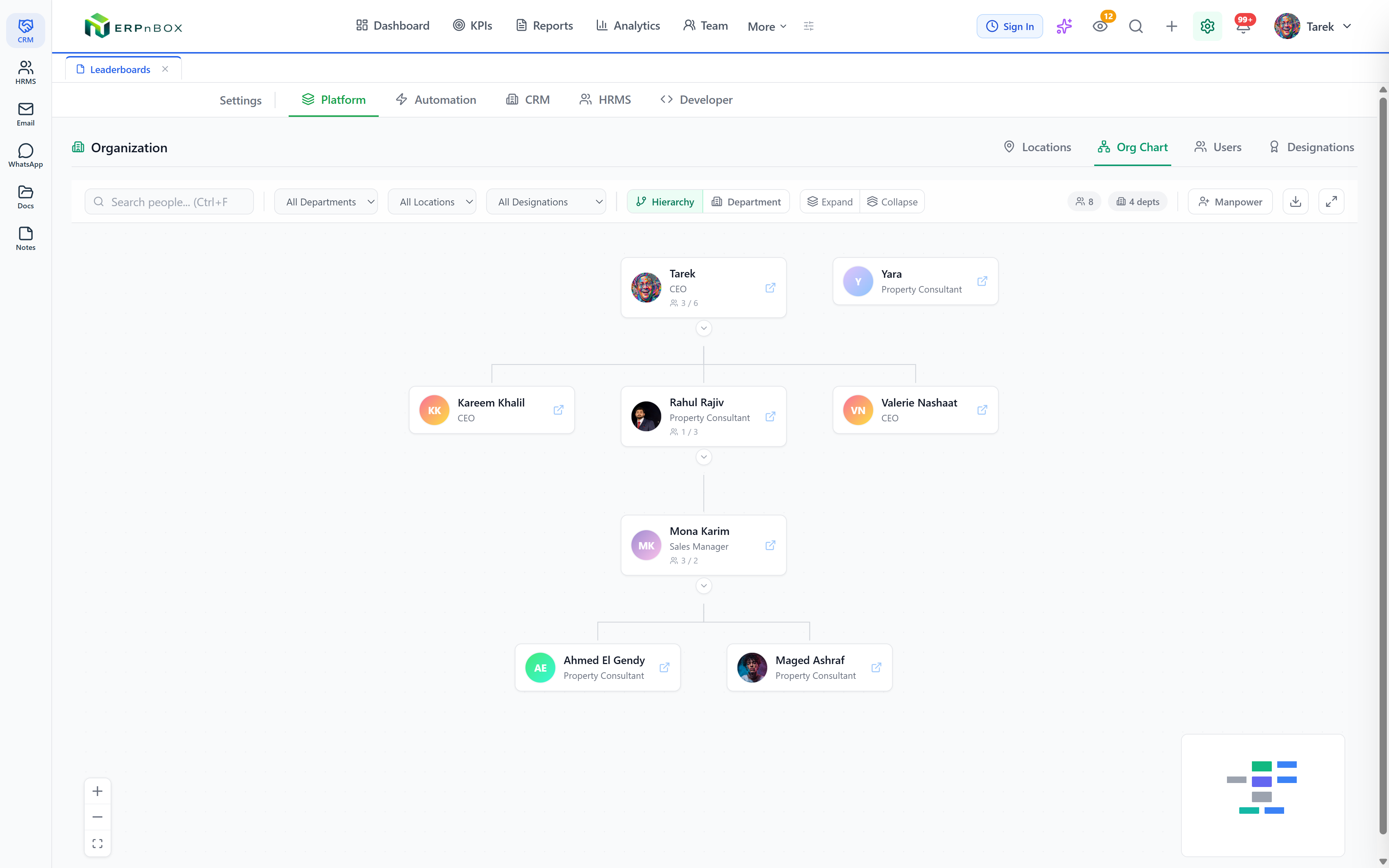
- A live org chart that drives data visibility
One record
The same person across HR and CRM
Per employee
Document types you define and upload
Hierarchy
Departments with heads and parents
Live chart
Reporting lines that set permissions
The employee record is the CRM record
A person is one record in ERPnBox, whether they are closing deals in the CRM or getting paid in payroll. Their department, designation, reporting manager, joining date, and location all live in one profile, so there is nothing to sync between two systems.
Structure that controls access
Departments are hierarchical with heads and parent departments, and locations model country, city, and office. The reporting hierarchy shown in the org chart is the same one that decides who can see which records, so you maintain one structure instead of a separate permission map.
01
A live org chart, not a slide
The reporting hierarchy that drives data visibility is the same one you see in the org chart. Change a report line and permissions follow, with department views, expand and collapse, and PNG export, and no separate access system to keep in sync.
Full feature list
Everything that's inside
Employees & documents
Employee profiles | Department, designation, reporting manager, joining date, and location on one record shared with the CRM. |
Documents | Admin-defined document types such as national ID or diploma, uploaded and stored per employee. |
Organization
Departments | Hierarchical departments with heads and parent departments, and a location per department. |
Locations | Multi-location structures used by shifts, attendance, leave, and geofenced check-in. |
Live org chart | An interactive chart of the reporting hierarchy with department views, expand and collapse, and PNG export. |
Manpower planning | Plan hires by title, department, and reporting line with quotas, and link a plan to the person hired. |
Frequently asked questions
Are HR and CRM the same employee record?
Yes. A person is one record used across HR and CRM, so their profile, permissions, and history are shared, with nothing to sync between separate systems.
Can I store employee documents?
Yes. You define document types such as national ID or diploma, and upload and store them per employee.
Does the org chart affect permissions?
Yes. The reporting hierarchy in the org chart is the same one that decides who can see which records, so changing a report line changes visibility.
Run your team on ERPnBox
Describe your team and AI sets up your HR system. Start free, no credit card.