Every lead lands, gets owned, and never slips
Pull leads in from Facebook ads and your own web forms, catch the duplicates before they pile up, and turn a hot lead into a contact, an account, and a deal in a single click.
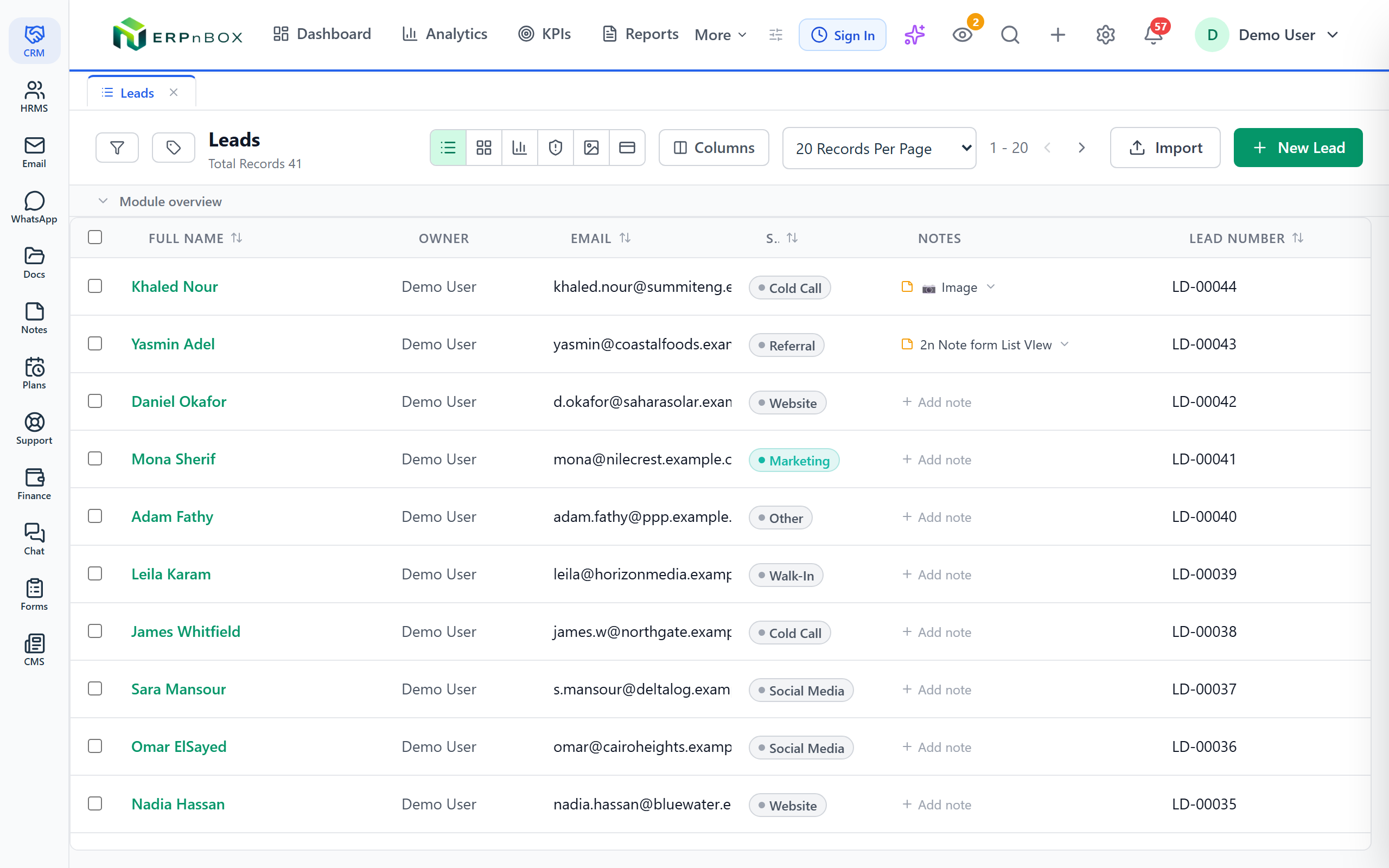
- Facebook Lead Ads sync in the moment someone submits
- Duplicates caught by exact, fuzzy, and phonetic matching
- Convert to contact, account, and deal in one click
- A shared pool with daily quotas so no lead sits idle
23
field types to shape leads, contacts, and accounts
5
ways to match a duplicate — exact to phonetic
1 click
from lead to contact, account, and deal
0
held leads before an agent may pull more
Leads, contacts, and accounts you actually own
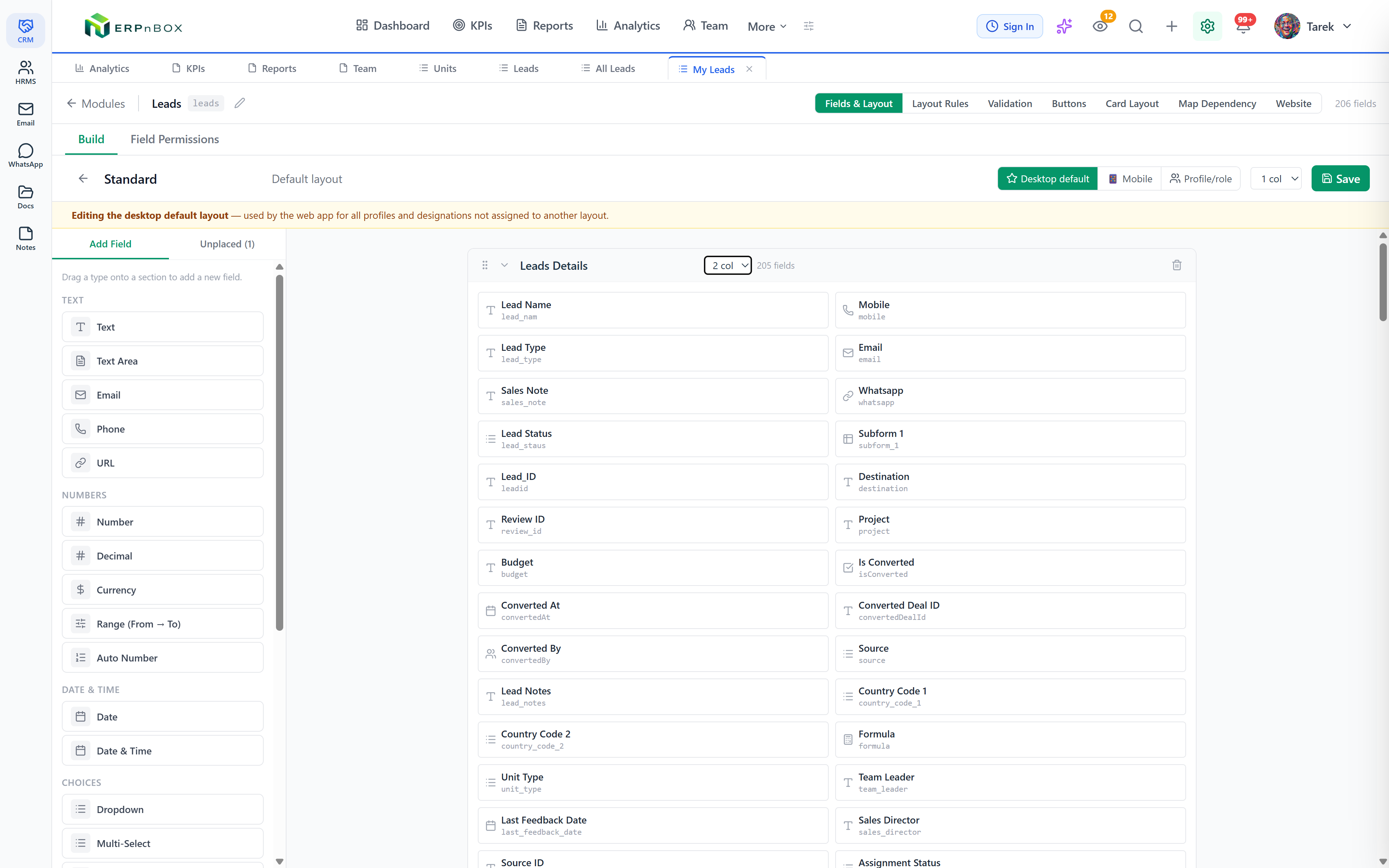
Leads, contacts, and accounts are yours to shape, not a fixed form you inherit. Drag on any of 23 field types, set two-column layouts and per-role visibility, and reuse shared dropdown lists across every module — no code, no support ticket.
Capture from everywhere, in one place
Connect Facebook Lead Ads and new leads arrive the instant someone submits. Publish a public web form and answers become records automatically. Import a spreadsheet when you're moving your book of business over. Every source lands in the same module.
01
Facebook leads, in the second they submit
Connect Facebook Lead Ads and each new lead lands in the right module the moment the form is submitted — mapped to your own fields, with retry handling so a failed sync never quietly loses a lead. Add a public web form for your site and campaigns feed the same pipeline.
02
Duplicates caught before they multiply
Set rules that match on the fields that matter — exact, contains, starts-with, fuzzy for typos, or phonetic for names that sound alike. When a new lead collides with an existing one, you're warned on the spot, and you can merge the two into a single clean record.
03
One click from lead to a live deal
When a lead is ready, convert it into a contact, an account, and a deal at once. You decide which fields carry over to each — the company name to the account, the estimated value to the deal — and the conversion can trigger a workflow to welcome them or assign an account manager.
04
A shared pool that keeps everyone honest
Drop unassigned leads into a shared pool and let agents pull their own — up to a daily and weekly quota you set. The oldest leads go first, and no one can pull a fresh batch while they still hold leads they haven't worked. Leads left untouched past their window return to the pool automatically.
Full feature list
Everything that's inside
Capture leads
Facebook Lead Ads sync | Connect your Facebook pages and lead forms; new leads sync into the right module the moment they submit, with retry handling on failure. |
Field mapping from Meta | The lead form's fields are read straight from Meta and mapped to your own — no hardcoded field list to fall out of date. |
Public web forms | Publish a form on its own link so anyone can submit; each answer becomes a record in the module you choose. |
CSV import | Bring an existing book of business over from a spreadsheet when you're moving in. |
Keep leads clean
Duplicate rules | Match on the fields you choose using exact, contains, starts-with, fuzzy, or phonetic matching, in any combination. |
Fuzzy & phonetic matching | Catch typos with edit-distance matching and names that sound alike with phonetic matching — not just character-for-character duplicates. |
Warn on create | When a new lead collides with an existing record, you're warned before the duplicate is ever saved. |
Merge duplicates | Combine two matching records into one clean record, keeping the values you want. |
Route & convert
Shared lead pool | Unassigned leads sit in a pool agents pull from themselves, oldest first, so the pool drains fairly. |
Daily & weekly quotas | Cap how many leads each agent can pull per day and per week, so leads are shared instead of hoarded. |
No hoarding lock | An agent can't pull a fresh batch while they still hold leads they haven't worked; untouched leads return to the pool automatically. |
Lead conversion | Convert a lead into a contact, an account, and a deal at once, with your own field mapping into each. |
Conversion workflow | Converting a lead can trigger automation — send a welcome email or assign an account manager on the spot. |
Explore more
Frequently asked questions
Can I pull leads straight from Facebook ads?
Yes. Connect your Facebook pages and Lead Ads forms, and every new lead syncs into the module you choose the moment it's submitted. The form's fields are read live from Meta and mapped to your own, and a failed sync is retried so a lead is never quietly lost.
How does duplicate detection work?
You set rules on the fields that matter — an email, a phone, a name. Each can match exactly, by contains or starts-with, fuzzily to catch typos, or phonetically for names that sound alike. When a new lead collides with an existing one you're warned before it's saved, and you can merge the two into one clean record.
What is the shared lead pool for?
It stops leads from being hoarded. Unassigned leads sit in a pool your agents pull from themselves, oldest first, up to a daily and weekly limit you set. No one can pull a fresh batch while they still hold leads they haven't worked, and any lead left untouched past its window returns to the pool automatically.
What happens when I convert a lead?
One click creates a contact, an account, and a deal from the lead at once. You decide which fields carry over to each — the company to the account, the estimated value to the deal — and the conversion can trigger a workflow to send a welcome email or assign an account manager.
Can I move my existing leads over from a spreadsheet?
Yes. Import a CSV of your existing leads and contacts when you're moving in, mapping each column to a field in your module.
Can I change the fields on a lead or contact?
Every field is yours to design. Drag on any of 23 field types, arrange two-column layouts, set which roles see which fields, and reuse shared dropdown lists across modules — all without code.
Run your whole sales team on ERPnBox
Describe your business and AI sets up your CRM. Start free, no credit card.