A pipeline shaped around how you actually sell
Name your own stages, drag a deal from one to the next, and look at the same deals seven different ways. Nothing is hard-coded — the board is yours to shape.
- Stages you define, not ones you inherit
- Drag a deal across the board to move its stage
- Seven views: list, kanban, calendar, chart, SLA, hero, cards
- Each column shows its deal count and total value
7
Ways to view your deals
Any
Stages you can define
23
Field types on every deal
0
Lines of code to set it up
Your stages, not a template's
Every sales team qualifies, negotiates, and closes a little differently. So the stages on your board are ones you name and reorder yourself — a picklist you control, not a fixed funnel you have to bend your process around.
One set of deals, seven lenses
A rep lives in the kanban board. A manager wants the chart. Someone chasing renewals needs the calendar, and a service team watches the SLA clock. Same deals underneath — each person picks the view that fits their job.
01
A kanban board you drag, not just read
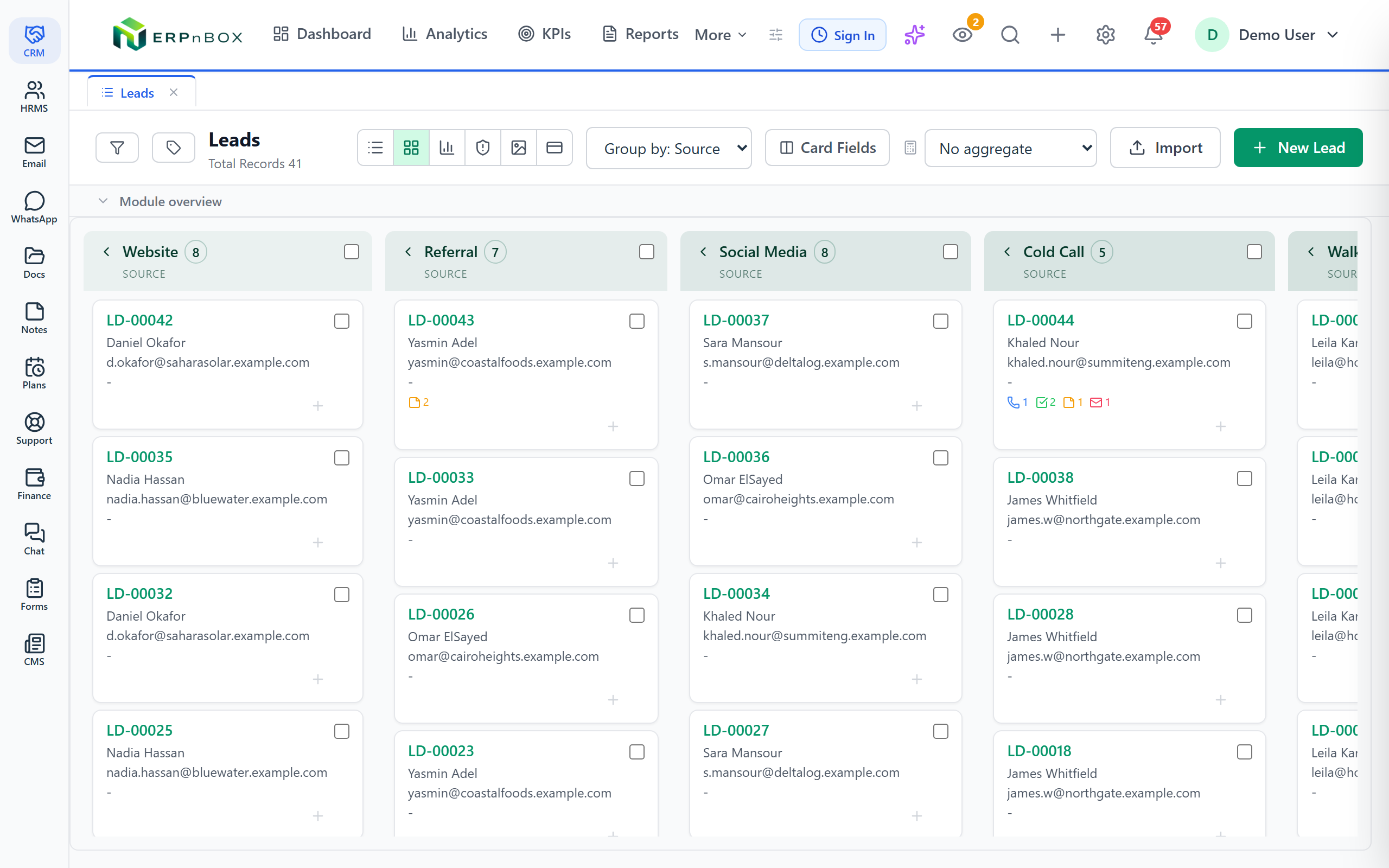
Group your deals by stage into columns, then drag a card from one column to the next to change its stage on the spot. Every column shows how many deals sit in it and their combined value, so the state of your pipeline is one glance away.
02
Look at the same deals seven ways
Switch between a dense list, the kanban board, a calendar keyed to any date field, a chart you can click into, an SLA board grouped by urgency, an image-led hero view, and compact cards — all on the same records, no export step.
03
Design the deal card people see
Choose which fields show on a kanban or hero card and in what order, pick an image field to lead the hero view, and set field and layout visibility per role — so each team sees a board built for the way they work.
04
Save the board each role starts on
Save any filter combination — by owner, team, or reporting line — as a named view, so a manager opens the whole team's pipeline and a rep opens just their own, each landing on the exact board they need.
Full feature list
Everything that's inside
Stages & the board
Fully customizable stages | Define your own pipeline stages as a picklist and reorder them freely — the columns on your kanban board follow the stages you set, not a fixed template. |
Drag-to-change-stage | Move a deal to a new stage by dragging its card from one column to another — the stage updates the moment you drop it. |
Per-column count and sum | Each stage column shows how many deals it holds and an aggregate total, such as the summed value of the deals in that stage. |
Group by any picklist | Pivot the board to group deals by any picklist field — stage, source, or a status you invented — not just one built-in field. |
The seven views
List & kanban | A dense, sortable list for scanning many deals at once, and the drag-and-drop kanban board for working a pipeline stage by stage. |
Calendar | Plot deals on a calendar keyed to any date field — a close date, a follow-up, a renewal — to see what lands when. |
Chart | See your deals as a chart grouped by any field and measured any way you choose, then click a segment to drill straight to the records behind it. |
SLA | A board that groups deals with active SLA timers by urgency, so anything approaching or past its deadline surfaces first. |
Hero & cards | An image-led hero view for deals that carry a photo, and compact cards for a lighter, more visual read than the list. |
Cards, roles & saved boards
Card-view layout designer | Choose which fields appear on a kanban or hero card and their order, and pick an image field to lead the hero card. |
Per-role visibility | Set which fields and layouts each role sees, so a rep's board and a manager's board can differ without maintaining two modules. |
Saved views & filters | Save any filter combination as a named view — including owner, team, and reporting-line filters and multi-select picklist filters. |
Default view per module | Set the view that opens by default — kanban for a pipeline, calendar for a renewals board, hero for a property list. |
Explore more
Frequently asked questions
Can I create my own pipeline stages?
Yes. Your stages are a picklist you define and reorder yourself. Name them to match how your team actually sells, and the kanban columns follow — there is no fixed funnel to work around.
How do I move a deal to the next stage?
Drag its card from one column to another on the kanban board. The stage updates as soon as you drop it — no opening the record and editing a field.
What are the seven views?
List, kanban, calendar, chart, SLA, hero, and cards. They all sit on the same deals, so switching view never means exporting or duplicating your data — you just change how you look at it.
Can reps and managers see different boards?
Yes. Save filtered views by owner, team, or reporting line so a rep opens just their own deals while a manager opens the whole team's, and use per-role field and layout visibility to tailor the card each sees.
Can I see the total value in each stage?
Every kanban column shows the number of deals it holds and an aggregate total such as their summed value, so you can read the weight of each stage without leaving the board.
Do I need a developer to set this up?
No. Stages, card layouts, views, and role visibility are all settings you configure with no code. An AI agent can even build the whole module from a conversation to get you started.
Run your whole sales team on ERPnBox
Describe your business and AI sets up your CRM. Start free, no credit card.