Books that cannot go out of balance
A real double-entry general ledger under the same login as your sales. Debits equal credits on every document, posted entries are permanent, and corrections happen the honest way — through reversing entries.
- Every entry balances — the engine enforces it, not your discipline
- Posted entries are immutable; you reverse, you never overwrite
- An editable chart of accounts with 26 account subtypes
- A period lock date that refuses any entry into a closed month
26
Account subtypes
100%
Entries balanced by the engine
0
Posted entries ever edited
1
Login for accounting and CRM
Accounting the way accountants trust
This is not a spreadsheet with a total at the bottom. It is a genuine double-entry ledger: every invoice, bill, payment, and manual journal posts matching debits and credits, and the system refuses to save anything that does not balance. Your Trial Balance ties because it cannot do otherwise.
Corrections leave a trail
Once an entry is posted it is locked. To fix a mistake you post a reversing entry, so the original stays visible and the correction stands beside it. Nothing quietly disappears — which is exactly what an auditor, and your future self, will want to see.
01
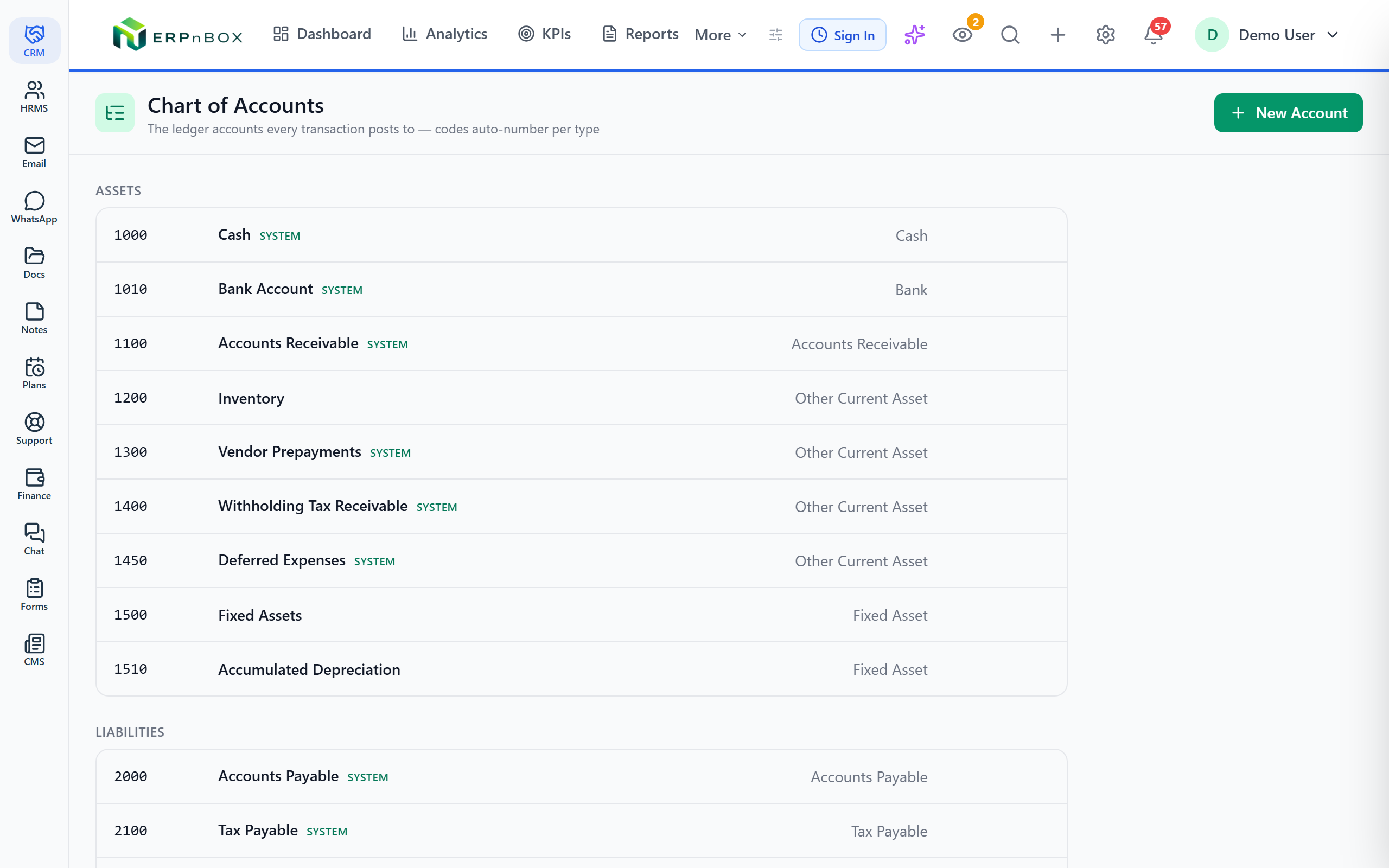
A chart of accounts you actually control
Build a fully editable chart with parent–child account trees and 26 account subtypes across assets, liabilities, equity, income, and expenses. Codes auto-generate per account type — assets 1xxx, liabilities 2xxx, equity 3xxx, income 4xxx, expenses 5–6xxx — so the structure stays clean as you grow.
02
Manual journals with a live balance check
Create balanced manual journal entries with a debit-equals-credit check that runs as you type. Voiding a journal posts a reversing entry rather than deleting it, so the general ledger keeps a full, honest history of every movement.
03
General ledger with running balances
Browse every journal entry, drill into its debit and credit lines, and follow a running balance per account. When a number looks wrong you can trace it back to the exact document that created it — no black boxes.
04
Opening balances and a period lock
Enter opening balances per account in one grid; the difference auto-balances to an Opening Balance Equity account, and revisions void-and-repost atomically. Set a period lock date and the ledger refuses any entry — or reversal — dated into the closed period.
Full feature list
Everything that's inside
Chart of accounts
Fully editable chart | Add, rename, and organize accounts into parent–child trees to match how your business really works. |
26 account subtypes | Twenty-six subtypes across assets, liabilities, equity, income, and expenses classify each account correctly for the statements. |
Auto-generated codes | Codes are generated per account type — assets 1xxx, liabilities 2xxx, equity 3xxx, income 4xxx, expenses 5–6xxx. |
Ledger & journals
Real double-entry posting | Debits equal credits on every document, enforced by the engine — nothing unbalanced can be saved. |
Immutable posted entries | Once posted, an entry can never be edited or deleted; corrections come through reversing entries only. |
Manual journal entries | Post balanced manual entries with a live debit-equals-credit check; voiding posts a reversing entry, never a deletion. |
General ledger & running balances | Browse every entry, drill into its debit and credit lines, and follow a running balance per account. |
Opening, closing & integrity
Opening balances | Enter opening balances per account in one grid; the difference auto-balances to an Opening Balance Equity account, and revisions void-and-repost atomically. |
Period lock date | Set a lock date and the ledger refuses any entry — or reversal — dated into the closed period, across every document type. |
Trial Balance with tie check | A Trial Balance for any date range with a built-in tie check that confirms total debits equal total credits. |
Explore more
Frequently asked questions
Is this real double-entry accounting or just invoicing with totals?
Real double-entry. Every invoice, bill, payment, and manual journal posts matching debits and credits to a genuine general ledger, and the engine refuses to save anything that does not balance. Your Trial Balance, P&L, and Balance Sheet come from those posted entries.
Can I edit or delete an entry after it is posted?
No — and that is on purpose. Posted entries are immutable. To correct one you post a reversing entry, so the original and the correction both stay on record. This keeps a clean, auditable history instead of silent edits.
Can I customize my chart of accounts?
Yes. The chart is fully editable with parent–child account trees and 26 account subtypes. Codes auto-generate per account type so new accounts stay consistent with the rest of the structure.
How do I stop entries from landing in a month I have already closed?
Set a period lock date. From then on the ledger refuses any entry — or reversal — dated into the closed period, across every document type, so a closed month stays closed.
How do I set up the starting balances for an existing business?
Enter opening balances per account in a single grid. The system auto-balances the difference to an Opening Balance Equity account, and if you revise later it voids and reposts atomically so the books never drift out of balance.
Run your books on ERPnBox
Real double-entry accounting in the same workspace as your CRM. Start free, no credit card.