Fourteen financial reports, every one tied to a real entry
See profit, cash, receivables and tax the moment you post a transaction. No spreadsheet exports, no month-end scramble, no numbers that disagree with the ledger.
- Profit and loss with period-over-period comparison, so last month and this month sit side by side
- Receivables and payables aging that shows exactly who owes you and who you owe, by age
- Cash flow by the direct method, a tax summary and a withholding tax summary drawn straight from your entries
- A year-end close that rolls profit into retained earnings and a ledger-health check that flags anything off
14
Financial reports ready on day one
26
Account subtypes behind the numbers
1
Click to close the year to retained earnings
0
Manual exports needed to reconcile
The report and the ledger never disagree
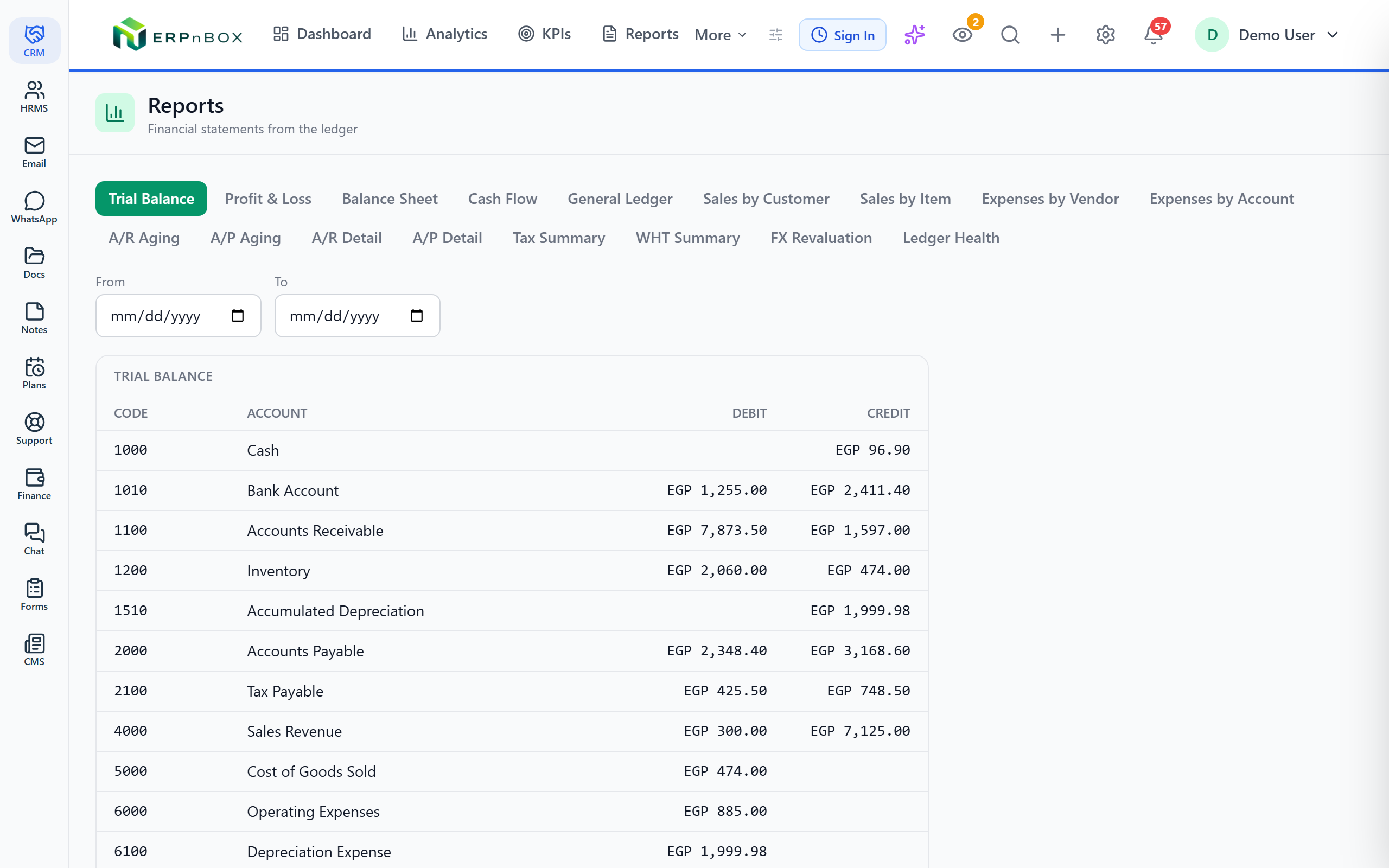
Most finance teams keep two versions of the truth: the accounting system and the spreadsheet they actually trust. Here there is one. Every figure on the profit and loss, the balance sheet and the trial balance is the sum of posted double-entry transactions, so a number you question drills straight down to the entry that produced it.
Recognition and close, handled
Deferred revenue and deferred expenses recognize over their proper periods instead of landing in one lopsided month. At year-end, a single close moves net profit into retained earnings and resets your income and expense accounts. The reports become a live source you can chart and analyze, not a static PDF you file away.
01
The statements every business is asked for
Profit and loss with comparison, balance sheet, and trial balance, each one produced from the same posted entries. Filter by period, compare against a prior period, and open any total to see the lines that make it up.
02
Know who owes what, and where money went
Receivables and payables aging plus detail, general ledger, sales by customer or item, and expenses by vendor or account. Collections calls, supplier reviews and cost cutting all start from a report that is already sorted for you.
03
Cash, tax and the health of your books
A direct-method cash flow statement shows real money moving. Tax and withholding tax summaries total what you have charged and withheld. A ledger-health report flags entries that do not balance, and a finance dashboard puts the headline numbers on one screen.
Full feature list
Everything that's inside
The core statements
Profit and loss | Revenue, expenses and net profit for any period, with period-over-period comparison. |
Balance sheet | Assets, liabilities and equity at a point in time, always in balance. |
Trial balance | Every account with its debit and credit totals, confirming the books tie out. |
General ledger | The full running record of every posting, by account. |
Who owes, who is owed, where money moves
A/R aging and detail | Outstanding customer balances grouped by how long they have been due. |
A/P aging and detail | What you owe suppliers, grouped by age so nothing goes late. |
Sales by customer or item | Revenue broken down by who bought and what they bought. |
Expenses by vendor or account | Spending grouped by supplier and by expense account. |
Cash flow (direct method) | Actual cash received and paid, not accruals. |
Tax, health and the close
Tax summary | Totals of tax charged and paid across your transactions. |
Withholding tax summary | Amounts withheld, summarized for your records. |
Ledger health | Flags entries that do not balance or accounts that look wrong. |
Finance dashboard | Headline figures for cash, revenue and receivables on one screen. |
Year-end close | Rolls net profit into retained earnings and resets income and expense accounts. |
Frequently asked questions
How many financial reports are included?
Fourteen: profit and loss with comparison, balance sheet, trial balance, A/R and A/P aging plus detail, general ledger, sales by customer or item, expenses by vendor or account, cash flow by the direct method, a tax summary, a withholding tax summary, a ledger-health report and a finance dashboard.
Can I compare one period against another?
Yes. The profit and loss report shows period-over-period comparison, so you can put this month next to last month, or this quarter next to the same quarter last year, and read the difference at a glance.
How does year-end close work?
When your year is finished, the close moves net profit into retained earnings and resets your income and expense accounts to zero for the new year. Your balance sheet carries forward correctly and last year's profit and loss stays intact for reference.
Do deferred revenue and expenses spread over the right periods?
Yes. Deferred revenue and deferred expenses recognize over their proper periods rather than hitting a single month, so your profit and loss reflects earnings as they are actually earned and spent.
Can I use finance figures in charts elsewhere?
Yes. Finance acts as an analytics source, so its figures feed the same charting and dashboard tools you use across the rest of your data, rather than being locked inside a static report.
Will the reports ever disagree with my ledger?
No. Every report is built from posted double-entry transactions, and the ledger-health report flags anything that does not balance. There is one set of numbers, and you can drill from a total straight to the entries behind it.
Run your books on ERPnBox
Real double-entry accounting in the same workspace as your CRM. Start free, no credit card.