Invoicing & Estimates
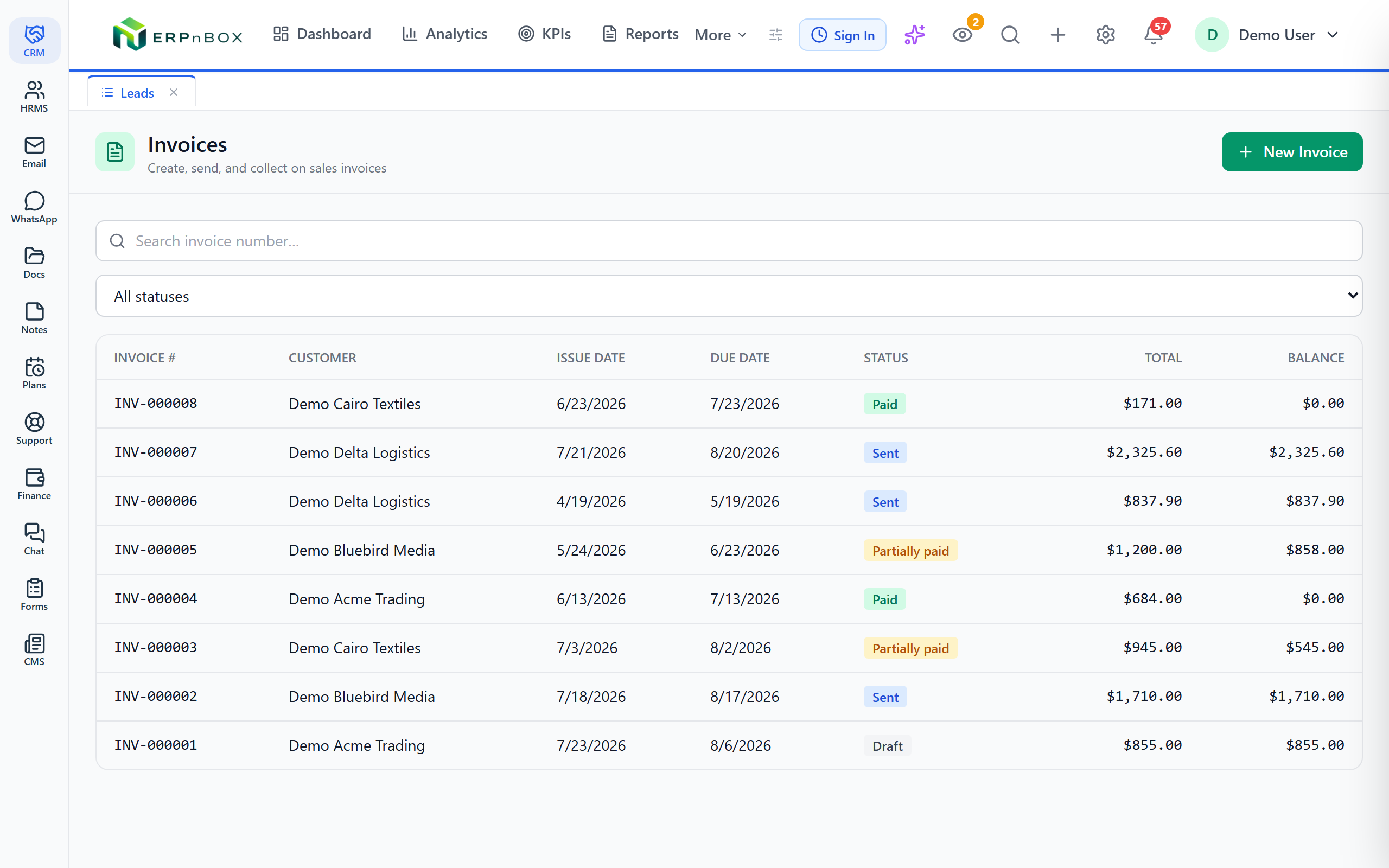
Send a clean, correct invoice in under a minute. Quote first, convert with one click, and let the numbers add themselves up.
- Tax and totals calculate live on every line as you type
- Turn an approved estimate into an invoice with one click
- Every invoice number is unique, sequential, and yours to prefix
- Email a branded PDF and share a customer portal link
1 click
Estimate to invoice
Live
Line tax & totals
14
Financial reports
Zero
Duplicate invoice numbers
The invoice does the arithmetic
Add a line, set a quantity, pick a tax rate, and the subtotal, tax, and grand total move at once. Prefer to quote a round number that already includes tax? Switch to tax-inclusive pricing and the system works backward to the net amount for you. No spreadsheet on the side, no mental math, no rounding surprises for the customer.
From first quote to final invoice, one thread
Start with an estimate while the deal is still a conversation. When the customer says yes, convert it to an invoice without retyping a single line. Need to correct one you already sent? Issue a credit note against it. Every document carries a clean, sequential number with your own prefix, so your books read in order and nothing goes missing.
01
Line-level tax with live totals
Set a tax rate per line, not just per invoice, so a single document can mix taxable and exempt items correctly. Subtotal, tax, and total recalculate the instant you change a quantity or price.
02
Estimates that become invoices
Send a professional quote, then convert the approved version into an invoice in one click. Lines, quantities, tax, and totals carry over intact, so what the customer agreed to is exactly what you bill.
03
Credit notes when things change
A return, a discount after the fact, or a genuine error — issue a credit note against the original invoice and keep the correction on record instead of quietly editing history.
04
Branded PDF, sent by email
Pick a template, generate a clean invoice PDF, and email it to the customer without leaving the record. Or share a customer portal link so they can open the document themselves.
Full feature list
Everything that's inside
Building the invoice
Line items | Add as many lines as you need, each with its own quantity, price, and tax rate. |
Live totals | Subtotal, tax, and grand total update as you type — no save-and-refresh. |
Tax-inclusive pricing | Quote a round, tax-included price and let the system compute the net amount. |
Quotes and corrections
Estimates | Draft and send a quote before the invoice, with the same clean layout. |
Convert to invoice | Turn an approved estimate into an invoice in one click, lines intact. |
Credit notes | Issue a credit against an invoice for returns, discounts, or corrections. |
Numbering and delivery
Atomic numbering | Every invoice gets a unique, sequential number — never a duplicate, never a gap you didn't intend. |
Custom prefixes | Set your own prefix so numbers match how your business labels documents. |
Template pickers | Choose the invoice and estimate template before you generate the PDF. |
Email & portal link | Send the PDF by email or share a customer portal link to the document. |
Frequently asked questions
Can I quote first and turn it into an invoice later?
Yes. Create an estimate, send it for approval, and when the customer agrees, convert it to an invoice in one click. Every line, quantity, tax rate, and total carries over, so you never retype the deal.
Does it handle tax-inclusive prices?
Yes. Enter a price that already includes tax and the system works backward to the net amount and the tax portion automatically, so your printed total matches the round number you quoted.
How do invoice numbers work?
Every invoice receives a unique, sequential number with the prefix you choose. Numbering is atomic, so two invoices can never share a number even when several people are billing at once.
How does the customer receive the invoice?
Generate a branded PDF from your chosen template and email it directly, or share a customer portal link so they can open the document online. You choose per invoice.
How do I fix an invoice I already sent?
Issue a credit note against the original invoice. That keeps a clear, honest trail of the correction instead of silently editing a document the customer has already seen.
Can customers pay the invoice online here?
No. This page is about creating, sending, and correcting invoices and estimates. It does not include an online pay-now button or any filing to a government tax portal.
Run your books on ERPnBox
Real double-entry accounting in the same workspace as your CRM. Start free, no credit card.