
The short answer
Fixed pay — basic salary and allowances — is set once and repeats. Variable pay — commission, bonus, overtime, one-off allowances — is entered each period, often from a Finance spreadsheet. Formula paycodes compute items like overtime automatically. Good payroll software reads both together at run time and keeps every line separate for a clean audit trail.
Every paycheck is really two payrolls stitched together. One half never changes from month to month. The other half is different every single time. Get the wiring between them right and payroll runs itself; get it wrong and someone in Finance rebuilds a spreadsheet at 11pm on the 25th.
What is the difference between fixed and variable pay?

Fixed pay is set once per employee and repeats unchanged every period — basic salary and standing allowances. Variable pay is entered fresh each period — commission, bonus, overtime, one-off allowances. Good payroll software reads both at run time and keeps them on separate lines so nothing is lost or double-counted.
The distinction matters because the two halves have completely different rhythms. Fixed pay is a decision you make when someone joins or gets a raise — you set it and forget it. Variable pay is a monthly conversation between line managers, Finance, and whoever ran the numbers on last month's sales. Treating variable pay as if it were fixed is how you end up paying last quarter's commission forever.
Which pay components are fixed and which are variable?
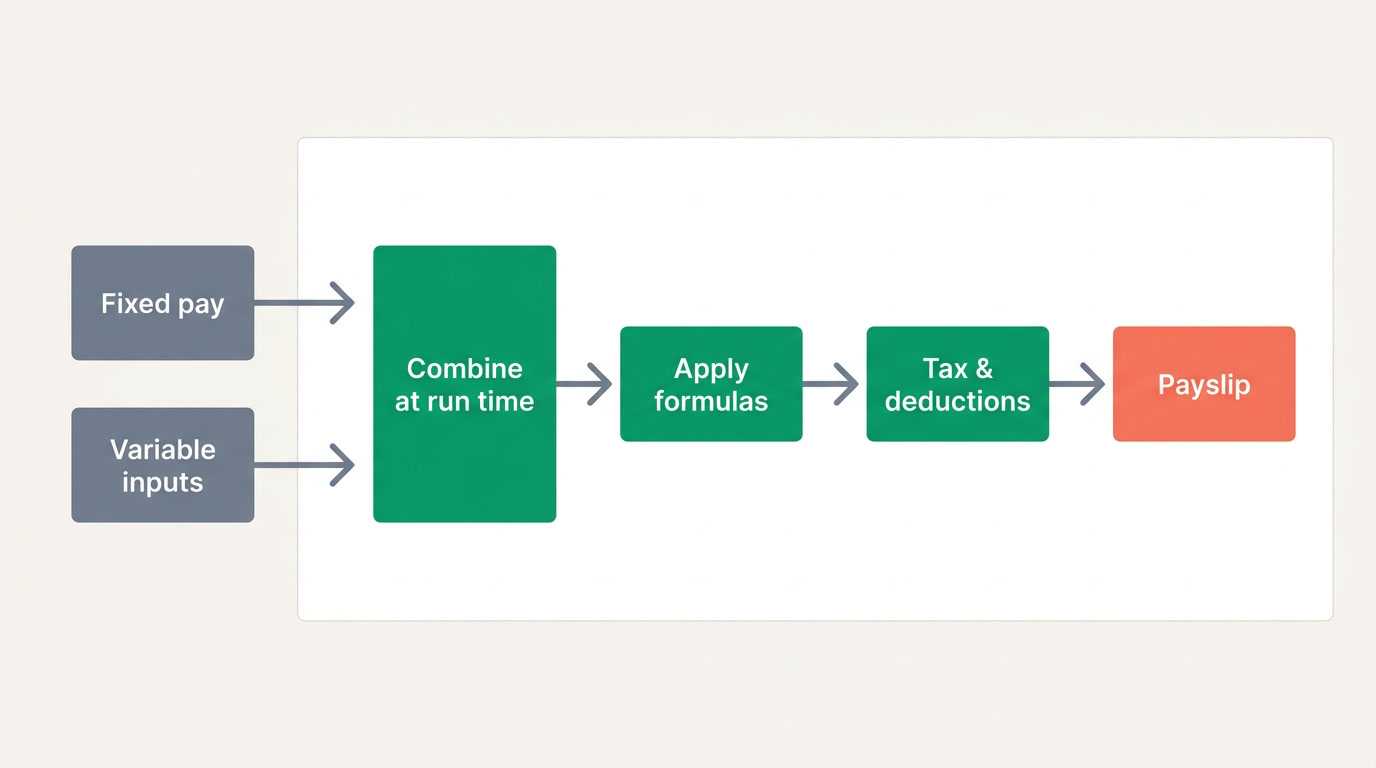
Fixed components stay the same until a contract changes: basic salary, housing, transport, and role allowances. Variable components are earned or triggered within a single period: sales commission, performance bonus, overtime, shift differentials, and one-time payments. The same person can carry both in one payslip.
| Component | Fixed or variable | How it's set |
|---|---|---|
| Basic salary | Fixed | Once, on hire or raise |
| Housing / transport allowance | Fixed | Set per employee or department |
| Sales commission | Variable | Entered each period from results |
| Overtime | Variable (formula) | Hourly rate × hours worked |
| Performance bonus | Variable | Approved per period |
| One-off allowance | Variable | Uploaded once, not repeated |
How does variable pay get into payroll each period?
In most businesses, variable pay arrives as a spreadsheet from Finance or Sales just before the run: this rep earned this commission, that person worked these overtime hours, here's the quarterly bonus list. The payroll system should import that file, match rows to employees, and add each amount as its own line — without touching anyone's fixed salary.
The spreadsheet hand-off is fine — it's often the honest reality of how commission gets calculated. The danger is re-keying. Every time a number is typed twice, it can be typed wrong once. What you want is a clean import where the variable amounts land next to the fixed ones, clearly labelled, and the person approving the run can see at a glance that commission is commission and basic is basic.
Keep the lines separate
Never fold a bonus into someone's basic "just for this month." Once fixed and variable blur together, you lose the audit trail, the tax treatment can differ, and next month's run may repeat a payment that was meant to happen once.
What are formula paycodes and why do they matter?
A formula paycode computes a pay item from an input times a rule instead of a typed amount. Overtime is hourly rate × hours. Mileage is kilometres × a per-km rate. An occasion allowance might be a daily rate × a factor, capped at a maximum. You enter the input; the software does the arithmetic, the same way every time.
Formulas are where variable pay stops being error-prone. Instead of asking a manager to work out "14 hours of overtime at time-and-a-quarter" on a calculator, the manager enters 14 hours and the rule handles the rest. The caps matter too: an occasion allowance that should never exceed a set ceiling will stop there automatically, so a typo of 300 days can't quietly pay out.
- Overtime = hourly rate × hours worked, often with a multiplier for weekends.
- Mileage / travel = distance × a per-unit rate you can edit as fuel costs change.
- Occasion allowance = daily rate × factor, capped so it can't run away.
- Attendance-linked pay derived from hours or days pulled straight from the clock.
The best payroll formula is one nobody has to remember. You set the rule once, and every run applies it the same way — no heroics, no calculator, no argument.
Why should software read fixed and variable pay together at run time?
Because a payslip only makes sense when both halves are combined at the moment of calculation. The system takes each employee's stored fixed components, layers on this period's variable inputs, applies any formulas, then runs tax and statutory deductions on the correct total. Do it in two disconnected steps and the deductions land on the wrong number.
This is also where payroll meets the rest of the business. Variable inputs often come from attendance and leave — hours worked, days absent — and the finished payroll cost flows out to the finance ledger as a journal entry. When payroll lives with HR, attendance, and accounting on one platform, the fixed-plus-variable calculation reads live data instead of yesterday's export. That's the case for an all-in-one platform rather than four tools taped together — and it's worth checking against any payroll software you're evaluating.
On ERPnBox, payroll sits inside the HR app next to employee records, attendance, and leave, and connects to the built-in finance ledger — with AI-assisted setup and support for any language, web and mobile. As always, the deepest formula and cost-allocation work is what to look for in any serious payroll system; treat this article as a checklist, not a sales sheet.
Run fixed and variable pay on one system
See how payroll, HR, attendance, and finance work together on a single login.
Explore HR & payrollFrequently asked questions
Can one employee have both fixed and variable pay?
Yes, and most do. A salesperson might have a **fixed basic and housing allowance** plus **variable commission and overtime** every period. The payslip should show each as its own line so both the employee and Finance can see exactly what was earned and why.
Is overtime fixed or variable pay?
Overtime is **variable** — it changes every period with hours worked. It's usually best handled as a **formula paycode**: hourly rate multiplied by hours, sometimes with a weekend multiplier. You enter the hours; the system computes the amount consistently.
How do I import variable pay from a spreadsheet safely?
Use a payroll tool that **imports the file, matches each row to an employee, and adds the amount as a labelled line** without altering fixed pay. Review the import before approving, and keep a copy of the source file. The goal is to avoid re-keying numbers by hand.
Why keep bonuses on a separate line instead of adding them to basic?
Because merging them **breaks the audit trail**, can change the tax treatment, and risks the payment repeating next period. A separate line keeps the contractual basic clean and makes every one-time amount obviously one-time.
What is a capped occasion allowance?
It's a formula-based allowance — say **daily rate × a factor** — with a **maximum ceiling** built in. The cap protects payroll from typos and abuse: even if someone enters an impossibly large input, the payout stops at the limit you set.
Does ERPnBox handle both fixed and variable pay?
ERPnBox runs **payroll inside its HR app**, connected to attendance, leave, and the finance ledger, with AI-assisted setup in any language. Deep features like advanced formula libraries and multi-dimension cost allocation are what to look for in serious payroll generally — evaluate any tool, including ours, against your real pay structure.