
The short answer
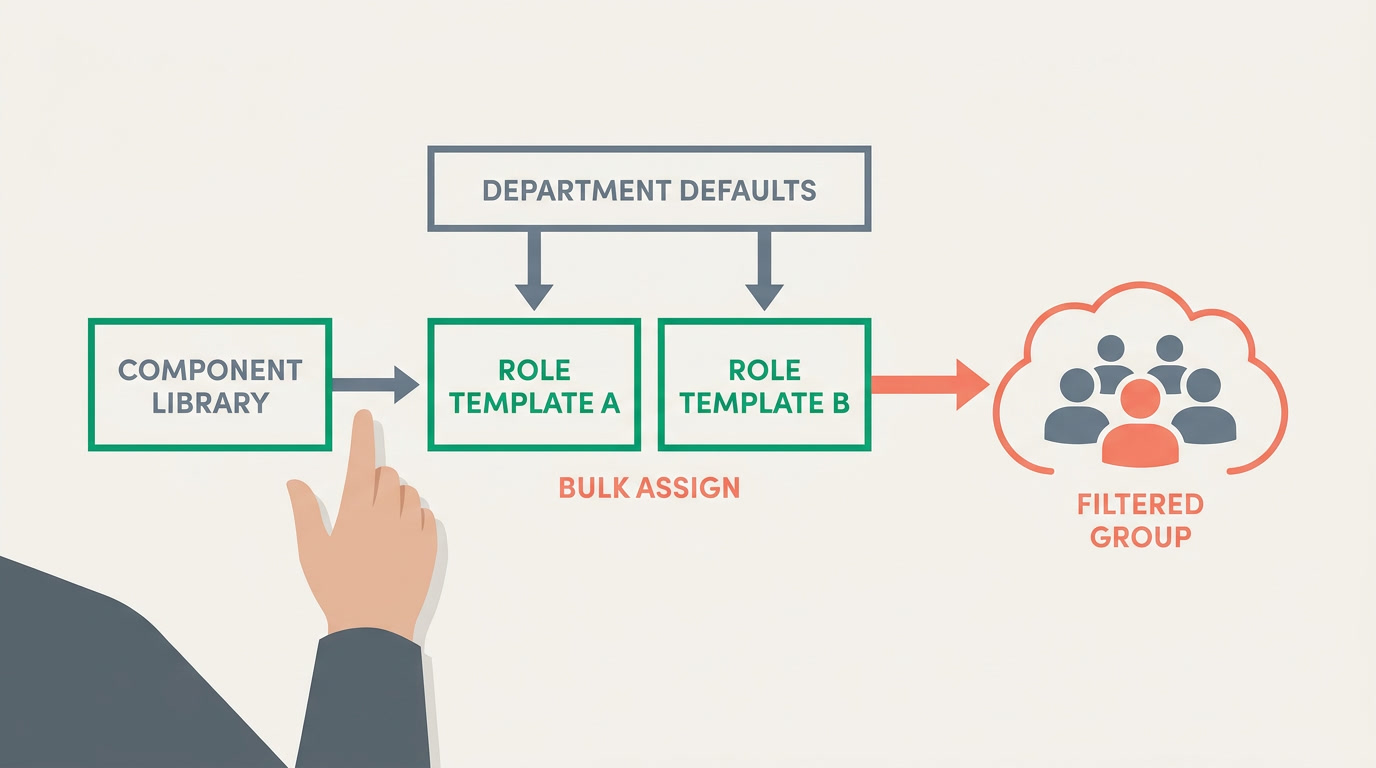
A salary structure is built from reusable components split into earnings and deductions. Define each component once, group them into templates by role, set department defaults, and add one-time items per period. Then assign a template to a filtered group in bulk, so onboarding a new hire is a single click rather than rebuilding pay from scratch.
Most payroll pain is self-inflicted at setup. Someone builds the first employee's pay by hand, then copies it for the next, and the next — until the twentieth hire has a slightly different basic label, a duplicate housing allowance, and a deduction nobody can explain. This guide shows the opposite habit: design a small library of salary components once, reuse it, and make onboarding a click. It is vendor-neutral — the ideas work in any payroll software — with honest notes on where an all-in-one platform helps.
What is a salary component, and why split earnings from deductions?
A salary component is one named line on a payslip — basic pay, a housing allowance, a tax withholding, a loan installment. Every component is either an earning (adds to pay) or a deduction (subtracts). Splitting the two cleanly is the single decision that keeps a payslip honest: the reader always sees the full contractual salary above the line, and every subtraction below it, named and justified.
Earnings usually break into fixed components — basic and standing allowances that rarely change — and variable ones like overtime, commission, or a one-off bonus that you enter each period. Deductions include statutory items (income-tax withholding, social-insurance shares) and voluntary or corrective ones (a loan installment, an attendance shortfall). Good software reads fixed and variable at run time and never silently folds a deduction into a lower basic.
One name, one meaning
The most expensive mistake is two components that mean the same thing — "Transport" and "Travel Allowance" sitting side by side. Name each component once, define it once, and reuse it everywhere. A clean library of 12 well-named components beats 40 near-duplicates.
How do salary templates turn a component library into a structure?

A salary template is a named bundle of components tuned for a role or grade — say, "Field Sales" or "Senior Engineer." Instead of assigning ten components one by one to each hire, you assign the template. The template is the reusable unit; the component library is its vocabulary. Change the template once and every future hire in that role inherits the fix.
A template carries defaults, not commitments. It might set a basic of a certain proportion of total pay, a standard transport allowance, and the statutory deductions that apply to everyone — while leaving one field, like the exact basic figure, to be filled per person. The point is that 90% of a new hire's pay is decided before you ever open their record.
Department defaults: the layer above templates
Departments often share pay rules that cut across roles — a shift allowance for everyone in Operations, a different overtime rule for the warehouse. Department defaults let you attach components at the department level so any template used inside it inherits them. This keeps templates lean and pushes broad policy to where it belongs, so a change to "how Operations handles overtime" happens in exactly one place.
Component type, example, and how it gets assigned
The table below is the mental model to keep. Every component has a type (earning or deduction, fixed or variable), a concrete example, and an assignment path — the route by which it lands on a payslip. Notice that the assignment path, not the amount, is what makes a structure scalable.
| Component type | Example | How it's assigned |
|---|---|---|
| Fixed earning | Basic pay, housing allowance | Set once in the template; per-person figure filled at hire |
| Variable earning | Overtime, commission, bonus | Entered each period — often a formula or an upload from Finance |
| Statutory deduction | Income-tax withholding, social-insurance share | Applied automatically by your country's rule to everyone eligible |
| Voluntary deduction | Loan installment, savings plan | Attached to the individual; recurs until a balance clears |
| One-time component | Sign-on bonus, single correction | Added to a single pay run only, then gone |
| Department default | Shift allowance for all of Operations | Inherited by every template used in that department |
What are one-time components, and why keep them separate?
A one-time component appears on a single pay run and never again — a sign-on bonus, a referral payout, a correction for a prior month. Keeping these separate from standing pay is what stops next month's payslip from silently repeating this month's bonus. A one-time item should be impossible to leave running by accident. Enter it against the period, watch it apply, and watch it disappear.
Variable earnings that recur but change in value — overtime, commission — are different. These are usually driven by a formula (overtime = hourly rate × hours) or uploaded each period as a spreadsheet from Finance. The distinction matters: a formula recurs and recomputes; a one-time item recurs never. Mixing them is how a spreadsheet of last month's numbers gets pasted into this month by mistake.
How does bulk assignment to a filtered group actually work?
Bulk assignment applies a template or a single component to many employees at once, selected by a filter — "everyone in the Cairo office in Sales," "all full-time staff hired this quarter." It turns a policy change from a hundred edits into one. This is the payoff of the whole approach: because pay is built from named components and templates, a filtered group can be re-templated in a single action.
- Filter the group precisely — by department, location, employment type, or hire date — so you touch exactly who you mean.
- Preview the change: which employees, which components, added or replaced. Never assign blind.
- Apply, and let per-person figures already on file stay intact where the template only sets structure.
- Audit afterward — a good system logs who assigned what to whom, so payroll changes are traceable.
Onboarding a new hire should be choosing a template and typing one number — not rebuilding pay from a blank page every time.
Where does an all-in-one platform fit into this?
The advanced ideas here — formula paycodes, attendance-based deductions, cost allocation to the ledger — are what to look for when you choose payroll software, not a checklist any one tool fully delivers. Be skeptical of vendors who claim all of them. Dedicated payroll tools like Gusto, Deel, or Rippling are genuinely strong at multi-country run mechanics and are the right call if payroll is your only problem.
The case for an all-in-one platform is different: payroll lives on the same system as HR, attendance, and a real Finance ledger, so the component library you designed feeds attendance-based deductions from the same clock-ins your HR team already uses, and pay costs land in Finance without re-keying. On ERPnBox, payroll sits inside the HR app next to employee records, attendance, and leave; setup can be AI-assisted from a chat, and it works in any language, web and mobile. Treat the deeper features above as a buyer's checklist — verify each one against your own run, whatever tool you pick.
Design your pay structure once
Payroll on the same login as HR, attendance, and real Finance — configured from a chat, in any language. From $15/user, 30-day free trial.
Explore HR & payrollFrequently asked questions
What is the difference between a salary component and a salary template?
A **component** is one line on a payslip — basic pay, an allowance, a deduction. A **template** is a named bundle of components tuned for a role, like "Field Sales." You define components once in a shared library, then group the right ones into templates so you assign a whole structure at hire instead of ten separate lines.
Should deductions be part of the salary structure or added separately?
Both, by kind. Statutory deductions and standing voluntary ones like a loan installment belong in the structure so they recur automatically. But keep them as **separate named lines** below the earnings, never folded into a lower basic — so the payslip always shows the full contractual salary and every subtraction is visible and justified.
How do department defaults avoid duplicating components across templates?
Attach a shared component — say a shift allowance for all of Operations — at the department level. Every template used inside that department inherits it, so you set the rule once rather than copying it into each role template. Change "how Operations handles overtime" in one place and it propagates.
How do I make sure a one-time bonus does not repeat next month?
Enter it as a **one-time component** tied to a single pay run, not as a standing earning. A well-built system applies it to that period only and drops it afterward. The rule of thumb: recurring items belong to the template or a formula; anything you would be embarrassed to see twice should be one-time by construction.
Can I change one component and have it update everyone who uses it?
That is the whole point of a shared library. If a component is defined once and referenced by many templates, editing its rule updates future runs for everyone who inherits it. Combined with bulk assignment to a filtered group, a company-wide pay-policy change becomes a single, auditable action instead of hundreds of edits.
Do I need dedicated payroll software or does an all-in-one platform suffice?
If payroll across many countries is your only problem, a dedicated tool like Gusto, Deel, or Rippling is genuinely strong. An all-in-one platform wins when you want payroll on the same system as HR, attendance, and a real Finance ledger, so component libraries, clock-ins, and cost postings share one source of truth. Match the tool to whether payroll stands alone or lives beside everything else.