
The short answer
A merge in ERPnBox combines two duplicate records into one surviving record. You pick which record survives and which field value wins, and the merge carries every activity, note and attachment from both records onto the survivor. Nothing in the child history is deleted. Review both records first, then merge with confidence.
Two records for the same customer is an accident. Deleting one of them to fix it is a choice — usually a bad one. Somewhere in the record you delete is the call from last March, the signed quote, the note that says "prefers email, never phone." A careless merge throws that away. A good merge keeps it. The whole point of a merge is to end with one record that remembers everything both records knew.
How does a merge decide which record survives?
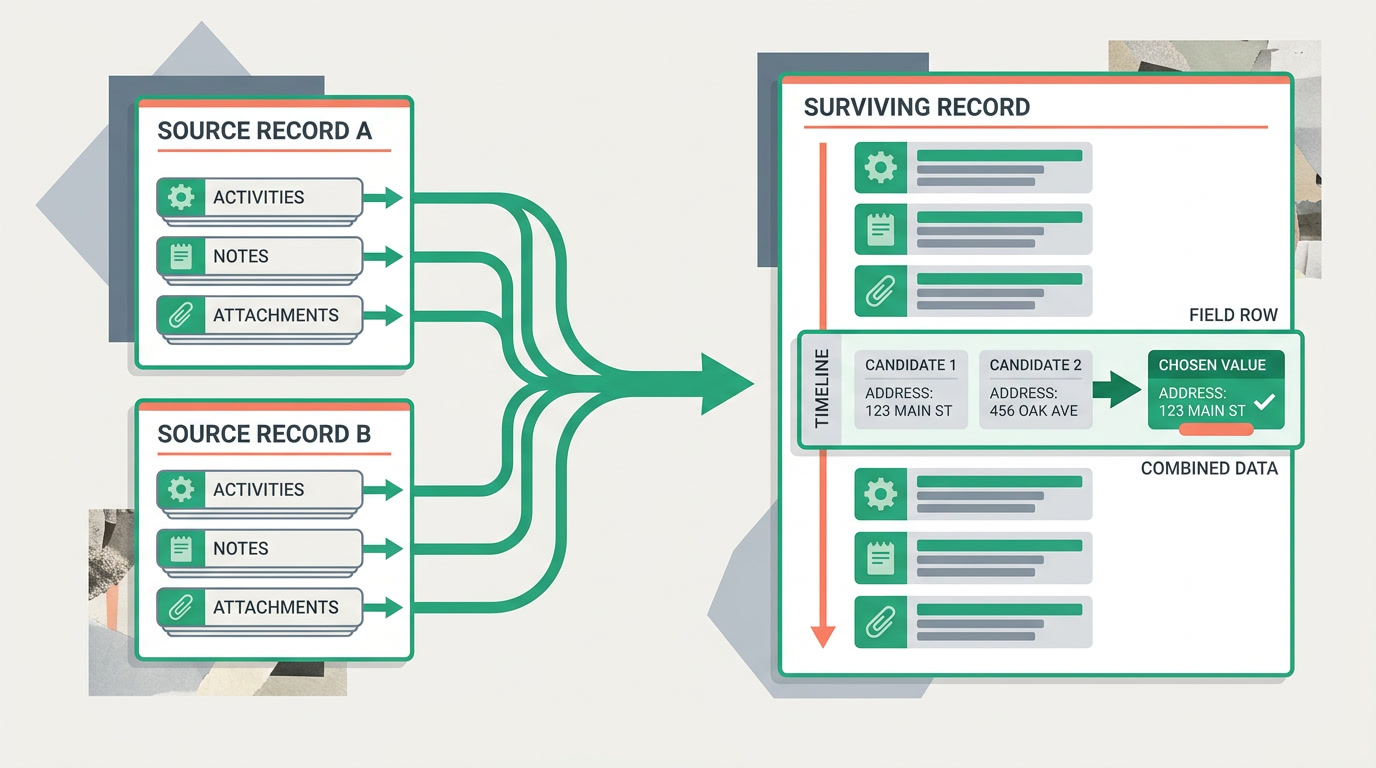
You decide — the merge never guesses silently. When you merge two records, ERPnBox shows both side by side and asks you to pick the surviving record and, field by field, which value wins. The survivor keeps its ID and its links; the other record folds into it. You are the referee, and the merge only executes the call you make.
This is why the review screen matters more than the merge button. Before you confirm, you can see that Record A has the correct phone number but Record B has the newer address — and take the best of each. Pair this with the duplicate manager, which surfaces the pairs to review, and smart matching, which suggests likely duplicates so you're not hunting for them by hand.
What happens to activities, notes and attachments when you merge?

They all move to the survivor — from both records. Every activity, every note, every attachment on the losing record is re-parented onto the surviving record, alongside its own. Nothing in the child history is discarded. After the merge you have one record whose timeline reads as the combined story of the two, in order.
The difference between the two fields — where you choose one value — and the child data — where you keep everything — is the difference between a safe merge and a lossy one. A field can only hold one phone number, so one wins. But there is no reason to lose one of two notes, so you lose neither. Fields are a choice; history is additive.
| Data on the record | On merge | You choose? |
|---|---|---|
| Standard fields (name, phone, stage) | One value survives per field | Yes — pick per field |
| Activities (calls, meetings, tasks) | All kept, from both records | No — always kept |
| Notes | All kept, from both records | No — always kept |
| Attachments | All kept, from both records | No — always kept |
| Related records (linked deals, contacts) | Re-linked to the survivor | No — always kept |
| The other record | Folded into the survivor | You pick which one folds |
Why does a careless merge lose data — and a good one doesn't?
The classic mistake is treating a merge like a delete. Someone spots a duplicate, opens the newer-looking one, and deletes the other — taking its entire history with it. A merge does the opposite: it drains the second record of everything worth keeping into the first before the second record goes away. Same end state on your list — one record — but one path keeps the past and the other burns it.
Review before you merge. Open both records, read the two timelines, and confirm they're truly the same entity — not a parent company and a subsidiary, not two people who share a name. Then choose the survivor and the winning field values. The thirty seconds you spend on the review screen is the cheapest insurance in your CRM.
How do you stop duplicates before they need merging?
The best merge is the one you never had to do. When you import records from a spreadsheet, ERPnBox can check for likely duplicates and skip or block them, so the import doesn't quietly seed the very problem you'll clean up later. Between duplicate checking on import and the duplicate manager catching what slips through, merging becomes an exception, not a chore.
And because ERPnBox is metadata-driven, the rules that define a duplicate are yours to set — you configure them, you don't code them. Match on email, on phone, on a combination, whatever fits how your records actually collide. See all the CRM view types for the lists and saved views you'll run these clean-ups from.
Frequently asked questions
Does merging delete any activities, notes or attachments?
No. **Every activity, note and attachment from both records is kept** and re-parented onto the surviving record. The child history is additive on merge — you never lose a note because there were two records. Only single-value fields, like a phone number, resolve to one winning value, and you choose which.
Can I choose which record survives?
Yes. The merge screen shows both records and lets you pick the **surviving record** plus, field by field, which value wins. Nothing is decided silently — the merge only carries out the choices you confirm on the review screen.
Can a merge be undone?
Treat a merge as final, which is why the **review step matters**. Open both records, read the two timelines, and confirm they're the same entity before you confirm. Reviewing first is far cheaper than trying to reconstruct a record afterward.
How do I find the duplicates to merge?
The [duplicate manager](/features/crm-duplicate-manager) surfaces likely duplicate pairs based on rules you configure, and [smart matching](/features/crm-smart-matching-merge) suggests probable matches so you review a curated list instead of scanning by eye.
Can I prevent duplicates when importing?
Yes. When you import from a spreadsheet, ERPnBox can check incoming rows against your duplicate rules and **skip or block likely duplicates**, so the import doesn't create the mess you'd have to merge away later.


