The short answer
A CRM's essentials are four things: one shared contact record, a visual pipeline of deals, follow-up reminders and light automation, and simple reporting. Everything else is optional at first. Start with contacts, pipeline, and follow-up. Add analytics and marketing once the basics are a daily habit for your team.
Walk into any software demo and you'll be shown a hundred features. It's easy to leave convinced you need all of them. You don't. A CRM earns its keep the moment it does a few plain things well: it remembers your customers, shows you what's in play, and nudges you to follow up. The trick to a CRM that actually gets used is knowing which handful of essentials matter, and quietly ignoring the rest until you do.
This guide is a friendly primer. No jargon, no feature checklists you'll never touch. Just the core pieces of a CRM, what each one is for, and how they line up with the way you already sell. If you're brand new to the category, our what is CRM explainer is a gentle place to start; this page picks up from there.
What are the essential parts of a CRM?
Underneath the marketing, every CRM is built on four essentials: a single shared record for each contact, a pipeline that shows where deals stand, follow-up and light automation so nothing slips, and reporting that tells you what's working. Master those four and you have ninety percent of the value. The rest is refinement.
- The single contact record. One place for everything about a person or company: their details, every email and call, notes, and open deals. When anyone on the team opens it, they see the whole story instead of guessing. This is the heart of the CRM.
- The pipeline. A visual board of your deals moving left to right through stages, from first contact to won or lost. It answers the question every owner asks: what's actually going to close this month, and what's stuck?
- Follow-up and automation. Reminders, tasks, and simple rules that fire on their own, so a lead never goes cold because someone forgot. Start light: a reminder to call back, an email that sends when a deal changes stage.
- Reporting. A plain view of the numbers that matter: how many leads came in, what your win rate is, which source pays off. You can't improve a sales process you can't see.
A quiet rule of thumb
If a feature doesn't help you remember a customer, move a deal, follow up on time, or see the numbers, it isn't essential yet. Adopt the four, ignore the hundred.
How does a CRM support your sales cycle?
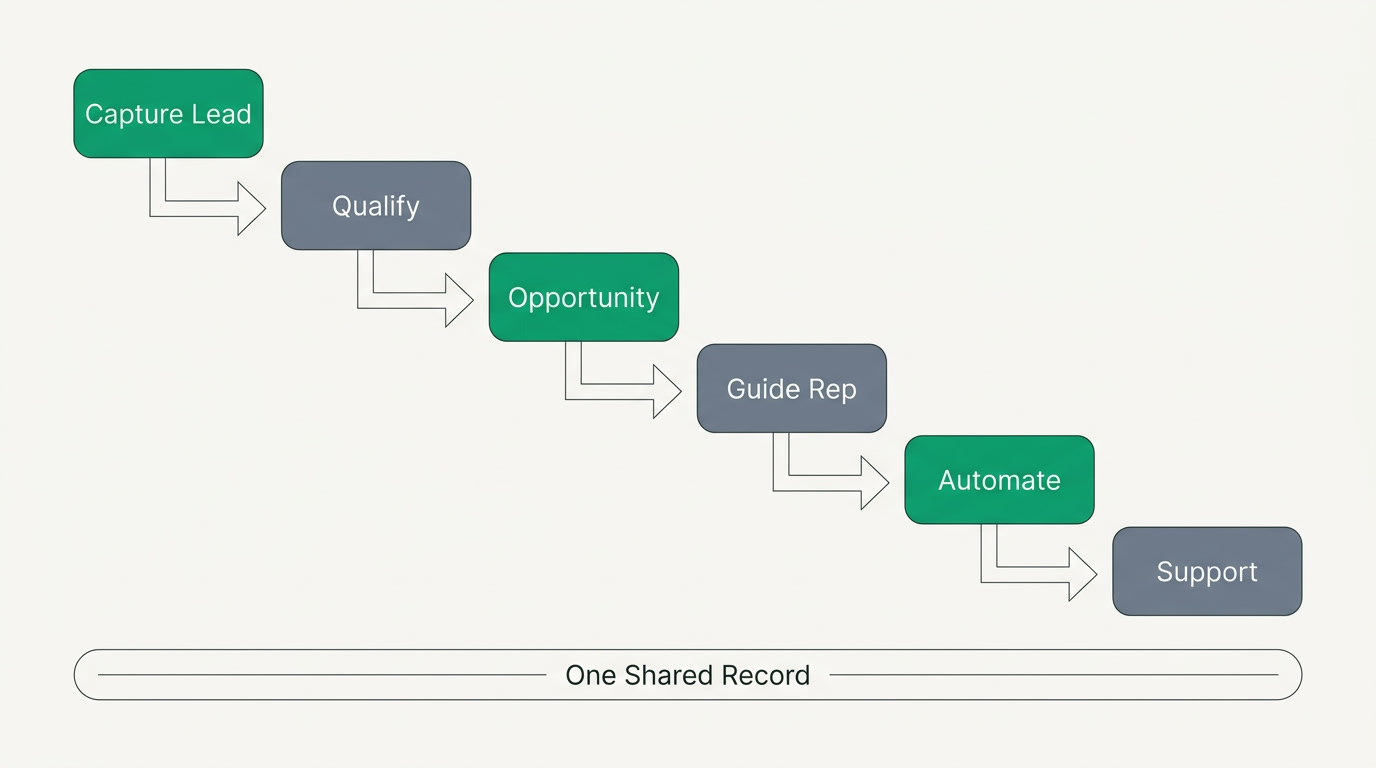
A CRM shadows your sales cycle step by step. It captures a lead the moment it arrives, helps you qualify and nurture it, tracks the opportunity as it grows, guides the rep on the next move, sends the right marketing touch automatically, and hands a happy customer to support after the sale. Same journey you already run, minus the sticky notes.
- Capture the lead. A form, an email, an inbound call — the CRM logs it as a new contact so it never lives only in someone's head.
- Qualify and nurture. Quick questions and a bit of history tell you if it's real. If it's early, gentle follow-ups keep you present until the timing is right.
- Manage the opportunity. The deal enters your pipeline with a value and a stage, and everyone can see it move.
- Guide the rep. Clear next steps and reminders mean the seller always knows what to do today, not just what happened last week.
- Automate the marketing touch. A welcome email, a check-in, a reminder — sent on schedule so relationships stay warm without manual effort.
- Hand off to support. Once the deal is won, the same record follows the customer into service, so support already knows who they are.
The magic isn't any single step — it's that they share one record, so nothing is retyped and nobody starts a conversation from zero. That's also the line between a CRM and an ERP: a CRM watches the customer journey, while an ERP runs the whole business behind it. If that distinction matters to you, see CRM vs ERP.
CRM strategy vs CRM software — what's the difference?
CRM strategy is the mindset: a decision to treat customer relationships as your most valuable asset and manage them deliberately. CRM software is the tool that makes that mindset practical — chiefly by giving everyone a 360-degree view of each customer. You need both. The best software can't rescue a company that doesn't care to follow up.
Think of it this way. The strategy says "we will never let a good customer feel forgotten." The software is what makes that promise keepable when you have three hundred customers instead of three. Buy the tool to serve the mindset, not the other way around. A team that adopts a cheap CRM with real discipline will beat a team that bought the expensive one and treats it as a filing cabinet.
Which essentials do small teams actually need first?
Start with three: your contacts in one place, a pipeline to track deals, and follow-up so nothing slips. That's a complete, working CRM for most small teams. Add reporting once you have enough activity to measure, and marketing automation once the basics are a daily habit. Layering features in this order protects adoption — the thing that quietly kills most CRM projects.
| Essential | What it gives you | When you need it |
|---|---|---|
| Contact record | One reliable place for every customer detail and interaction | Day one — before anything else |
| Pipeline | A clear view of every deal and its stage | As soon as you're tracking more than a few deals |
| Follow-up | Reminders and tasks so leads never go cold | Early — the moment you miss your first callback |
| Reporting | Win rates, lead sources, activity trends | Once you have a few months of data to read |
| Marketing automation | Scheduled emails and nurture sequences | After the basics are a habit, not before |
The best CRM is the one your team will actually open on a Monday morning. Everything else is a footnote.
How do you choose a CRM that has the essentials without the bloat?
Judge a CRM on four honest tests: does it fit the way you already sell, will your team happily use it, is the total cost clear once you add seats and add-ons, and does it connect to the rest of your business? Almost every tool demos beautifully. The ones worth keeping survive the second month. Our how to choose a CRM guide goes deeper.
It also helps to be honest about the field, because different tools are genuinely better for different teams. Salesforce is the most powerful and customizable CRM there is, the enterprise standard — though that depth often means admins, consultants, and real budget. HubSpot pairs excellent marketing and CRM with a generous free tier and superb ease of use, and tends to get pricier as your contacts and seats grow. Zoho is broad and affordable, with forty-plus apps you can wire together, which can feel like assembling a suite. Microsoft Dynamics runs deep and shines if you already live inside Microsoft, at the cost of weight. And Pipedrive is refreshingly simple and sales-focused, if lighter on marketing and service. If you only need a pure sales CRM, or you already live in one of these ecosystems, buy that — honestly.
The one question these tools rarely answer well is the last: does your CRM connect to finance and HR? For many small businesses the customer, the invoice, and the person who serves them are the same story — split across three tools that don't talk. That's the gap ERPnBox was built to close. It gives you the CRM essentials — a single contact record, a pipeline, follow-up, reporting — already connected to real double-entry Finance and HR and payroll, plus a dozen apps, behind one login and one per-seat price. It's the ERP for small business, AI-built so you skip the months of implementation. If you're weighing all-in-one against a stack of specialists, all-in-one vs best-of-breed lays out the trade honestly.
Honest total cost
ERPnBox is one per-seat price: Professional at $15/user with 3,000 AI credits, Growth at $20/user with 6,000, and Enterprise custom. A 30-day free trial, no card required, and paying yearly gives you two months free. No hidden implementation invoice at the end.
See the essentials, already connected
Start with contacts, a pipeline, and follow-up — and grow into finance and HR when you're ready. Try ERPnBox free for 30 days, no card.
Explore the CRMOne last word of encouragement: start small. Put your contacts in, draw your first pipeline, set one follow-up reminder, and use it for a week before you add anything. A CRM you actually use, doing four simple things, beats the most sophisticated system nobody opens. Get the essentials right, and the rest will make sense when you need it — not a day before.
Frequently asked questions
What is the single most important part of a CRM?
The **single contact record** — one place holding every detail and interaction for a customer. Everything else, from the pipeline to reporting, is built on top of it. If your team can open a contact and instantly see the full history, ==you already have the beating heart of a CRM==. Start there.
Do I really need automation in my first CRM?
Only the light kind. Begin with simple **follow-up reminders and tasks** so a lead never goes cold. Full marketing automation — nurture sequences and scheduled campaigns — can wait until the basics are a daily habit. Adding it too early usually means it goes unused.
What's the difference between CRM strategy and CRM software?
Strategy is the mindset — a commitment to treat relationships as your most valuable asset. Software is the tool that makes it practical by giving everyone a 360-degree view of each customer. ==Buy the tool to serve the mindset, not the reverse==; a disciplined team on a modest CRM beats a careless one on an expensive tool.
Is a simple CRM better than a powerful one for a small team?
Usually, yes — at first. The best CRM is the one your team will actually open on a Monday morning. A tool like [Pipedrive](https://www.pipedrive.com) or a lean setup wins on adoption, while a deep platform like [Salesforce](https://www.salesforce.com) pays off once you have the scale and support to use it. ==Match the tool to your stage, not your ambition.==
When should my CRM connect to finance and HR?
The moment the same customer shows up as a deal, then an invoice, then a support ticket — and you're retyping the details each time. That's when a connected all-in-one like [ERPnBox](/crm), with CRM, [Finance](/finance) and [HR](/hrms) sharing one record, saves more than it costs. Before that, a standalone CRM is perfectly fine.
How much should a small business expect to pay for a CRM?
It varies widely, and the sticker price is rarely the real one — watch for per-contact tiers and paid add-ons. As a connected reference point, [ERPnBox](/pricing) is one flat per-seat price: **$15/user** on Professional, **$20/user** on Growth, with a 30-day free trial and no card. ==Always ask what the total looks like a year in, not just today.==