The short answer
A pay run moves through draft, validated, processing, review, approved, disbursed, and completed. The first four stages only calculate and have no permanent effects, so processing is safe to re-run. Approval is the commit: it deducts loan installments and adjusts leave balances. You can cancel any run before it is disbursed.
A payroll mistake is not like a typo in a memo. It moves money into people's bank accounts, and once it lands, it is hard to pull back. The pay-run workflow exists so that nothing irreversible happens until a human has looked at the numbers and said yes. This guide walks through every stage, from draft to completed, and explains the single idea that keeps payroll teams out of trouble: calculation is safe to repeat, but approval is the point of no return.
What are the stages of a pay-run workflow?
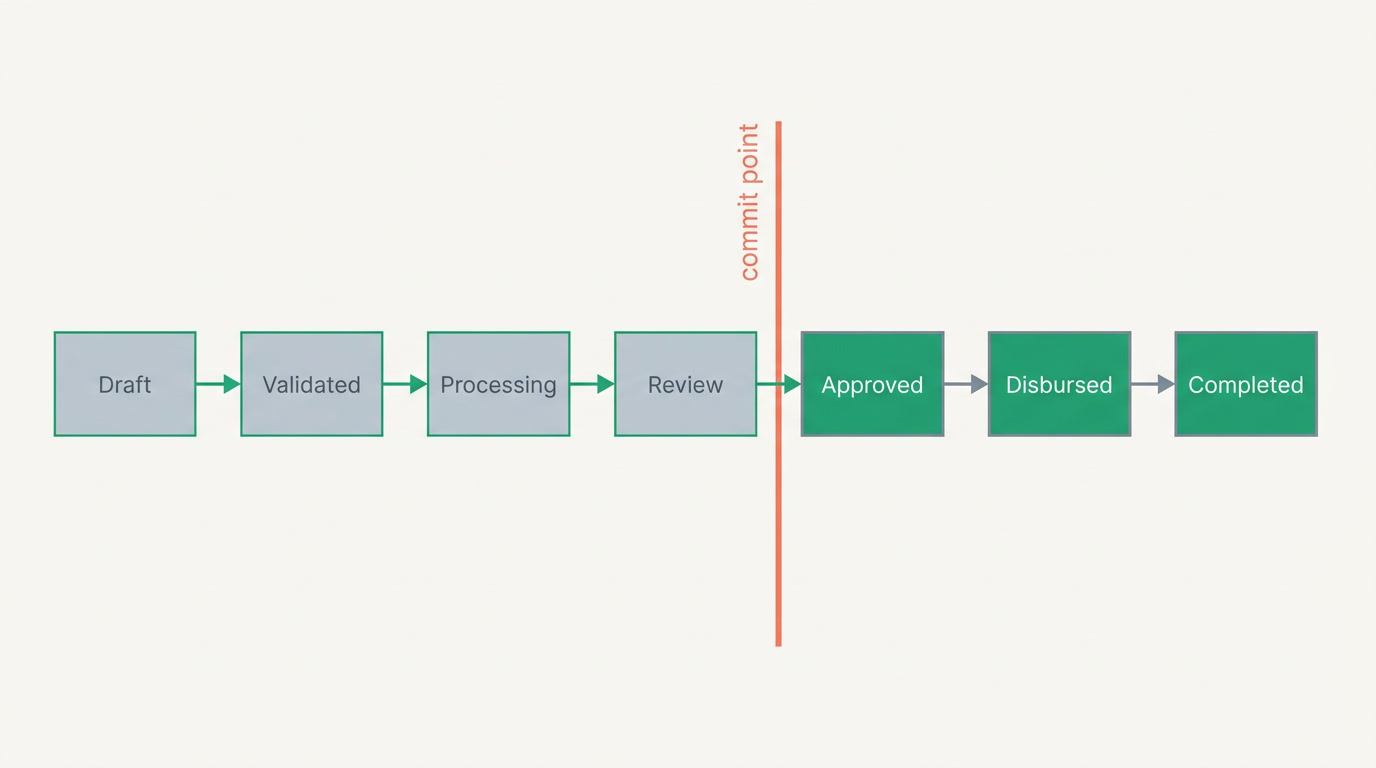
A well-built pay run moves through seven states: draft, validated, processing, review, approved, disbursed, and completed. The first four make no changes to anything permanent — they only gather data and compute numbers. The last three commit real side effects: they touch loan balances, leave balances, and finally the money itself. You can cancel any run before it is disbursed.
- Draft — you open the pay period and pull in who gets paid. Fixed pay (basic, allowances) comes from each employee's salary structure; nothing is calculated yet.
- Validated — the system checks the inputs: missing salary structures, employees with no bank details, variable pay (overtime, commission, bonuses) uploaded for the period, attendance data present. Problems surface here, cheaply.
- Processing — the actual calculation: gross, tax withholding, statutory deductions, attendance-based deductions, net. This is calculation ONLY — no side effects — and you can re-run it as many times as you like.
- Review — a person reads the payslips, checks totals against last period, and spots the outlier: the employee whose net doubled, the missing bonus, the wrong overtime.
- Approved — the commit. Now the side effects fire: loan installments are deducted and their balances updated, leave balances are adjusted, and the run is locked from further recalculation.
- Disbursed — payment is released to employees, whether through a bank file, a transfer, or a payment provider. Past this point, cancellation is no longer a button — it is a bank recall.
- Completed — payslips are published to employee self-service and the payroll journal is posted to the general ledger. The period is closed.
Why is processing reversible but approval the commit?
Because the two do fundamentally different things. Processing only reads inputs and writes numbers onto the run itself — payslip lines you can throw away and recompute. Approval reaches out and changes records that live *outside* the run: it deducts a loan installment, it burns leave days. Undo those cleanly and you invite double-deductions and drifted balances. So good payroll software refuses to touch the outside world until you approve.
This is the difference between a draft and a transaction. You can edit a draft a hundred times; the last version is the only one that counts. But the moment you approve, the run stops being a draft and becomes a set of committed facts. That is why the sequence is deliberate: recalculate freely while it is cheap, then approve once, on purpose, when a human has seen the result.
The rule worth memorizing
Re-run processing as often as you need. Approve exactly once, and only after review. If a run before disbursement looks wrong, cancel it and start clean — that is cheaper and safer than patching an approved run.
What happens at each stage, exactly?
The clearest way to see the design is a side-by-side of each state: whether it changes anything permanent, whether you can safely repeat it, and whether you can still cancel. Notice how the whole table stays green — no side effects, fully reversible — right up until approved.
| Stage | What happens | Permanent side effects? | Can cancel? |
|---|---|---|---|
| Draft | Period opened, employees and fixed pay pulled in | None | Yes |
| Validated | Inputs checked; variable pay and attendance confirmed present | None | Yes |
| Processing | Gross, tax, deductions, net computed — re-runnable | None | Yes |
| Review | Human reads payslips, compares to prior period | None | Yes |
| Approved | Loan installments deducted, leave balances adjusted, run locked | Yes | Only via reversal |
| Disbursed | Payment released to employees | Yes | No — bank recall |
| Completed | Payslips published, journal posted to the ledger | Yes | No |
Why do review and approval controls matter?
Because payroll is where honest errors and quiet fraud both hide. A review step forces a second pair of eyes onto the totals before money moves — catching the doubled net, the ghost employee, the overtime that should have been zero. Separating who *runs* payroll from who *approves* it is a basic control, the same logic banks use to require two signatures on a large cheque.
Controls also mean traceability. Every good pay run keeps a record of who approved it and when, so a later question — "why was this person paid more in March?" — has an answer instead of a shrug. This matters most when payroll data flows straight into your accounts. Read our guide on how to choose payroll software for the full control checklist, or what is payroll software if you are starting from scratch.
The safest pay run is the boring one: nothing surprising in review, one deliberate approval, no reversals. Excitement in payroll is a symptom, not a feature.
How does this connect to the rest of the business?
A pay run does not live alone. Its inputs come from attendance and leave — absences, overtime, lateness — and its output is a journal that belongs in your finance ledger. When those three sit in one system, the run at approval can read real leave balances and write a real journal voucher without anyone re-keying a spreadsheet. When they are three separate tools, that hand-off is where errors breed.
That is the honest case for an all-in-one platform. On a system like ERPnBox, payroll lives inside the HR app next to employee records, attendance, and leave, and connects to a real double-entry Finance ledger — one login, one per-seat price, set up from a chat and usable in any language. The advanced controls this article teaches — a reversible processing stage, formula pay codes, cost allocation — are the standard you should hold *any* payroll tool to; treat this guide as your checklist when you compare options, not a spec sheet for one product.
If you promise employees a take-home figure rather than a gross, the run's calculation gets one layer harder — see net-to-gross payroll for how grossing-up works inside the same workflow. And if your team needs the depth of a specialized payroll bureau in your country, a dedicated tool such as Gusto or a regional payroll provider can be the right call — the workflow principles here apply to all of them.
See payroll, attendance, and finance on one system
HR, payroll, and a real double-entry ledger on one login — from $15/user, with a 30-day free trial.
Explore HR & payrollFrequently asked questions
Can I edit a pay run after processing it?
Yes — that is the whole point of a **reversible processing stage**. Before you approve, you can change a variable-pay figure, fix an attendance entry, or correct a salary structure and simply re-run processing. Because processing has no permanent side effects, recomputing is free. Once you *approve*, the run locks; from there, changes mean a formal reversal or an adjustment in the next period.
What exactly happens when I click approve?
Approval is the **commit**. Three things fire: any **loan installments** due this period are deducted and the loan balances updated; **leave balances** are adjusted for the leave taken; and the run is locked so no further recalculation can change it. This is why approval should only ever happen after a human has reviewed the totals.
When can I no longer cancel a pay run?
You can cancel any run **before it is disbursed**. Draft, validated, processing, review, and even an approved-but-not-yet-paid run can be cancelled, though cancelling after approval means unwinding the loan and leave side effects. Once payment is **disbursed**, cancellation is no longer a button in your software — it becomes a bank recall, which is slow, uncertain, and awkward for everyone.
Why separate the person who runs payroll from the one who approves it?
Separation of duties is a basic financial control. When one person computes payroll and a **different** person approves it, no single individual can quietly push through an error — or a fraudulent payment — without a second set of eyes. It is the same reason large payments often need two signatures. For a small team, even a quick review by the owner before approval delivers most of the benefit.
Does the pay run create the accounting entries automatically?
Good payroll software produces a **journal voucher** at the end of the run — the wages expense, the tax and social-insurance liabilities the employer must remit, and the net pay owed. When payroll and your ledger sit on the same platform, that journal posts straight to the general ledger at completion. When they are separate tools, someone re-keys it by hand, which is exactly where reconciliation errors start.
Does the employer pay the income tax it withholds?
No — the employer **collects and remits** it, but the tax is the employee's. The pay run withholds income tax from gross pay according to your country's brackets and hands it to the tax authority on the employee's behalf. Statutory **social-insurance** contributions are different: those usually split into an employee share (deducted) and an employer share (an extra cost on top). Rates and rules vary by country, so always check where you operate.