
The short answer
Most software rollouts fail because people don't adopt the tool, not because the tech is bad. AI eases this by drafting communication and training, answering questions in-context, configuring the tool so there's less to learn, surfacing non-adopters, personalizing nudges, summarizing feedback, and easing data migration. But leadership and clear purpose still decide the outcome.
New software rarely fails because the software is bad. It fails because people quietly go back to the spreadsheet. The hardest part of any rollout is not installation — it is adoption. This is where AI has become genuinely useful, not as magic, but as a patient assistant that lowers the effort of learning something new. Here are seven concrete ways it helps, and one honest note on where it does not.
Why do most software rollouts fail?
Most rollouts fail on the human side, not the technical one. The single biggest predictor of success is whether people actually log in and use the tool. Studies suggest a large share of change initiatives stall because staff never adopt the new way of working. The system can be flawless and still lose to habit, confusion, and the fear of looking slow.
Change management is the discipline of moving people from the old way to the new one with as little pain as possible. Traditionally it meant long training sessions, thick manuals, and a help desk drowning in the same three questions. AI does not remove the need for leadership — but it does remove a lot of the friction that makes people give up in week two.
What are the 7 ways AI eases change management?
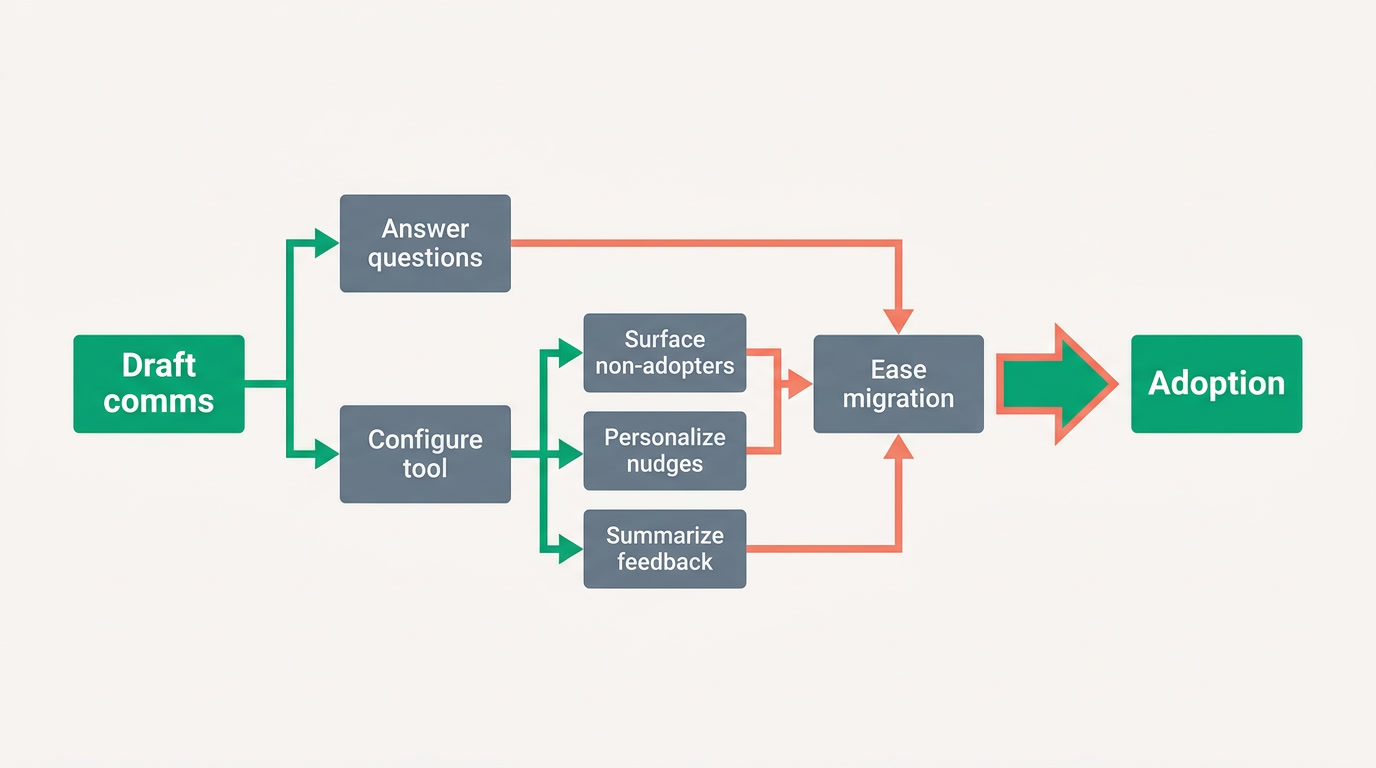
AI helps across the whole adoption curve: it drafts the announcements, answers questions in the moment, sets up the tool so there is less to learn, shows you who has fallen behind, nudges the right people, digests feedback, and eases the messy data move. Each one attacks a specific reason people stall.
1. It drafts the communication and training
The blank page is the first thing that kills momentum. AI drafts the launch email, the quick-start guide, and a short training outline in minutes — in your tone, for your team. You still edit and approve every word, but you start from a solid draft instead of a cursor blinking on white. Good communication is half of change management, and this is the fastest place to win.
2. It answers "how do I…" in context
Most people don't read the manual — they get stuck and ask the person next to them. An in-app AI assistant answers "how do I add a customer?" right where the work happens, without opening a ticket or waiting. This alone quietly removes the biggest single barrier to adoption: the moment someone gets stuck and gives up. The questions get answered before frustration sets in.
3. It configures the tool so there is less to learn
The best way to reduce the learning curve is to shorten it. When AI helps set up the workspace — the right fields, the right stages, sensible automations — people meet a tool shaped like their business, not a generic blank slate they must bend into place. Less to configure means less to explain, and far less to unlearn later.
4. It surfaces who hasn't adopted yet
You cannot fix what you cannot see. AI can summarize usage patterns and flag the team or person who logged in twice and vanished. Adoption is a number you should watch like revenue — not to punish anyone, but to reach the quiet strugglers before they slip back to the old spreadsheet for good.
5. It personalizes the nudges
A blanket "please use the new system" email is ignored by everyone. A workflow automation that sends a specific, timely reminder — "your two leads from yesterday still need a first note" — actually moves behavior. Small, relevant nudges beat big, generic announcements, and AI makes them cheap to produce at the right moment for the right person.
6. It summarizes the feedback
After launch, feedback arrives as a hundred scattered messages, complaints, and hallway comments. AI can group them into themes — "eight people find the invoice screen confusing" — so you act on patterns instead of the loudest voice. Listening well early is what turns skeptics into champions, and summarizing makes listening at scale possible.
7. It eases the data migration
Nothing scares a team more than "we lost our data in the switch." AI helps map messy old columns to the new home and flags likely duplicates before they land. When people find their real customers and history on day one, trust in the new system is instant. You still review the mapping — but the tedious matching work is done for you.
| Change challenge | How AI helps | The human still needed |
|---|---|---|
| People don't read the manual | An assistant answers questions in-app, in the moment | Set the tone that asking is welcome |
| Steep learning curve | AI configures the tool to fit the business | Decide what the process should actually be |
| Silent non-adopters | Usage summaries surface who fell behind | Reach out with support, not blame |
| Generic reminders ignored | Automations send specific, timely nudges | Judge the right cadence, not nagging |
| Feedback lost in the noise | AI groups comments into clear themes | Choose what to fix and communicate it |
The honest limit
AI lowers the change curve — it does not flatten it for you. It will not create urgency, decide priorities, or make a leader stand behind the new way. Treat it as a tireless assistant with a human always in the loop: it drafts, you approve; it flags, you decide; it nudges, you lead. A rollout with great AI support and absent leadership still fails.
How does an AI-built platform lower the change curve?
An AI-built platform lowers the curve by removing the two heaviest costs of change up front: setup and questions. When the tool arrives already shaped like your business and comes with an assistant that answers in-context, there is simply less to teach and less to fear. That is the approach behind ERPnBox.
With ERPnBox, a conversation with the AI builder sets up your CRM, HR, and real double-entry finance in one place, under one login — so a new hire learns one system, not five. When they get stuck, the AI assistant answers where they are, and records stay connected across apps so an invoice still carries its deal. If you're still deciding what to standardize, our guide on what a CRM actually is and the examples by industry are a practical place to start. The point is never to remove people from the change — it is to make the change easy enough that they say yes.
The best change management makes the new way feel like the easy way. AI's real job is to shrink the gap between "I have to" and "I want to."
See how little there is to learn
Build your workspace in a conversation and try the in-app assistant free for 30 days — no card required.
Start freeFrequently asked questions
Can AI guarantee people will adopt new software?
No, and be wary of anyone who says it can. **AI lowers the friction of change — it drafts comms, answers questions, and flags who's behind — but adoption still depends on leadership, clear purpose, and a manager who stands behind the new way.** Think of AI as a tireless assistant that makes the right thing easier, with a human always making the call.
What is the number-one reason software rollouts fail?
People not using it. Most failures are about **adoption, not technology** — staff find the tool confusing, don't see the benefit, or slip back to old habits. The fix is making the tool easy to learn and worth logging into. Watch your login and usage numbers as closely as your revenue.
Does an in-app AI assistant really reduce training needs?
It reduces a specific, expensive kind: the constant "how do I…" questions. **When answers appear where the work happens, people learn by doing instead of sitting through sessions they forget.** It doesn't replace a short kickoff or clear process decisions, but it absorbs the day-to-day questions that otherwise flood a help desk and stall momentum.
How does AI help with the scary part — moving our data?
It handles the tedious matching. **AI maps your old columns to the new fields and flags likely duplicates before they land**, so your customers and history show up correctly on day one. You still review the mapping — a human should always confirm the important records — but you skip the slow, error-prone manual sorting that makes migrations dreaded.
Should leaders still be involved if AI handles the change?
Absolutely — more than ever. **AI handles the mechanics, but only a leader creates urgency, sets priorities, and signals that the new way is here to stay.** A rollout with excellent AI support and an absent, ambivalent leadership team still fails. The best results come from pairing AI's tireless support with visible, consistent human sponsorship.
Where does ERPnBox fit into change management?
ERPnBox lowers the change curve at both ends. **A conversation with the AI builder sets up your CRM, HR, and finance so there's less to learn, and an in-app assistant answers questions as people work** — all under one login and one per-seat price. Records stay connected across apps, so people meet a tool that fits, not a blank slate they must configure alone.